

Disclaimer: This recording is an edited excerpt from a live webinar. Minor edits have been made to improve clarity and remove content not relevant to this demo. All relationship data, notes, pipeline details, and scenarios depicted are entirely fictitious and part of Affinity’s demo environment.
What You Can Do
- Get an instant company brief before a meeting
- Surface internal risk flags and team concerns
- Trace relationship origin and warm intro paths
- Pull AI Notetaker summaries from recent meetings
- Retrieve action items logged by teammates
- Query your full deal pipeline with stage, team, and activity data
Prerequisites
- Affinity MCP must be connected in your LLM environment. See Getting Started with Affinity MCP for instructions.
- Your team should be actively logging notes, meeting summaries, and activity in Affinity
- AI Notetaker should be enabled and running in your meetings for the meeting summary use cases to work
Use Case 1: Pre-Meeting Company Brief
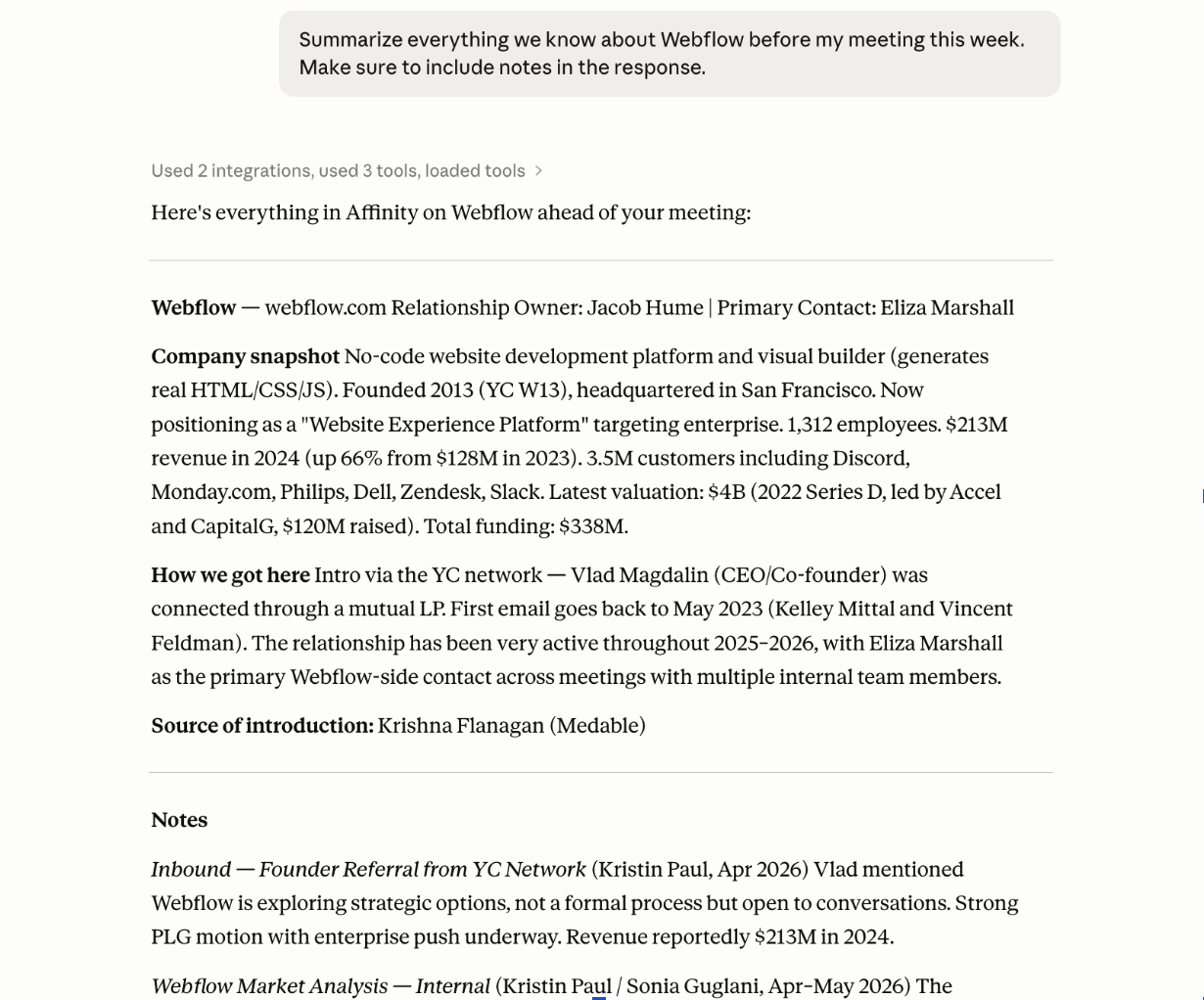
When to use it: You have a meeting coming up, you haven’t been the primary person on the deal, and you need context fast. How to do it: Open Claude with the Affinity MCP connected and type a prompt like: “Summarize everything we know about [Company] before my meeting this week. Make sure to include notes in the response.” Claude will call the Affinity MCP and return a consolidated brief that may include:- A company snapshot (what they do, stage, enriched data)
- Recent news (acquisitions, announcements, etc.), if Claude has web search on — news doesn’t come from Affinity MCP
- Relationship history (interactions your team has had with the company)
- CRM notes from team members, including market analysis and flags
- Suggested questions or topics to probe in the meeting (Claude often surfaces these unprompted)
Tip: If the response comes back thin, try asking for specific details in your prompt
Use Case 2: Surfacing Internal Risk Flags
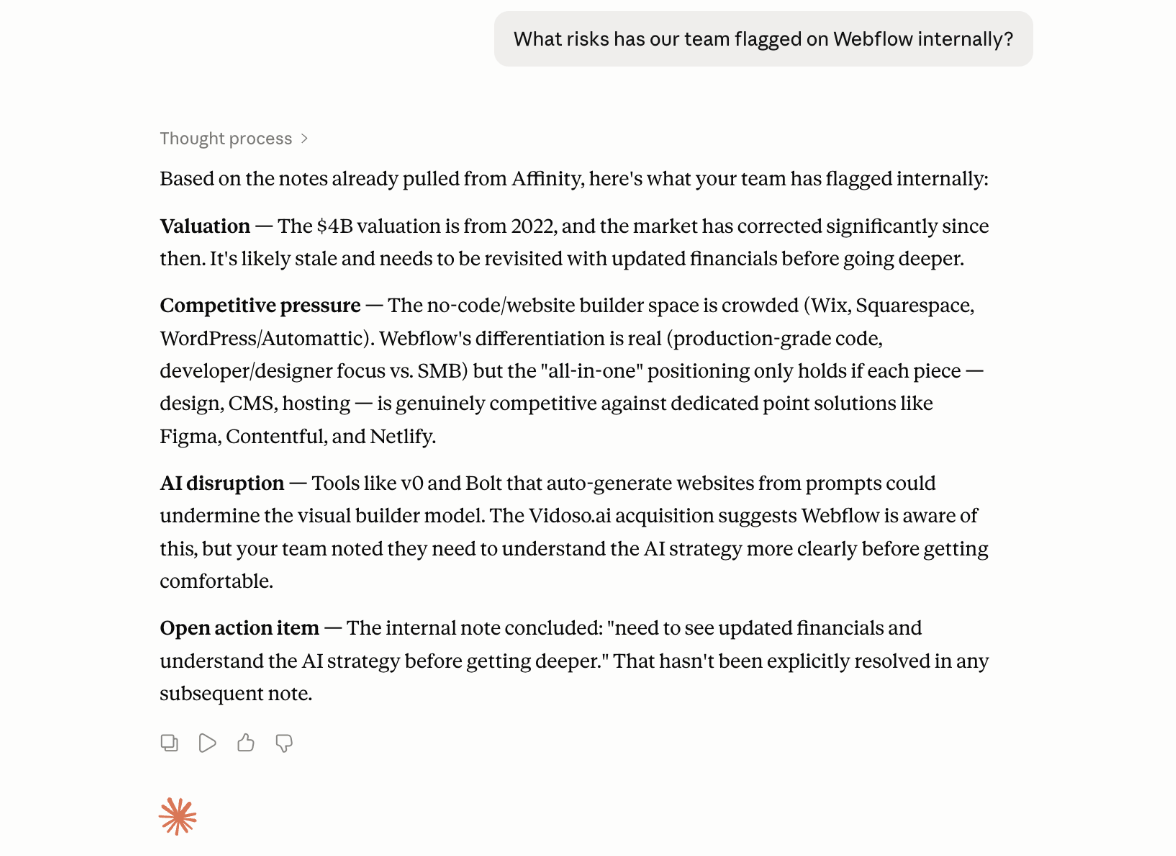
When to use it: You want to know what concerns your team has actually raised on a deal, without having to find the right person to ask. How to do it: In the same conversation, follow up with: “What risks has our team flagged on [Company] internally?” Claude will reference the notes already pulled and return a consolidated view of concerns, such as:- Valuation questions
- Competitive threats
- Leadership or strategy concerns
Use Case 3: Tracing Relationship Origin
When to use it: Warm introductions matter in private capital. Before a meeting, it’s worth knowing exactly how this relationship started and who owns the connection. How to do it: Ask: “How did our relationship with [Company] start? Who made the introduction?” Claude will pull the origination history from Affinity and surface:- The source of the deal (e.g., YC Network, mutual LP, inbound)
- Who facilitated the introduction
- When the relationship began
Use Case 4: Pulling AI Notetaker Summaries
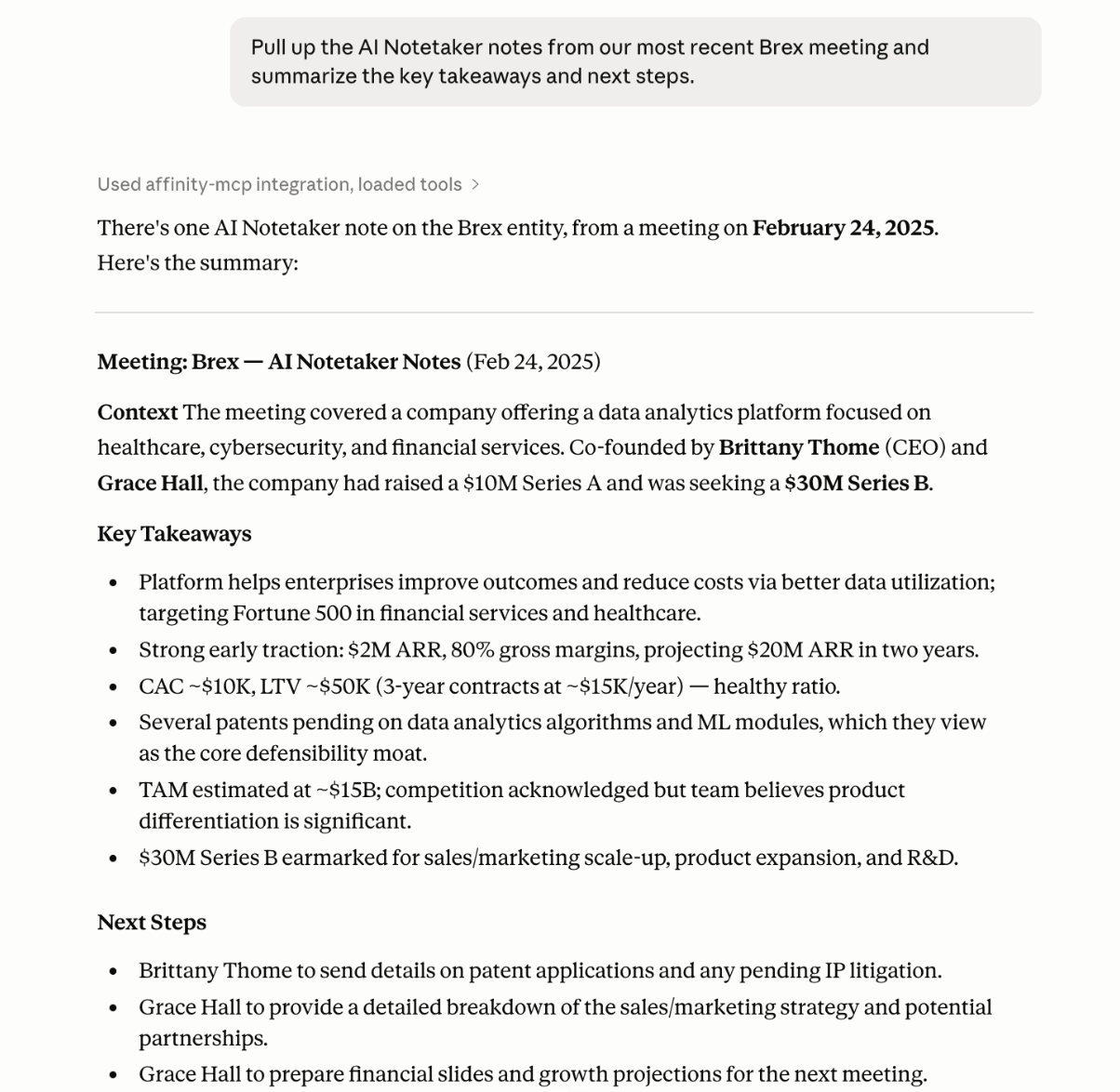
When to use it: Your team had a recent meeting and the Affinity AI Notetaker was running. You want a quick rundown of what happened without listening to a recording or reading through raw notes. How to do it: Ask: “Pull up the AI Notetaker notes from our most recent [Company] meeting and summarize the key takeaways and next steps.” Claude will return a structured meeting summary that includes:- Meeting context
- Key takeaways
- Logged next steps
Use Case 5: Checking Action Items from a Meeting
When to use it: You want to know what next steps were assigned after a meeting without hunting through Slack or following up with a teammate. How to do it: After pulling Notetaker notes, follow up with: “What action items or next steps were logged after this meeting? What was I or my team asked to do?” Claude will surface any action items recorded in Affinity, including tasks teammates left for each other in the database. The accountability trail is in the CRM. No digging on Slack, checking your email inbox or chasing down your colleagues.Use Case 6: Querying Your Master Deal Pipeline
When to use it: You want a snapshot of your active deals at a specific stage, including team ownership, investment amounts, and when each deal was last touched. How to do it: Ask: “Look at our master deal flow list. Which active deals are at Term Sheet or Deep Diligence or later? For each one, include the deal team, investment amount, and date of last activity.” Claude will query Affinity, work through the list, and return a structured view organized by stage.Note: Claude pulls each data point individually. Expect a brief pause here (a few seconds to a minute) as Claude works through the data. You can watch it show its reasoning in real time as it pulls and filters.
Tips for Getting Better Results
- Be specific. Vague prompts get vague answers. Tell Claude the company name, the type of notes you want (Notetaker vs. manual), and the format you prefer.
- Build on the conversation. You don’t need to re-explain context with each follow-up. Claude keeps the thread going, so you can say “now pull the risks” after already asking for a full brief.
- Use plain language. You don’t need to know field names or filter syntax. Describe what you want the way you’d ask a colleague.
- Iterate. If the first response is too broad, ask Claude to narrow it. If it’s missing something, ask for it directly. The more you use it, the better you’ll get at prompting for exactly what you need.
Troubleshooting & FAQ
Claude isn’t returning any data for a company. What’s wrong?- Check that the company exists in Affinity and is spelled the way it appears in the CRM. Claude matches on names, so “Snyk” vs. “Sneak” will return different results. If the company is there but Claude still can’t find it, try being more explicit: “Search Affinity for a company called [exact name].”
- Claude pulls what it can find based on your prompt. If notes are sparse in the response, try asking for them directly: “Pull all CRM notes on [Company]” or “What has our team written about [Company] internally?” Also confirm the notes are actually attached to the correct company record in Affinity, not buried under a contact or a different list.
- The MCP pulls live data from Affinity, so what you get reflects what’s currently in the CRM. If something looks stale, the underlying record may not have been updated. Check Affinity directly to confirm.
- Some queries, especially pipeline-level requests that pull across many records, take longer than single-company lookups. This is normal. Claude will show its reasoning as it works, so you can see what it’s doing. If it times out, try narrowing the query (fewer fields, one stage at a time, one company at a time).
- This usually means one of a few things: the AI Notetaker wasn’t running in that meeting, the notes haven’t been attached to the correct company or opportunity record in Affinity, or the meeting hasn’t synced yet. Confirm the notes exist in Affinity before prompting Claude to retrieve them.
- Add more specificity to your prompt. Include the company name, the type of notes you want, and the format you expect. Instead of “what do we know about this deal,” try “summarize the CRM notes and Notetaker summaries for [Company] and flag any open risks or next steps.”
- You can, but results are better when you focus on one company at a time. For pipeline-level queries (e.g., all deals at a specific stage), broad prompts work well. For deep dives on a specific deal, keep the conversation focused on that company.
- Claude can access what the Affinity MCP exposes, including company records, notes, lists, and Notetaker summaries. It does not have access to data that your user permissions wouldn’t normally allow you to see.
- Claude is synthesizing what’s in Affinity, but AI can make mistakes, so verify key details before you rely on them. If something looks off, check the source data in Affinity first.
\