

Concept — background and overview.
When does Affinity auto-create people contacts?
-
When an internal (you or your team members who are syncing into Affinity) sends either a meeting invite or an email to externals (non-team members) on the “To” or “CC” lines, Affinity will auto-create the externals as people contacts.
- These externals must have full names associated with their email addresses in order to get auto-created. You can use the following format to ensure they have full names associated: First Last <email address>
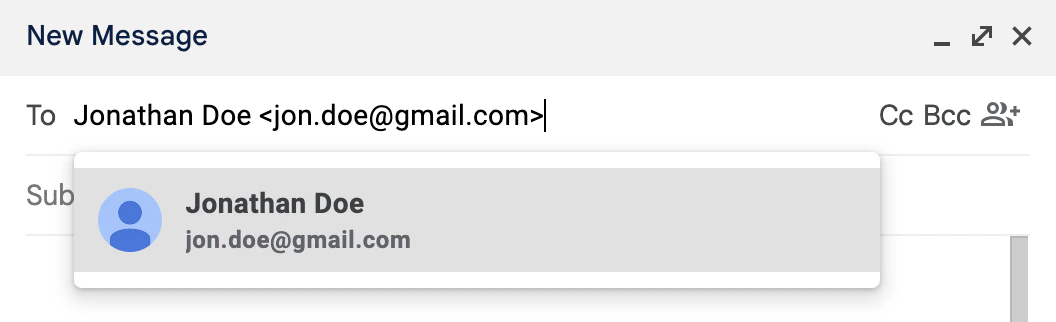
- These externals must have full names associated with their email addresses in order to get auto-created. You can use the following format to ensure they have full names associated: First Last <email address>
- We also suggest downloading Affinity’s Pathfinder extension (See the section titled “How to use Affinity Pathfinder within your Gmail inbox”) or Outlook extension (for Outlook users) so that these email addresses appear within the Suggested section for easy contact creation when opening an email.
- Any externals on the “BCC” line will not get auto-created.
- When your team member (who is not syncing into Affinity) sends either a meeting invite or an email to externals (non-team members) and internals (you or your team members who are syncing into Affinity) on the “To” or “CC” lines, Affinity will auto-create the externals as people contacts.
- When an external (who is already a contact) sends either a meeting invite or an email to internals and other externals (who are not contacts yet), Affinity will auto-create the other externals as contacts.
- When an external (who is not a contact yet) sends either a meeting invite or an email to one or more internals and at least one external who is already a contact in Affinity, Affinity will auto-create the external as a contact.
- When an external (who is not a contact yet) sends either a meeting invite or an email to an internal, and the internal replies, Affinity will auto-create the external as a contact.
When does Affinity not auto-create people contacts?
- Affinity will not auto-create contacts for any cold inbound emails that you receive from an external for the first time and choose not to respond to. We treat these externals as spam in order to prevent the creation of unwanted contacts.
- To have the externals auto-created, simply respond to the cold inbound email.
- Affinity requires First and Last names to be associated with the external contacts’ email addresses when auto-creating contacts.
- East Asian characters are currently not supported at this time, which also may explain why you don’t see external contacts with East Asian characters being auto-created despite your interactions with them.
- Affinity will not auto-create people contacts for email addresses with generic terms such as: help, support, feedback, notification, delivery, update, sale, welcome, no-reply, order, product, system, news, build, account, billing, customer, service, team, info, hello, payment, community, contact, event, communication, podcast, calendar, invoice, concierge… just to name a few.
- We suggest downloading Affinity’s Pathfinder extension or Outlook extension (for Outlook users) so that these email addresses appear within the Suggested section for easy contact creation when opening an email.
Important Callouts
- If you send an email and include people on the “BCC” line, Affinity will not consider those on the “BCC” line for contact creation.