> ## Documentation Index
> Fetch the complete documentation index at: https://support.affinity.co/llms.txt
> Use this file to discover all available pages before exploring further.
# Working with Affinity agents
> What Affinity agents are, how they work, where they live, how to get access, and how to stay in control.
Affinity agents (part of **Affinity Ascend**) are assistants that do work you already do in Affinity — preparing for meetings, keeping your CRM current, finding intro paths — but **on their own time, in the background**, and they bring you the result to review. Where Affinity AI in Chat answers *live* when you ask, a background agent works *offline* and queues up suggestions for you.
The rule that holds across every agent: **an agent suggests; you decide.** Nothing reaches your CRM until you approve it.
 ## What agents are
Some agents are **background agents** — they watch for the events they monitor, prepare a suggestion when one happens, and add it to a review queue. A background agent doesn't act in real time and doesn't act on its own — it waits for you. Others are **on-demand** — you invoke them yourself (for example, Warm Intro runs from Chat when you ask).
### The shared trust model
* **Suggest** — the agent prepares a draft, a summary, or a set of field updates, with its reasoning and source.
* **Review** — the suggestion waits for you in the agent's Activity queue. Nothing is applied yet.
* **Approve** — only the items you approve are written to the CRM.
A few guarantees: **human-in-the-loop** (nothing written without approval), **permission-bound** (an agent only sees and changes what your own account can), and **no outreach on your behalf** without your explicit approval.
## Where your agents live
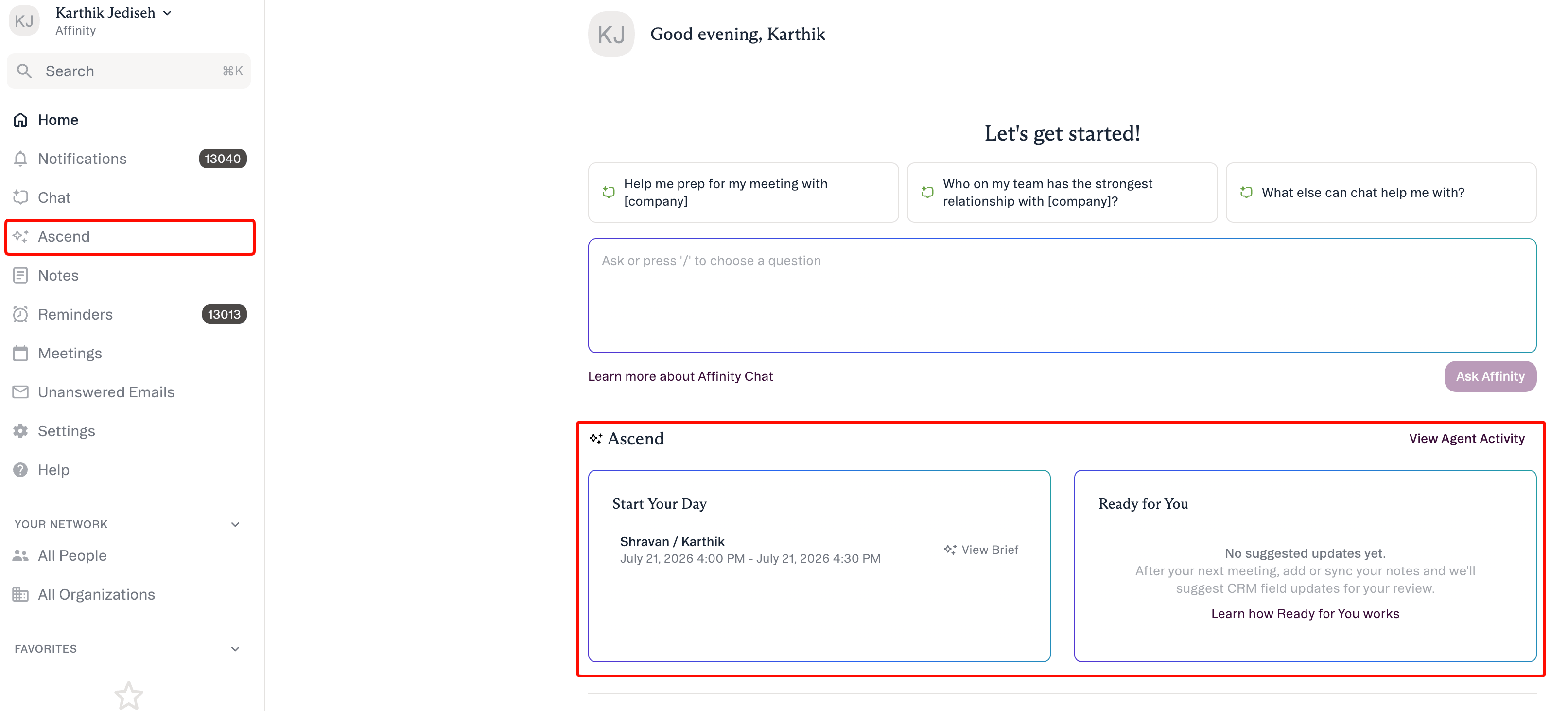
Agents live under **Ascend** in the left navigation (a separate top-level item from Chat). The Ascend area has three tabs:
## What agents are
Some agents are **background agents** — they watch for the events they monitor, prepare a suggestion when one happens, and add it to a review queue. A background agent doesn't act in real time and doesn't act on its own — it waits for you. Others are **on-demand** — you invoke them yourself (for example, Warm Intro runs from Chat when you ask).
### The shared trust model
* **Suggest** — the agent prepares a draft, a summary, or a set of field updates, with its reasoning and source.
* **Review** — the suggestion waits for you in the agent's Activity queue. Nothing is applied yet.
* **Approve** — only the items you approve are written to the CRM.
A few guarantees: **human-in-the-loop** (nothing written without approval), **permission-bound** (an agent only sees and changes what your own account can), and **no outreach on your behalf** without your explicit approval.
## Where your agents live
Agents live under **Ascend** in the left navigation (a separate top-level item from Chat). The Ascend area has three tabs:
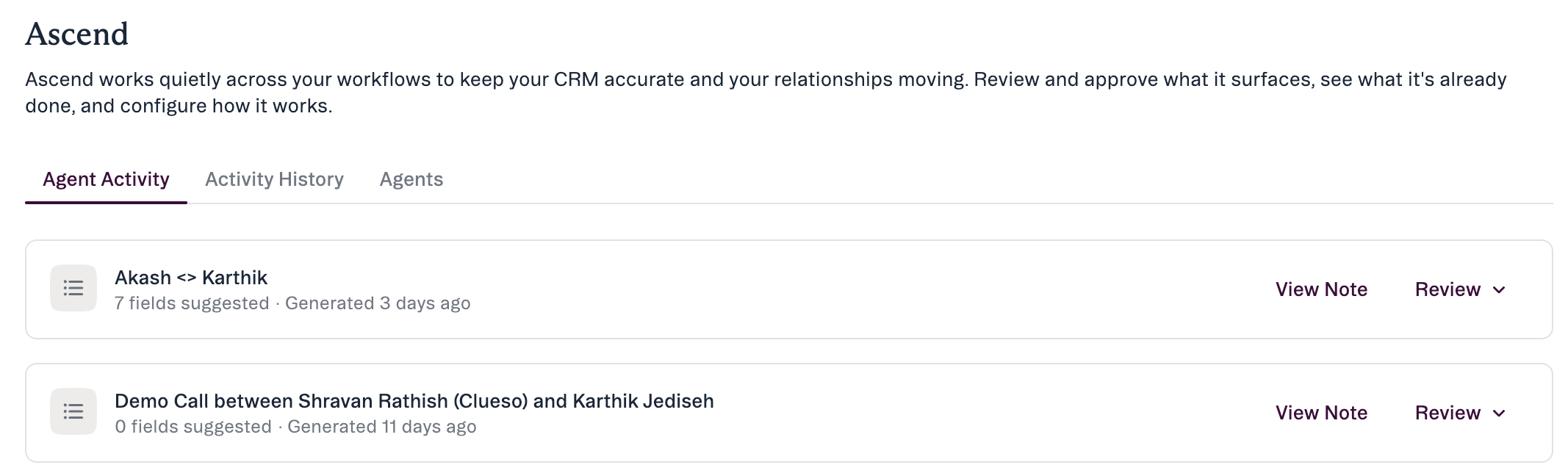 * **Agent Activity** — the queue of suggestions waiting for you. Start here.
* **Activity History** — what the agent has already done, and the detail behind any one item.
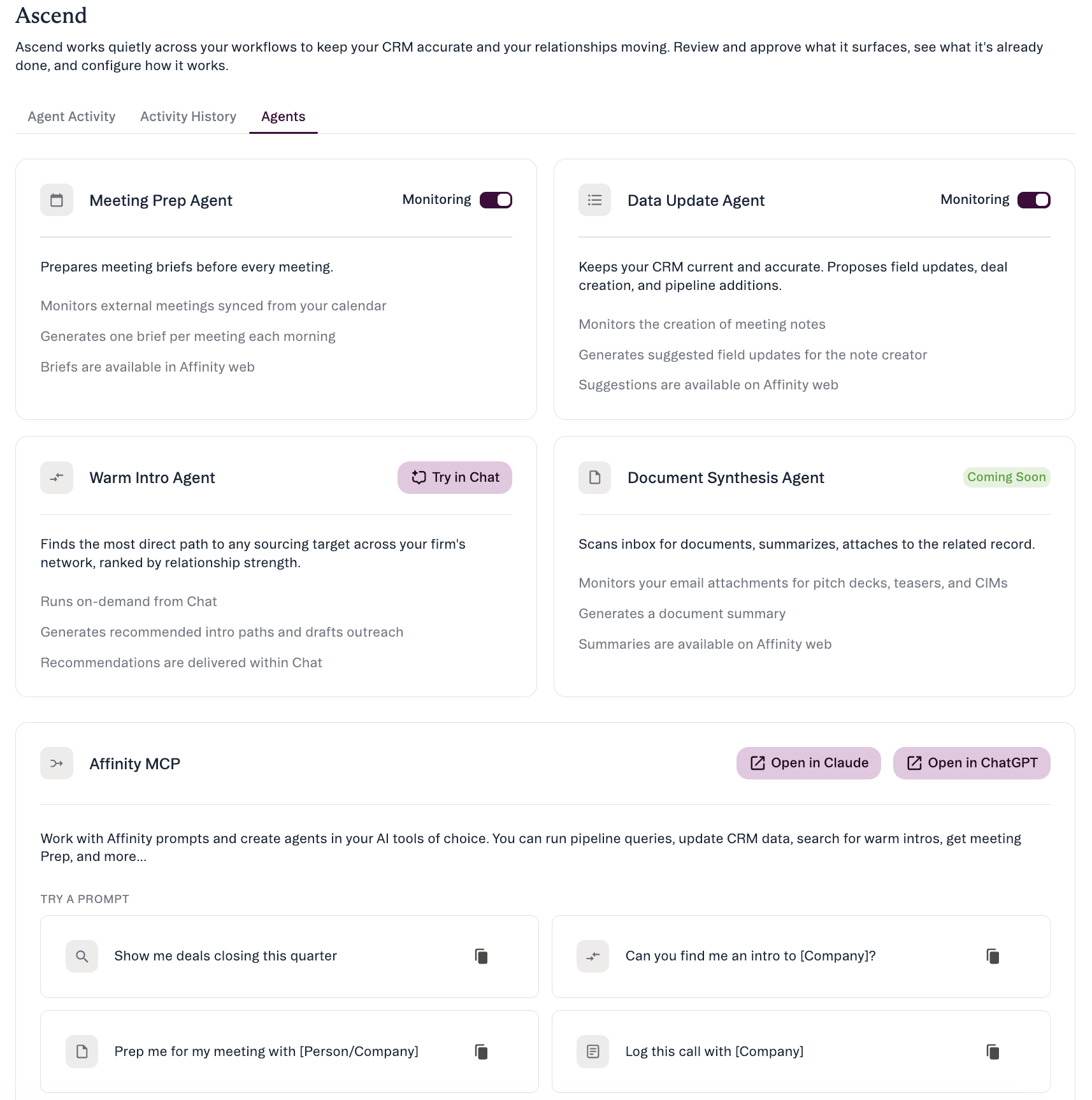
* **Agents** — where agent names appear, and where you turn **Monitoring** on or off for each background agent.
Your day's meeting brief surfaces in-app on the **“Start your day” / “Ready for you”** dashboard on your Affinity home; open it with **View Brief**.
## The launch lineup
Four agents, each with a different way of working. All require **Scale, Advanced, or Enterprise**. Only **Meeting Prep** and **Data Update** are background agents with a **Monitoring** toggle; **Warm Intro** runs on demand from Chat; **Document Synthesis** is coming soon.
* **Agent Activity** — the queue of suggestions waiting for you. Start here.
* **Activity History** — what the agent has already done, and the detail behind any one item.
* **Agents** — where agent names appear, and where you turn **Monitoring** on or off for each background agent.
Your day's meeting brief surfaces in-app on the **“Start your day” / “Ready for you”** dashboard on your Affinity home; open it with **View Brief**.
## The launch lineup
Four agents, each with a different way of working. All require **Scale, Advanced, or Enterprise**. Only **Meeting Prep** and **Data Update** are background agents with a **Monitoring** toggle; **Warm Intro** runs on demand from Chat; **Document Synthesis** is coming soon.
 | Agent | What it does | How it runs | You approve |
| --------------------------------------- | ------------------------------------------------------------------------------------- | --------------------------------------------- | ------------------------------------ |
| **Meeting Prep** | A pre-meeting brief for each external meeting, on your homepage and in Agent Activity | Background (Monitoring toggle) | Nothing to apply — a brief you read |
| **Data Update** | Reads a meeting note and proposes Suggested Field Updates | Background (Monitoring toggle) | The suggested field updates |
| **Warm Intro** | Ranks intro paths to a target and drafts outreach (no send) | On demand from Chat | You choose the path and make the ask |
| **Document Synthesis**\*(coming soon)\* | Will scan inbound decks/teasers/CIMs and summarize them | Background (coming soon — not yet functional) | The summary before it's saved |
### Meeting Prep
A background agent that prepares a **pre-meeting brief** for each of the day's **external** meetings (web app only at launch), on your **“Start your day” / “Ready for you”** dashboard and in the **Agent Activity** feed.
It pulls relationship history, the last interaction and how recent it was, who's engaged, deal/pipeline context, and recent company news. Nothing to apply — open it with **View Brief**. Control it with the **Monitoring** toggle in **Ascend → Agents**.
### Data Update
A background agent that keeps your CRM current. It fires when a **meeting note is created**, reads the note, and proposes **Suggested Field Updates**.
Expanding **Review** shows each proposed field with its scope, **Current Value** (and when it was last updated), and the **Suggested Value**.
Open **View Meeting Note** to check the source. It can cover **any editable field**, global or list-specific — including dropdowns and **Ranked Dropdown fields (Status, Stage, Priority)**, appending rather than overwriting multi-value fields. One suggestion set per meeting, to the note creator. External meetings only. Control it with the **Monitoring** toggle in **Ascend → Agents**.
Affinity Notetaker is the primary source — it takes the note and attaches it to the meeting automatically, which is what triggers the suggestions. Notetaker feeds the agents but isn't part of Ascend. (No email, Slack, mobile, or push notifications at launch.)
### Warm Intro (on demand from Chat)
Not a background agent — you invoke it **on demand from Chat**. Ask *“who can introduce me to someone at \[Company]?”* and Affinity AI returns **ranked intro paths** from your relationship data and can **draft outreach for you to send yourself (it never sends)**. Also available as the `affinity-warm-intro` MCP skill. See [Warm Intros in AI Chat and MCP](/s/article/Warm-Intros-in-AI-Chat-and-MCP).
### Document Synthesis *(coming soon)*
Coming soon — you'll see its card, but it isn't functional at launch and has no toggle yet. When it ships it will watch for inbound **PDF** pitch decks, teasers, and CIMs, summarize them, and post a summary to **Agent Activity**. See [Document Synthesis](/s/article/Document-Synthesis).
## How AI Chat fits alongside agents
AI Chat is a conversational interface to your CRM, a **separate item in the left navigation** (a docked side panel) — distinct from **Ascend**. Ask questions in natural language with cited sources. Beyond answering, Chat can take **four confirm-before-execute write actions**: **Update Field**, **Add to List**, **Create Note**, and **Create Reminder**. Reading your agent briefs in Chat, and reviewing Suggested Field Updates in Chat, are **fast-follows after launch** — not part of GA. Triggering an agent to run from the conversation isn't in Chat either; the agents run automatically on their own.
## Getting access
All agents require **Scale, Advanced, or Enterprise**. **Affinity Notetaker** — the source for the Data Update agent's post-meeting suggestions — extends to **Scale and above**. Once an admin enables **Ascend Agents** at **Settings → Automations & AI → Affinity AI**, turn on the background agents (Meeting Prep, Data Update) with the **Monitoring** toggle in **Ascend → Agents**. **Warm Intro** runs on demand from Chat; **Document Synthesis** is coming soon.
## How to stay in control
* **Review before it's real.** Suggestions sit on **Agent Activity** until you act. Nothing writes until you click **Apply Updates**.
* **It shows its work.** Each suggestion names what it's proposing and the source (**View Meeting Note**).
* **It respects permissions.** An agent only sees and changes what your account already can.
* **It won't send on your behalf.** No agent sends email or outreach without your explicit approval.
* **You control which agents run.** An admin enables/disables **Ascend Agents** for the org at **Settings → Automations & AI → Affinity AI**; each user toggles **Monitoring** per background agent on **Ascend → Agents**.
## Common questions
* **Will an agent change my CRM on its own?** No — everything waits in Activity for your review.
* **Who can see an agent's suggestions?** They're yours to review. Once approved, the result appears on the record like any edit your team can see.
* **What if I ignore a suggestion?** Nothing happens — unreviewed suggestions stay in Activity.
* **Can I turn an agent off?** Yes — each user via **Monitoring** on **Ascend → Agents**; an admin for the whole org at **Settings → Automations & AI → Affinity AI**.
* **How is this different from AI Chat?** Chat answers live and takes four confirm-before-execute actions; background agents work on their own time and bring results back for you to review in Ascend.
***
*Affinity AI can make mistakes. Review each suggestion before approving it.*
## Related topics
- [Affinity Ascend agents — Overview](/s/article/Affinity-Ascend-agents-overview.md)
- [Troubleshooting Affinity Ascend agents](/s/article/Troubleshooting-Affinity-Ascend-agents.md)
- [Set up & configure your agents](/s/article/Set-up-and-configure-your-agents.md)
- [Warm Intros in AI Chat and MCP](/s/article/Warm-Intros-in-AI-Chat-and-MCP.md)
- [Enabling Affinity Ascend — An Admin's Guide](/s/article/Enabling-Affinity-Ascend.md)
- [Affinity MCP: Security & data handling](/s/article/Affinity-MCP-security.md)
- [Review & approve an agent's suggestions](/s/article/Review-and-approve-agent-suggestions.md)
- [Tutorial 10: Working with Your Team — Collaboration Essentials](/s/article/Tutorial-10-working-with-your-team-collaboration-essentials.md)
- [Warm Intro Agent — overview](/s/article/Warm-Intro-Agent.md)
| Agent | What it does | How it runs | You approve |
| --------------------------------------- | ------------------------------------------------------------------------------------- | --------------------------------------------- | ------------------------------------ |
| **Meeting Prep** | A pre-meeting brief for each external meeting, on your homepage and in Agent Activity | Background (Monitoring toggle) | Nothing to apply — a brief you read |
| **Data Update** | Reads a meeting note and proposes Suggested Field Updates | Background (Monitoring toggle) | The suggested field updates |
| **Warm Intro** | Ranks intro paths to a target and drafts outreach (no send) | On demand from Chat | You choose the path and make the ask |
| **Document Synthesis**\*(coming soon)\* | Will scan inbound decks/teasers/CIMs and summarize them | Background (coming soon — not yet functional) | The summary before it's saved |
### Meeting Prep
A background agent that prepares a **pre-meeting brief** for each of the day's **external** meetings (web app only at launch), on your **“Start your day” / “Ready for you”** dashboard and in the **Agent Activity** feed.
It pulls relationship history, the last interaction and how recent it was, who's engaged, deal/pipeline context, and recent company news. Nothing to apply — open it with **View Brief**. Control it with the **Monitoring** toggle in **Ascend → Agents**.
### Data Update
A background agent that keeps your CRM current. It fires when a **meeting note is created**, reads the note, and proposes **Suggested Field Updates**.
Expanding **Review** shows each proposed field with its scope, **Current Value** (and when it was last updated), and the **Suggested Value**.
Open **View Meeting Note** to check the source. It can cover **any editable field**, global or list-specific — including dropdowns and **Ranked Dropdown fields (Status, Stage, Priority)**, appending rather than overwriting multi-value fields. One suggestion set per meeting, to the note creator. External meetings only. Control it with the **Monitoring** toggle in **Ascend → Agents**.
Affinity Notetaker is the primary source — it takes the note and attaches it to the meeting automatically, which is what triggers the suggestions. Notetaker feeds the agents but isn't part of Ascend. (No email, Slack, mobile, or push notifications at launch.)
### Warm Intro (on demand from Chat)
Not a background agent — you invoke it **on demand from Chat**. Ask *“who can introduce me to someone at \[Company]?”* and Affinity AI returns **ranked intro paths** from your relationship data and can **draft outreach for you to send yourself (it never sends)**. Also available as the `affinity-warm-intro` MCP skill. See [Warm Intros in AI Chat and MCP](/s/article/Warm-Intros-in-AI-Chat-and-MCP).
### Document Synthesis *(coming soon)*
Coming soon — you'll see its card, but it isn't functional at launch and has no toggle yet. When it ships it will watch for inbound **PDF** pitch decks, teasers, and CIMs, summarize them, and post a summary to **Agent Activity**. See [Document Synthesis](/s/article/Document-Synthesis).
## How AI Chat fits alongside agents
AI Chat is a conversational interface to your CRM, a **separate item in the left navigation** (a docked side panel) — distinct from **Ascend**. Ask questions in natural language with cited sources. Beyond answering, Chat can take **four confirm-before-execute write actions**: **Update Field**, **Add to List**, **Create Note**, and **Create Reminder**. Reading your agent briefs in Chat, and reviewing Suggested Field Updates in Chat, are **fast-follows after launch** — not part of GA. Triggering an agent to run from the conversation isn't in Chat either; the agents run automatically on their own.
## Getting access
All agents require **Scale, Advanced, or Enterprise**. **Affinity Notetaker** — the source for the Data Update agent's post-meeting suggestions — extends to **Scale and above**. Once an admin enables **Ascend Agents** at **Settings → Automations & AI → Affinity AI**, turn on the background agents (Meeting Prep, Data Update) with the **Monitoring** toggle in **Ascend → Agents**. **Warm Intro** runs on demand from Chat; **Document Synthesis** is coming soon.
## How to stay in control
* **Review before it's real.** Suggestions sit on **Agent Activity** until you act. Nothing writes until you click **Apply Updates**.
* **It shows its work.** Each suggestion names what it's proposing and the source (**View Meeting Note**).
* **It respects permissions.** An agent only sees and changes what your account already can.
* **It won't send on your behalf.** No agent sends email or outreach without your explicit approval.
* **You control which agents run.** An admin enables/disables **Ascend Agents** for the org at **Settings → Automations & AI → Affinity AI**; each user toggles **Monitoring** per background agent on **Ascend → Agents**.
## Common questions
* **Will an agent change my CRM on its own?** No — everything waits in Activity for your review.
* **Who can see an agent's suggestions?** They're yours to review. Once approved, the result appears on the record like any edit your team can see.
* **What if I ignore a suggestion?** Nothing happens — unreviewed suggestions stay in Activity.
* **Can I turn an agent off?** Yes — each user via **Monitoring** on **Ascend → Agents**; an admin for the whole org at **Settings → Automations & AI → Affinity AI**.
* **How is this different from AI Chat?** Chat answers live and takes four confirm-before-execute actions; background agents work on their own time and bring results back for you to review in Ascend.
***
*Affinity AI can make mistakes. Review each suggestion before approving it.*
## Related topics
- [Affinity Ascend agents — Overview](/s/article/Affinity-Ascend-agents-overview.md)
- [Troubleshooting Affinity Ascend agents](/s/article/Troubleshooting-Affinity-Ascend-agents.md)
- [Set up & configure your agents](/s/article/Set-up-and-configure-your-agents.md)
- [Warm Intros in AI Chat and MCP](/s/article/Warm-Intros-in-AI-Chat-and-MCP.md)
- [Enabling Affinity Ascend — An Admin's Guide](/s/article/Enabling-Affinity-Ascend.md)
- [Affinity MCP: Security & data handling](/s/article/Affinity-MCP-security.md)
- [Review & approve an agent's suggestions](/s/article/Review-and-approve-agent-suggestions.md)
- [Tutorial 10: Working with Your Team — Collaboration Essentials](/s/article/Tutorial-10-working-with-your-team-collaboration-essentials.md)
- [Warm Intro Agent — overview](/s/article/Warm-Intro-Agent.md)