> ## Documentation Index
> Fetch the complete documentation index at: https://support.affinity.co/llms.txt
> Use this file to discover all available pages before exploring further.
# What AI Chat can do & how to trust it
> What Affinity AI Chat can answer, the actions it can take with your approval, and how to rely on it.
Affinity AI Chat is an intelligence layer inside Affinity — like a colleague who has read every company, person, note, and interaction in your CRM. It answers questions grounded in your data with cited sources, and can take a defined set of confirm-before-execute actions, always with your approval.
## What it can answer
Affinity AI draws only on data you can already see:
* **Companies, people, and opportunities** — fields, lists, owners, stages
* **Notes, meetings, emails, and activity history**
* **Relationships and connection strength**
* **Recent external news** on a company
A few real prompts: *“Help me prep for my meeting with Acme Corp tomorrow,”* *“Find Series B medtech companies we haven't contacted in 90 days,”* *“Who at our firm has the strongest relationship with Sequoia?”* Ask follow-ups in the same thread to refine.
## What it can do (with your approval)
Every action is **confirm-before-execute**: Affinity AI proposes the change, and nothing is written until you approve.
**Available at GA (July 22):**
* **Update a field** — a field value or an opportunity's pipeline stage.
* **Add to a list** — add a record to one of your lists.
* **Create a note** — draft and log a note on a record.
* **Create a reminder** — so a follow-up doesn't slip.
Reading your meeting briefs in Chat, and reviewing Suggested Field Updates in Chat, are **fast-follows after launch** — not part of GA. Triggering an agent to run from Chat isn't available either; the agents run automatically on their own, and you review Suggested Field Updates (from the **Data Update** agent) in Ascend.
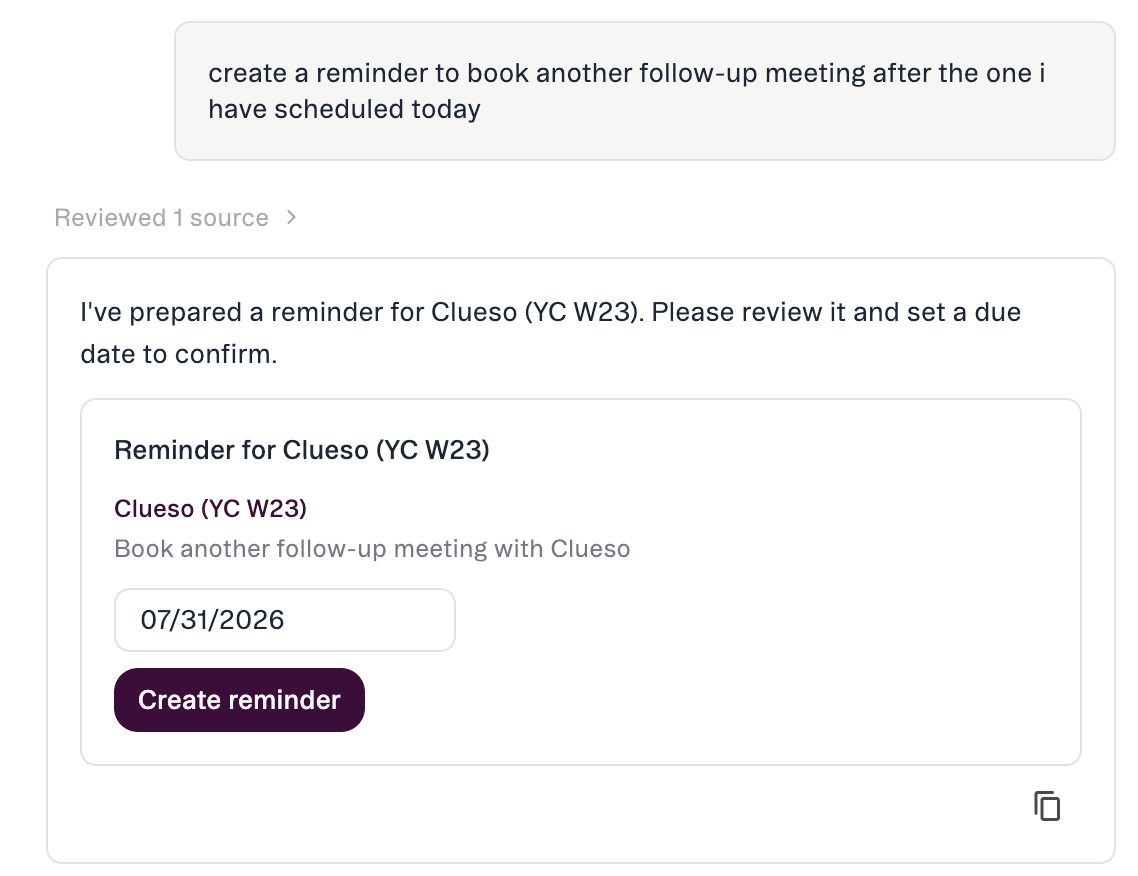 **Coming later — not yet available:** uploading a file, creating a saved view, creating a list. Affinity AI will **not** send email or outreach, merge or delete records, or make bulk changes. See [Take actions with AI Chat](/s/article/Take-actions-with-AI-Chat).
## How an answer looks
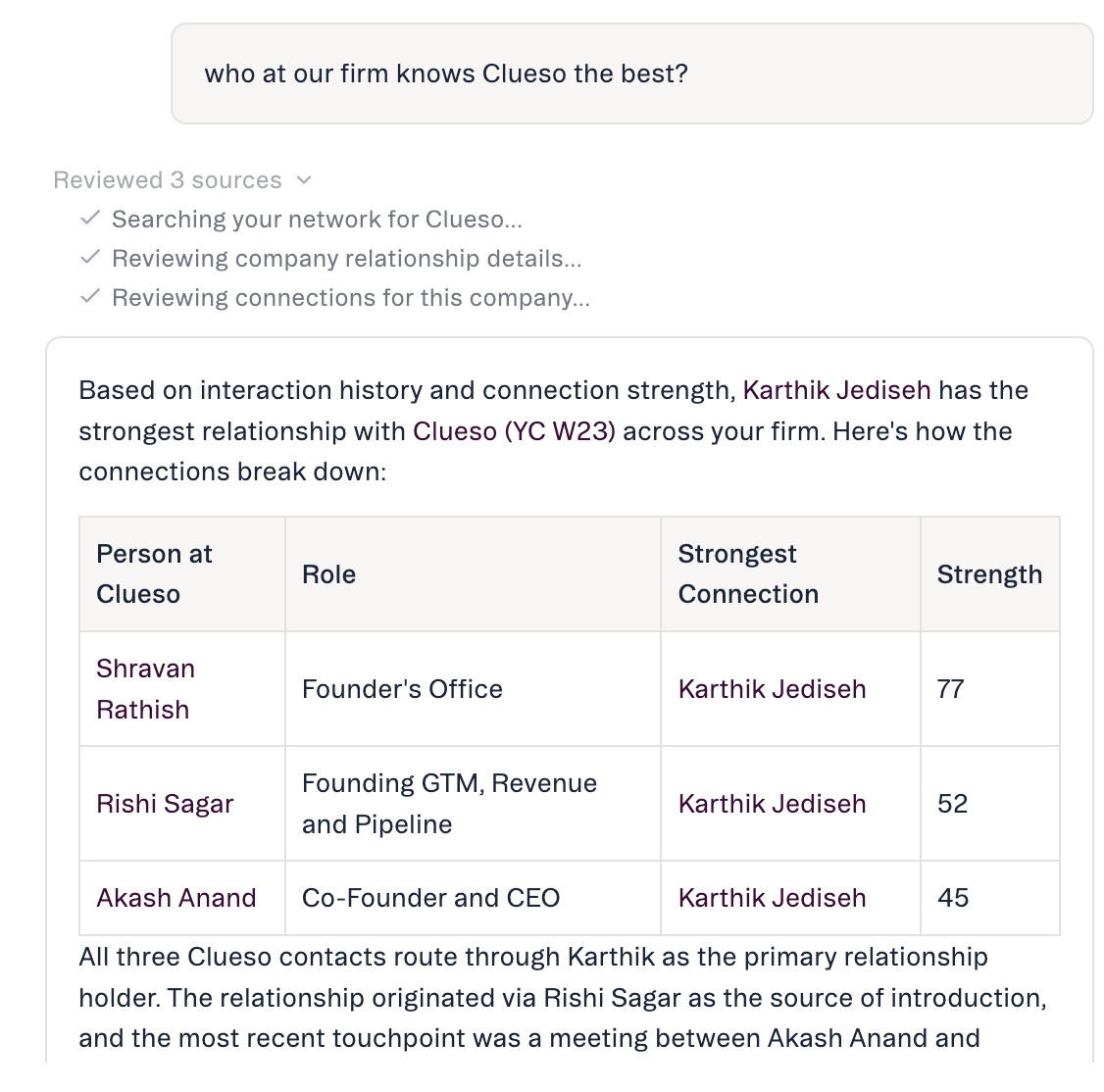
Affinity AI works in two visible stages: a **thinking state** shows the work in progress; a short **“sources used”** line at the end tells you exactly which data the answer drew on, so you can open it and verify.
**Coming later — not yet available:** uploading a file, creating a saved view, creating a list. Affinity AI will **not** send email or outreach, merge or delete records, or make bulk changes. See [Take actions with AI Chat](/s/article/Take-actions-with-AI-Chat).
## How an answer looks
Affinity AI works in two visible stages: a **thinking state** shows the work in progress; a short **“sources used”** line at the end tells you exactly which data the answer drew on, so you can open it and verify.
 ## How to trust it
* **It shows its sources.** Every answer ends with the data it reviewed.
* **It signals confidence.** When supporting data is thin, it flags low confidence — open the source before relying on it.
* **It suggests; it doesn't act on its own.** You always see a confirmation before anything changes, and can tell a *suggested* action from a *completed* one.
* **It respects your permissions.** It can only see and change what your account already allows.
* **You can give feedback.** 👍 / 👎 on any answer; 👎 routes to Affinity's product team.
## Known limits
* **\~90-day activity-history window** (being extended) — very long-range “first ever interaction” questions can be truncated.
* **Person search by attribute is post-launch** — name or email today; role/title, location, expertise later.
* **No location/geographic filtering yet.**
* **No reliable historical field-value lookup** — it reports a field's value now, not what it was at a past point.
## Where to find it
AI Chat lives in the web app (no mobile yet). It's part of **Affinity Ascend** — Chat and Ascend (agents) are separate items in the left navigation. Admins control whether AI features are on for your org at **Settings → Automations & AI → Affinity AI**.
## Common questions
* **Will it change my data without asking?** No — every action is confirm-before-execute. There's no “always allow.”
* **Does it see data I can't access?** No — it's scoped to your existing permissions.
* **Will it send emails?** No.
* **How is it different from Search or filters?** It's conversational — ask follow-ups and refine — and it aggregates across profiles instead of tab-hopping.
***
*Affinity AI can make mistakes. Review each suggestion before approving it.*
## Related topics
- [Affinity AI Chat Overview](/s/article/Affinity-AI-chat-overview.md)
- [Getting Started with AI Chat](/s/article/Getting-started-with-AI-chat.md)
- [Take actions with AI Chat](/s/article/Take-actions-with-AI-Chat.md)
- [Affinity Ascend agents — Overview](/s/article/Affinity-Ascend-agents-overview.md)
- [Prompts for Affinity AI Chat](/s/article/Prompts-for-Affinity-AI-Chat.md)
- [Meeting Preparation with AI Chat](/s/article/Meeting-preparation-with-AI-chat.md)
- [Enabling Affinity Ascend — An Admin's Guide](/s/article/Enabling-Affinity-Ascend.md)
- [Connect AI Tools to Affinity with MCP](/s/article/Tutorial-MCP-connect-ai-tools-to-affinity.md)
- [Document Synthesis — overview](/s/article/Document-Synthesis.md)
## How to trust it
* **It shows its sources.** Every answer ends with the data it reviewed.
* **It signals confidence.** When supporting data is thin, it flags low confidence — open the source before relying on it.
* **It suggests; it doesn't act on its own.** You always see a confirmation before anything changes, and can tell a *suggested* action from a *completed* one.
* **It respects your permissions.** It can only see and change what your account already allows.
* **You can give feedback.** 👍 / 👎 on any answer; 👎 routes to Affinity's product team.
## Known limits
* **\~90-day activity-history window** (being extended) — very long-range “first ever interaction” questions can be truncated.
* **Person search by attribute is post-launch** — name or email today; role/title, location, expertise later.
* **No location/geographic filtering yet.**
* **No reliable historical field-value lookup** — it reports a field's value now, not what it was at a past point.
## Where to find it
AI Chat lives in the web app (no mobile yet). It's part of **Affinity Ascend** — Chat and Ascend (agents) are separate items in the left navigation. Admins control whether AI features are on for your org at **Settings → Automations & AI → Affinity AI**.
## Common questions
* **Will it change my data without asking?** No — every action is confirm-before-execute. There's no “always allow.”
* **Does it see data I can't access?** No — it's scoped to your existing permissions.
* **Will it send emails?** No.
* **How is it different from Search or filters?** It's conversational — ask follow-ups and refine — and it aggregates across profiles instead of tab-hopping.
***
*Affinity AI can make mistakes. Review each suggestion before approving it.*
## Related topics
- [Affinity AI Chat Overview](/s/article/Affinity-AI-chat-overview.md)
- [Getting Started with AI Chat](/s/article/Getting-started-with-AI-chat.md)
- [Take actions with AI Chat](/s/article/Take-actions-with-AI-Chat.md)
- [Affinity Ascend agents — Overview](/s/article/Affinity-Ascend-agents-overview.md)
- [Prompts for Affinity AI Chat](/s/article/Prompts-for-Affinity-AI-Chat.md)
- [Meeting Preparation with AI Chat](/s/article/Meeting-preparation-with-AI-chat.md)
- [Enabling Affinity Ascend — An Admin's Guide](/s/article/Enabling-Affinity-Ascend.md)
- [Connect AI Tools to Affinity with MCP](/s/article/Tutorial-MCP-connect-ai-tools-to-affinity.md)
- [Document Synthesis — overview](/s/article/Document-Synthesis.md)