> ## Documentation Index
> Fetch the complete documentation index at: https://support.affinity.co/llms.txt
> Use this file to discover all available pages before exploring further.
# Understanding inferred connections
> How Affinity surfaces likely relationships — like an investor who can bridge you to a portfolio company — even when no one at your firm has contacted the target directly.
Most of what Affinity knows about your network comes from **explicit relationships** — people you've actually emailed, met, or scheduled — **real activity**. But on a new deal, it often dead-ends: you've never contacted anyone at the target, so any path stays invisible.
**Inferred connections** fill that gap. An inferred connection is:
* A *likely* relationship Affinity surfaces from shared history,
* even when **no one at your firm has interacted with that person directly**, and
* a **lead worth checking — not a confirmed relationship**. (Think of two people who attended the same college in the same years: they probably crossed paths, but you can't be sure.)
## The two types in this release
* **Overlapping work history** — *"your teammates likely know them."*
* A contact worked at the same company, over an overlapping stretch of time, as one or more of your teammates.
* **Investor ↔ portfolio-company executive** — *"known through your firm's network."*
* Leverages the first second-degree, external-to-external connection Affinity builds.
* A contact your firm already knows was at an investment firm *when it funded* a target company, so they very likely know that company's executives and founders.
**Example (investor ↔ exec):** Your firm doesn't know anyone at Crusoe Energy — but you know Megan, a colleague's contact, who was at Bain Capital when Bain invested in Crusoe. Megan is your **bridge**: she can likely open the door to someone at Crusoe.
## Where you'll see them
For this release, inferred connections appear in one place:
* Open any Company Profile → **Connections** tab.
* Below your direct connections, look for **"Inferred Connections to** `{Company}`**"**, with a sub-header like *"3 people likely within your firm's network."*
* Each row is a **connection card** — one card per person your firm might be able to reach at that company.
### Reading a collapsed card
By default each card is collapsed and shows:
* **The person** — name, title, and company (e.g. *"John Smith · CTO @ Potluck"*). A LinkedIn icon appears when we have a match.
* **One or two relationship rows** explaining *why* they surfaced:
* **Work-history row** — e.g. *"5 teammates have overlapping work history."*
* **Funding row** — e.g. *"Carol Channing was a Partner at Greenleaf Investing when it funded Potluck under CTO John Smith."*
* When both rows appear, **work history sits on top** — a teammate who actually worked alongside someone is usually a warmer path than a funding-era overlap.
### Expanding a card for the full timeline
Click a **funding / investor-executive card** to expand it in place into a **timeline view**:
* A horizontal bar for each person across the relevant years.
* A shaded band marking the window they shared.
* A dashed marker on the funding round (e.g. *"SERIES B"*) with a plain-language summary — *"Carol Channing was an investor at Greenleaf Investing 8 months ago when Potluck raised its Series B on March 25, 2025."*
* A **⋯** menu on each person's row to view their profile, open LinkedIn, or copy their email.
* Only **one card is open at a time** — opening another closes the first.
At launch, **only funding / investor-executive cards expand** — work-history cards stay collapsed. The work-history data doesn't yet include the per-person start and end dates a timeline needs, so we don't draw one we can't stand behind. A full work-history timeline is a planned follow-up.
## Find a warm intro with AI Chat or MCP
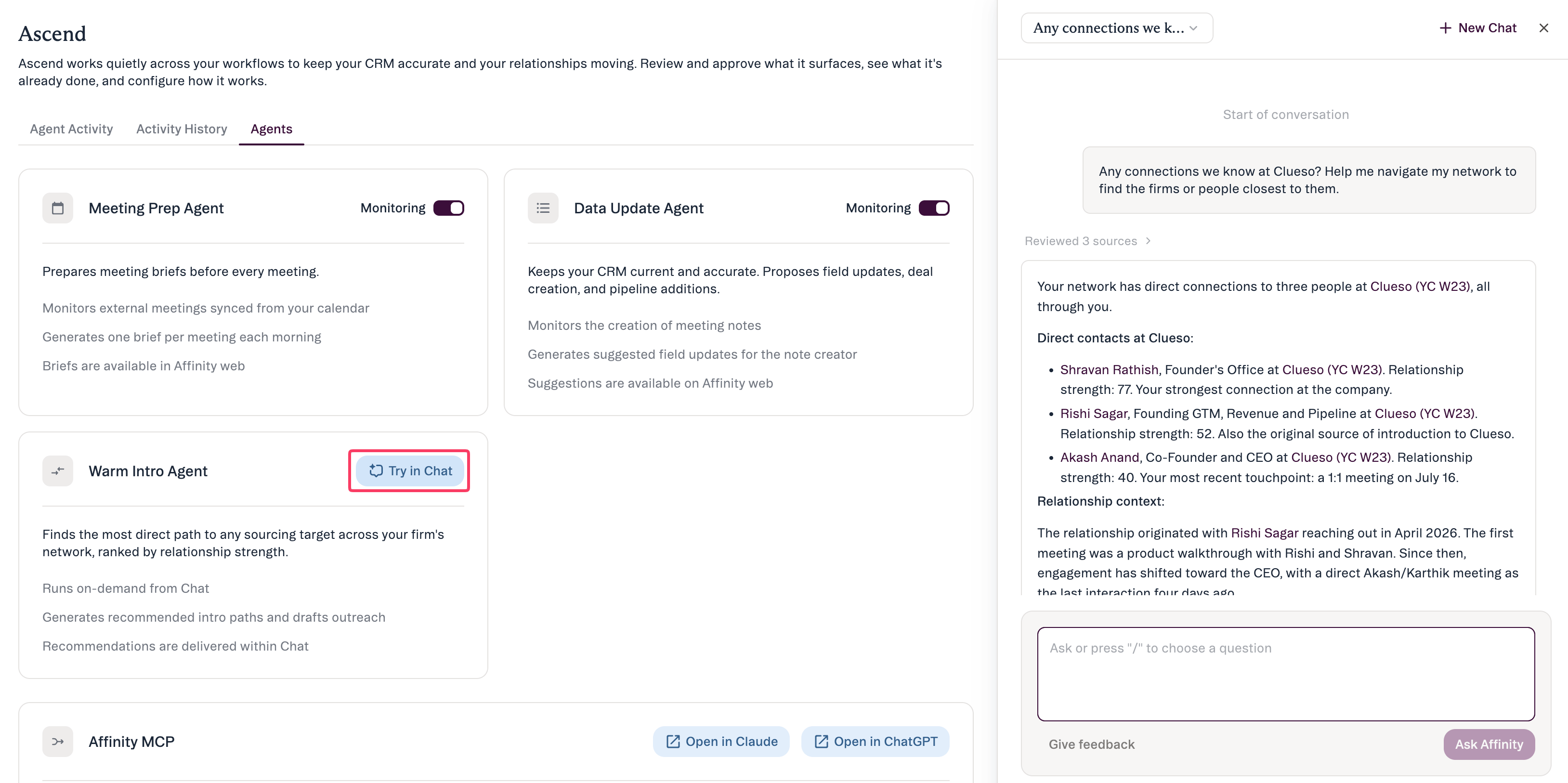 You can also reach inferred connections through **AI Chat** and the **Affinity MCP** — just ask the way you'd ask a well-connected colleague:
* *"Who can introduce me to someone at Crusoe Energy?"*
* *"Do we know anyone at \[investment firm]?"*
* *"How can I get introduced to the CEO of \[company]?"*
How the results are presented:
* **Ranked warm paths come first** — your real, interaction-backed relationships.
* Inferred connections appear **separately, in a clearly labeled "possible paths" section** — never blended into warm paths, and never called "warm."
* Each one shows the **basis of the inference in plain language** — *"overlapped at Jobbers 2018–2021"* or *"both connected to Potluck via Greenleaf Investing"* — so you can judge it. There's no invented strength score; the basis *is* the value.
* **Empty result?** It means none surfaced for that company — not an error, and not that you have zero. Coverage varies by company and by your firm's access.
## How Affinity infers an investor ↔ executive connection
You're being handed a prediction, so it helps to see the chain behind it:
1. A **funding event** links an investor firm to a company it backed.
2. Affinity checks whether a person your firm knows **worked at that investor firm during the investment period** — at the time of the deal, not just sometime in their career.
3. It filters for **relevant roles** — partners and investors on the investor side; C-suite, founders, and board members on the company side — so the bridge is senior enough to plausibly know the target's leadership.
Because the match is anchored to *when* someone was somewhere, it's a historical overlap — not a loose "same industry" guess.
* Affinity **scores each inferred connection for confidence** (longer, more recent overlaps and smaller companies score higher) to decide what surfaces and in what order.
* **You won't see a confidence number** — it works quietly in the background, the same way relationship strength does for your explicit relationships.
## What's not available yet
* **Company profiles only** — not yet on individual people's profiles (including bridge-contact profiles). Fast follow.
* **No click-through** to an unknown target person's own profile page yet — gated on a larger data effort.
* **Not in global search yet** — searching a target's name won't surface them as inferred (same data gating).
* **The Connections-tab number badge counts direct connections only** — it doesn't include inferred ones yet, so the badge may look low while inferred matches appear in the section below it.
* **Work-history cards can't be expanded** into a timeline at launch (see the note above).
* **Not in this release:** mobile, the connection side panel, and the Chrome "Path Finder" extension.
## FAQ
No — it's a well-reasoned lead based on shared history. Treat it as a starting point to research and validate, not proof that two people know each other.
That's the point of inferred connections — they surface probable paths your recorded activity can't. The relationship row (and, for funding overlaps, the timeline) shows exactly what shared history triggered it.
Because it isn't warm. Inferred paths are structural guesses with no interaction history behind them, so Affinity keeps them separate from your ranked warm paths and is upfront that they're leads.
No. Confidence scoring runs in the background to rank what surfaces, but it isn't shown in the product.
Not necessarily. An empty result means no inferred paths surfaced for that company — which can come down to available data or your firm's access. Not an error, and not a statement that none exist.
## Related topics
- [Leveraging your Connections and Relationship Strengths](/s/article/Leveraging-your-Connections-and-Relationship-Strengths.md)
- [Affinity For Salesforce Leveraging Your Connections And Relationship Strengths](/s/article/Affinity-for-Salesforce-Leveraging-your-Connections-and-Relationship-Strengths.md)
- [Tutorial 2: Navigating Profiles and Understanding Your Data](/s/article/Tutorial-2-navigating-profiles-and-understanding-your-data.md)
- [Affinity For Salesforce - How To Use Affinity's Outlook Add-in](/s/article/Affinity-for-Salesforce-How-to-use-Affinity-s-Outlook-add-in.md)
- [Affinity For Salesforce - How To Use Affinity's Pathfinder Chrome Extension](/s/article/Affinity-for-Salesforce-How-to-use-Affinity-s-Pathfinder-Chrome-Extension.md)
- [Warm Intros in AI Chat and MCP](/s/article/Warm-Intros-in-AI-Chat-and-MCP.md)
- [Affinity CRM - How to use Affinity's Outlook Add-in](/s/article/Affinity-CRM-How-to-use-Affinity-s-Outlook-Add-in.md)
- [Affinity CRM And Affinity Alliances - How To Use Affinity's Pathfinder Chrome Extension](/s/article/Affinity-CRM-and-Affinity-Alliances-How-to-use-Affinity-s-Pathfinder-Chrome-Extension.md)
- [Warm Intro Agent — overview](/s/article/Warm-Intro-Agent.md)
You can also reach inferred connections through **AI Chat** and the **Affinity MCP** — just ask the way you'd ask a well-connected colleague:
* *"Who can introduce me to someone at Crusoe Energy?"*
* *"Do we know anyone at \[investment firm]?"*
* *"How can I get introduced to the CEO of \[company]?"*
How the results are presented:
* **Ranked warm paths come first** — your real, interaction-backed relationships.
* Inferred connections appear **separately, in a clearly labeled "possible paths" section** — never blended into warm paths, and never called "warm."
* Each one shows the **basis of the inference in plain language** — *"overlapped at Jobbers 2018–2021"* or *"both connected to Potluck via Greenleaf Investing"* — so you can judge it. There's no invented strength score; the basis *is* the value.
* **Empty result?** It means none surfaced for that company — not an error, and not that you have zero. Coverage varies by company and by your firm's access.
## How Affinity infers an investor ↔ executive connection
You're being handed a prediction, so it helps to see the chain behind it:
1. A **funding event** links an investor firm to a company it backed.
2. Affinity checks whether a person your firm knows **worked at that investor firm during the investment period** — at the time of the deal, not just sometime in their career.
3. It filters for **relevant roles** — partners and investors on the investor side; C-suite, founders, and board members on the company side — so the bridge is senior enough to plausibly know the target's leadership.
Because the match is anchored to *when* someone was somewhere, it's a historical overlap — not a loose "same industry" guess.
* Affinity **scores each inferred connection for confidence** (longer, more recent overlaps and smaller companies score higher) to decide what surfaces and in what order.
* **You won't see a confidence number** — it works quietly in the background, the same way relationship strength does for your explicit relationships.
## What's not available yet
* **Company profiles only** — not yet on individual people's profiles (including bridge-contact profiles). Fast follow.
* **No click-through** to an unknown target person's own profile page yet — gated on a larger data effort.
* **Not in global search yet** — searching a target's name won't surface them as inferred (same data gating).
* **The Connections-tab number badge counts direct connections only** — it doesn't include inferred ones yet, so the badge may look low while inferred matches appear in the section below it.
* **Work-history cards can't be expanded** into a timeline at launch (see the note above).
* **Not in this release:** mobile, the connection side panel, and the Chrome "Path Finder" extension.
## FAQ
No — it's a well-reasoned lead based on shared history. Treat it as a starting point to research and validate, not proof that two people know each other.
That's the point of inferred connections — they surface probable paths your recorded activity can't. The relationship row (and, for funding overlaps, the timeline) shows exactly what shared history triggered it.
Because it isn't warm. Inferred paths are structural guesses with no interaction history behind them, so Affinity keeps them separate from your ranked warm paths and is upfront that they're leads.
No. Confidence scoring runs in the background to rank what surfaces, but it isn't shown in the product.
Not necessarily. An empty result means no inferred paths surfaced for that company — which can come down to available data or your firm's access. Not an error, and not a statement that none exist.
## Related topics
- [Leveraging your Connections and Relationship Strengths](/s/article/Leveraging-your-Connections-and-Relationship-Strengths.md)
- [Affinity For Salesforce Leveraging Your Connections And Relationship Strengths](/s/article/Affinity-for-Salesforce-Leveraging-your-Connections-and-Relationship-Strengths.md)
- [Tutorial 2: Navigating Profiles and Understanding Your Data](/s/article/Tutorial-2-navigating-profiles-and-understanding-your-data.md)
- [Affinity For Salesforce - How To Use Affinity's Outlook Add-in](/s/article/Affinity-for-Salesforce-How-to-use-Affinity-s-Outlook-add-in.md)
- [Affinity For Salesforce - How To Use Affinity's Pathfinder Chrome Extension](/s/article/Affinity-for-Salesforce-How-to-use-Affinity-s-Pathfinder-Chrome-Extension.md)
- [Warm Intros in AI Chat and MCP](/s/article/Warm-Intros-in-AI-Chat-and-MCP.md)
- [Affinity CRM - How to use Affinity's Outlook Add-in](/s/article/Affinity-CRM-How-to-use-Affinity-s-Outlook-Add-in.md)
- [Affinity CRM And Affinity Alliances - How To Use Affinity's Pathfinder Chrome Extension](/s/article/Affinity-CRM-and-Affinity-Alliances-How-to-use-Affinity-s-Pathfinder-Chrome-Extension.md)
- [Warm Intro Agent — overview](/s/article/Warm-Intro-Agent.md)