> ## Documentation Index
> Fetch the complete documentation index at: https://support.affinity.co/llms.txt
> Use this file to discover all available pages before exploring further.
# Take actions with AI Chat
> Ask Affinity AI to update your CRM, with a confirm-before-execute step on every change.
You already move deals between stages and update fields by hand. **AI Chat** can do that for you on request — and **never writes anything to your CRM without your confirmation**. Every action shows exactly what will change and waits for you to approve it.
AI Chat is generally available on **Scale**, **Advanced**, and **Enterprise**. It was read-only during the early beta; at the July 22 launch it can take **confirm-before-execute actions** in addition to answering questions. The set of actions it can take is expanding over time.
## What AI Chat can do at the July 22 launch
| Action | What you say |
| -------------------------------------------------------- | ---------------------------------------------------- |
| Update a **field value** | “Set Acme Corp's round size to \$20M” |
| Update a **pipeline stage** | “Move Lumira Diagnostics to Active Diligence” |
| **Add to a list** | “Add Lumira Diagnostics to my Watchlist” |
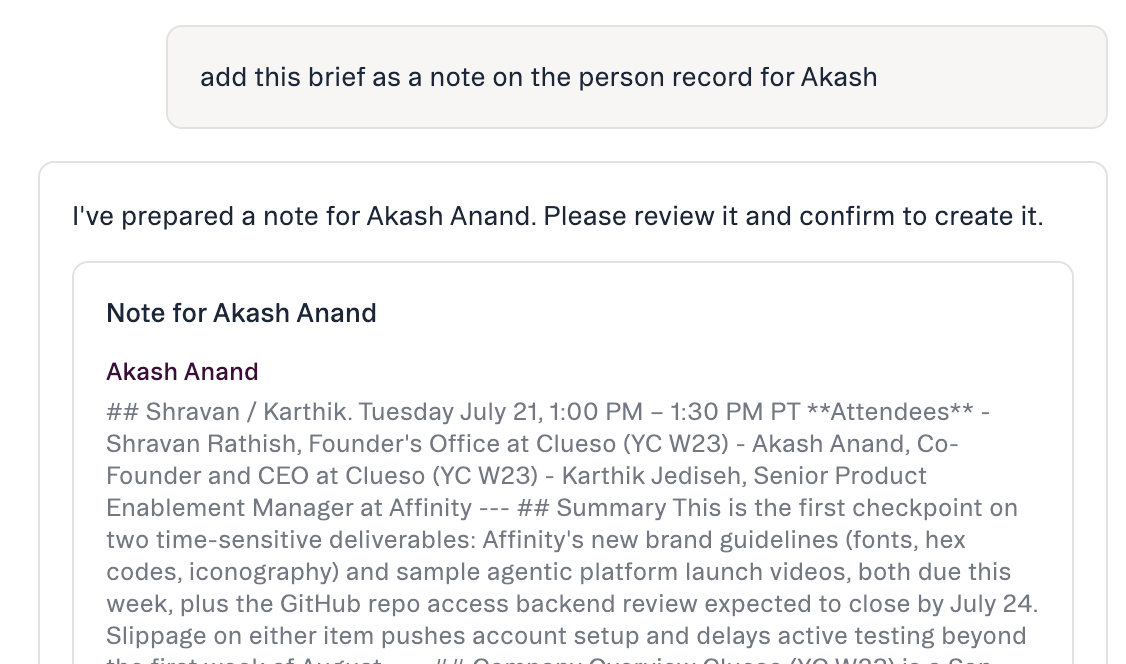
| **Create a note** (on a person, company, or opportunity) | “Log a note on Acme Corp summarizing our last call” |
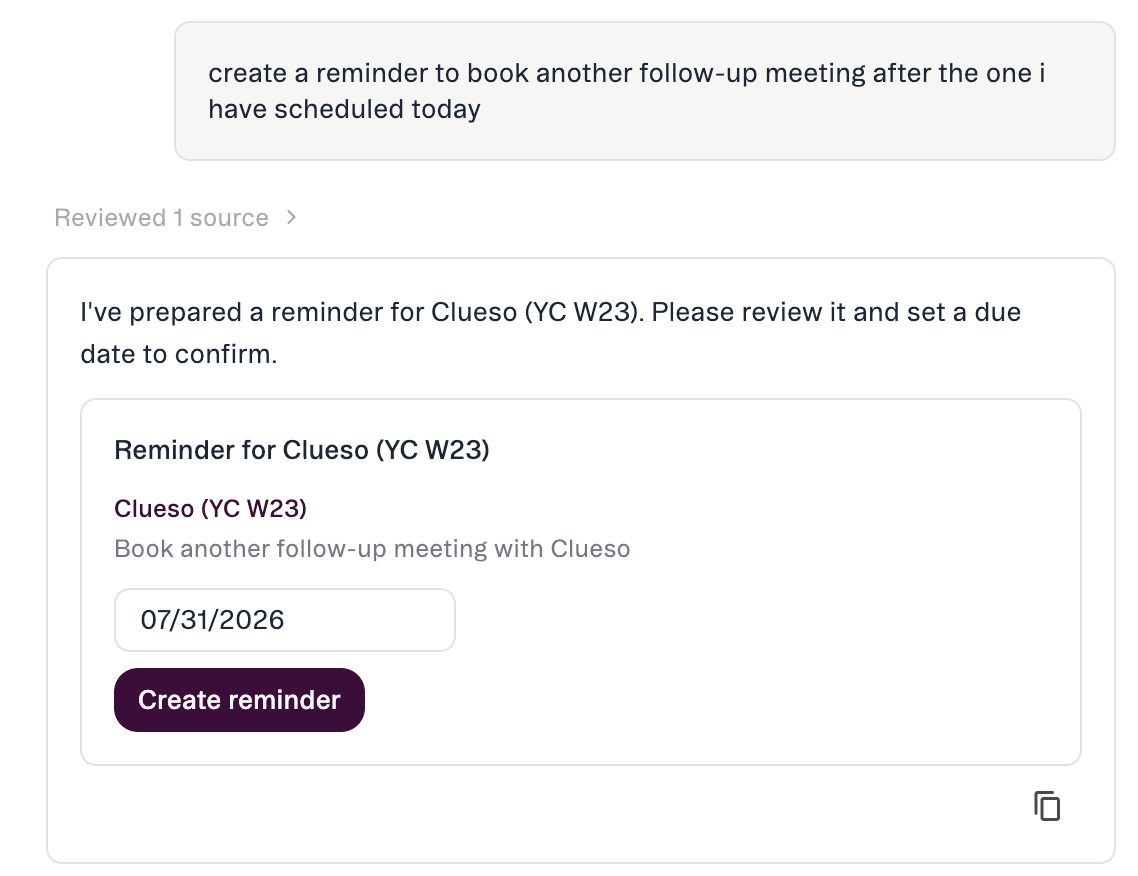
| **Create a reminder** | “Remind me to follow up with Acme Corp next Tuesday” |
You ask in plain language and Affinity AI proposes the exact change for your confirmation. **Nothing is written until you approve it.**
 ### Actions coming as the set expands
Not available at the July 22 launch, coming later: **uploading a file**, **creating a saved view**, and **creating a list**. Each will follow the same confirm-before-execute flow.
## How a change happens
### Actions coming as the set expands
Not available at the July 22 launch, coming later: **uploading a file**, **creating a saved view**, and **creating a list**. Each will follow the same confirm-before-execute flow.
## How a change happens
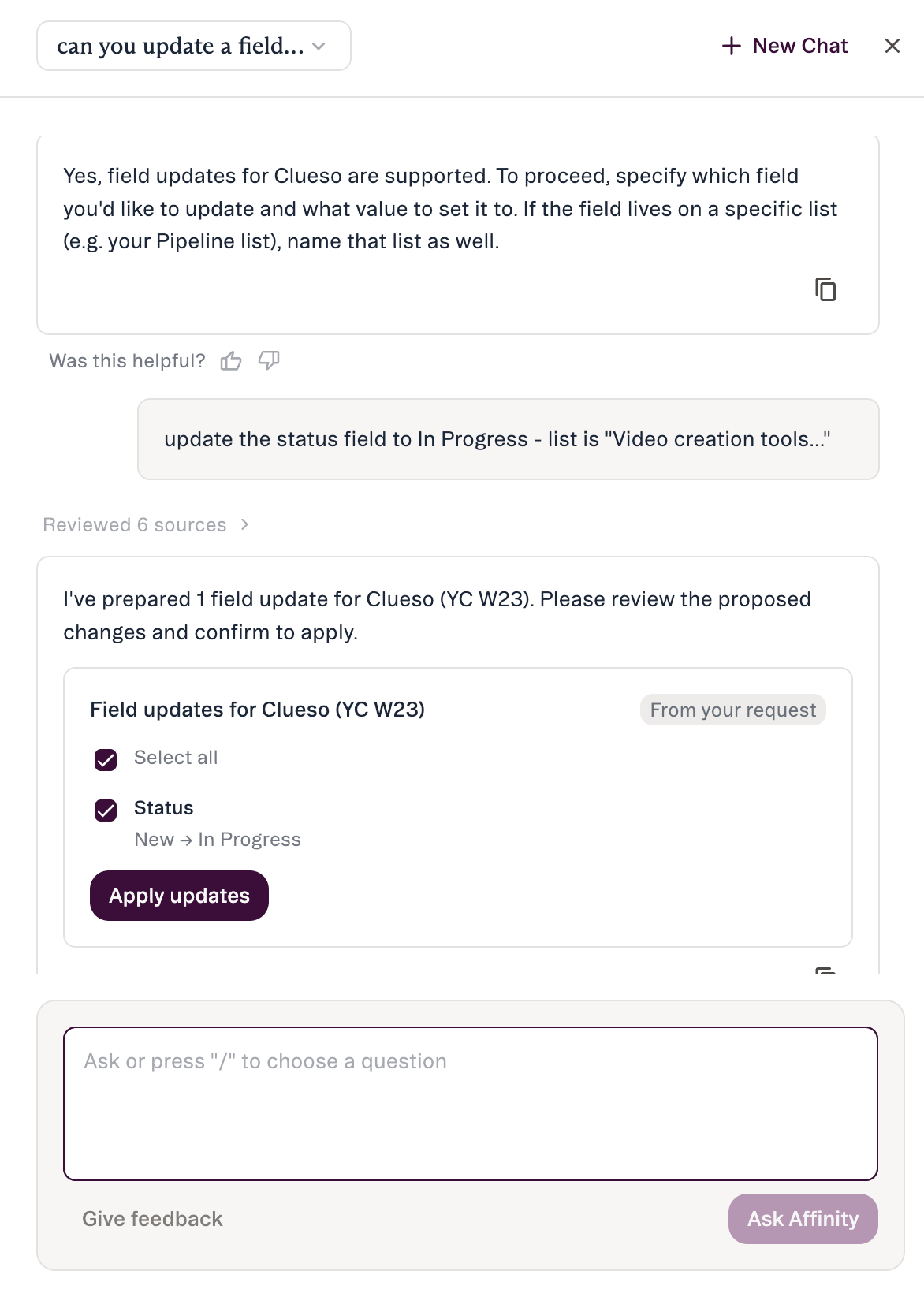 1. **You ask** for the change in plain language.
2. **Affinity AI shows a preview** — exactly what will change, as a **before-and-after diff** (current → proposed), plus a note that the change will be visible to your team.
3. **You confirm or cancel.** The change doesn't run until you respond. There is no “always allow.”
4. **Affinity AI posts a receipt** confirming what changed, with links back to the record and its edit history.
1. **You ask** for the change in plain language.
2. **Affinity AI shows a preview** — exactly what will change, as a **before-and-after diff** (current → proposed), plus a note that the change will be visible to your team.
3. **You confirm or cancel.** The change doesn't run until you respond. There is no “always allow.”
4. **Affinity AI posts a receipt** confirming what changed, with links back to the record and its edit history.
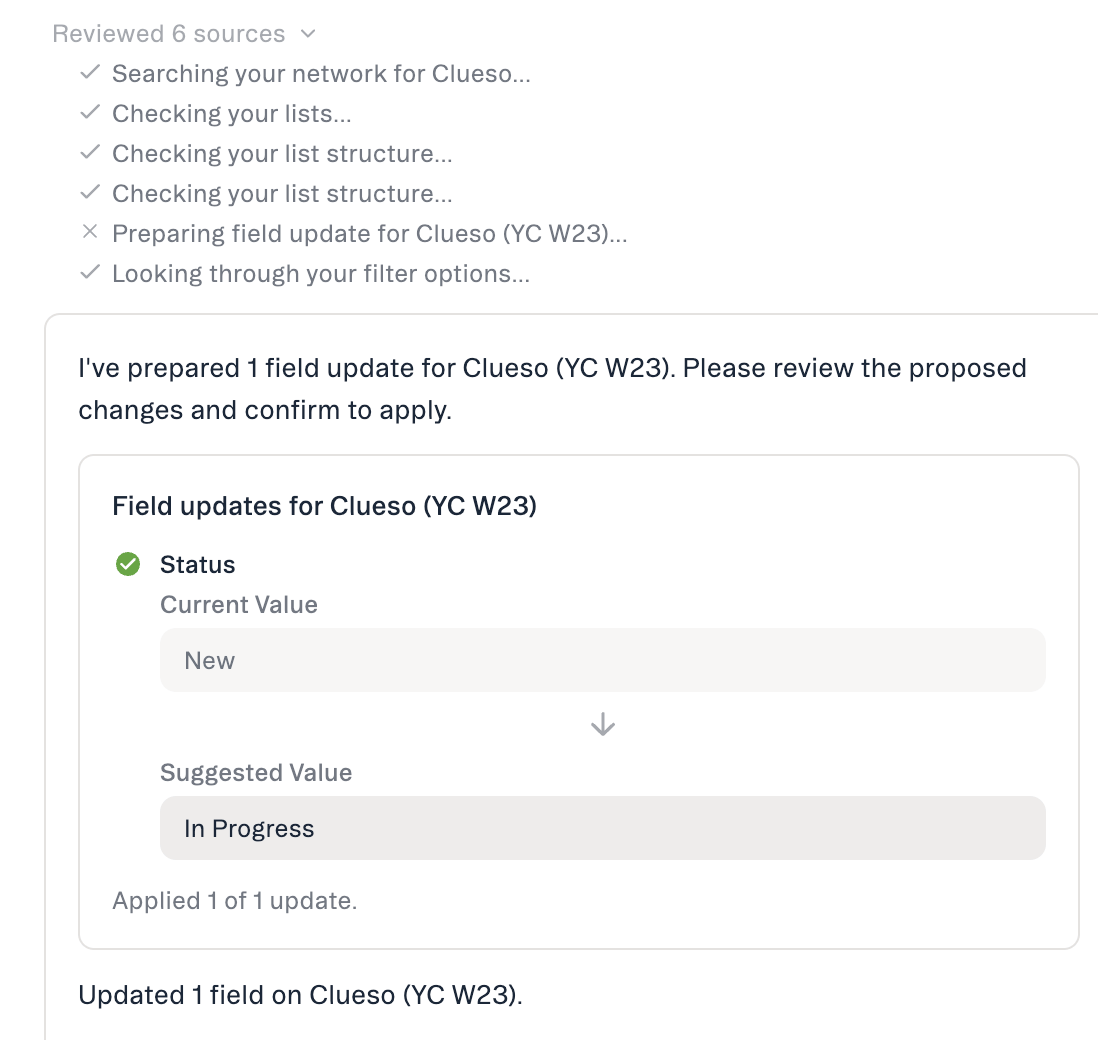 If you'd collapsed the chat panel, a **toast** appears so you don't miss the result.
## Getting access and staying in control
* **Plan:** Scale, Advanced, and Enterprise.
* **Permissions:** Affinity AI can only see and change what **your own account** already can.
* **Confirmation is mandatory.** Every action waits for your approval — there's no auto-approve.
* **Admin controls:** admins can enable or disable AI features for the org in **Settings → Automations & AI → Affinity AI** (the AI Chat card).
## What AI Chat won't do
By design, Affinity AI will **not** send emails or outreach, merge or delete records, or make bulk changes across many records at once.
## Honest limits
* **\~90-day activity window** (being extended) — long-range history can be truncated.
* **Person search by attribute is post-launch** — name or email today.
* **No location/geographic filtering yet.**
* **No reliable point-in-time field history.**
## Common questions
* **Will it change anything without asking?** No — every action shows a preview and waits for confirmation.
* **What exactly can it change at launch?** Update a field or pipeline stage, add to a list, create a note, create a reminder. Upload a file / saved view / create a list come later.
* **Who can see the change?** It appears on the record like any other edit; the preview notes “visible to your team” before you confirm.
* **Can I do several actions at once?** Affinity AI names them, then confirms them **one at a time** — never as a single bulk change.
## If something doesn't work
| If you see… | What it means |
| ------------------------------------------------- | --------------------------------------------------------------------------- |
| “…wasn't found in your pipeline” | The company name may differ in your CRM — try the name as it appears there. |
| “…isn't a stage in your pipeline” | The stage didn't match; Affinity AI will list the available stages. |
| “…can't be updated with your current permissions” | A teammate with edit access needs to make the change. |
| “…didn't complete” | The change wasn't written. Adjusting the request usually helps — try again. |
***
*Affinity AI can make mistakes. Review each suggestion before approving it.*
## Related topics
- [Affinity AI Chat Overview](/s/article/Affinity-AI-chat-overview.md)
- [Prompts for Affinity AI Chat](/s/article/Prompts-for-Affinity-AI-Chat.md)
- [Meeting Preparation with AI Chat](/s/article/Meeting-preparation-with-AI-chat.md)
- [Getting Started with AI Chat](/s/article/Getting-started-with-AI-chat.md)
- [Pipeline catch-up with AI Chat](/s/article/Pipeline-catch-up-with-AI-Chat.md)
- [What AI Chat can do & how to trust it](/s/article/What-AI-Chat-can-do.md)
- [AI & MCP](/s/article/AI-and-MCP.md)
- [Affinity Ascend agents — Overview](/s/article/Affinity-Ascend-agents-overview.md)
- [Affinity AI Prompt Library](/s/article/Affinity-AI-Prompt-Library.md)
If you'd collapsed the chat panel, a **toast** appears so you don't miss the result.
## Getting access and staying in control
* **Plan:** Scale, Advanced, and Enterprise.
* **Permissions:** Affinity AI can only see and change what **your own account** already can.
* **Confirmation is mandatory.** Every action waits for your approval — there's no auto-approve.
* **Admin controls:** admins can enable or disable AI features for the org in **Settings → Automations & AI → Affinity AI** (the AI Chat card).
## What AI Chat won't do
By design, Affinity AI will **not** send emails or outreach, merge or delete records, or make bulk changes across many records at once.
## Honest limits
* **\~90-day activity window** (being extended) — long-range history can be truncated.
* **Person search by attribute is post-launch** — name or email today.
* **No location/geographic filtering yet.**
* **No reliable point-in-time field history.**
## Common questions
* **Will it change anything without asking?** No — every action shows a preview and waits for confirmation.
* **What exactly can it change at launch?** Update a field or pipeline stage, add to a list, create a note, create a reminder. Upload a file / saved view / create a list come later.
* **Who can see the change?** It appears on the record like any other edit; the preview notes “visible to your team” before you confirm.
* **Can I do several actions at once?** Affinity AI names them, then confirms them **one at a time** — never as a single bulk change.
## If something doesn't work
| If you see… | What it means |
| ------------------------------------------------- | --------------------------------------------------------------------------- |
| “…wasn't found in your pipeline” | The company name may differ in your CRM — try the name as it appears there. |
| “…isn't a stage in your pipeline” | The stage didn't match; Affinity AI will list the available stages. |
| “…can't be updated with your current permissions” | A teammate with edit access needs to make the change. |
| “…didn't complete” | The change wasn't written. Adjusting the request usually helps — try again. |
***
*Affinity AI can make mistakes. Review each suggestion before approving it.*
## Related topics
- [Affinity AI Chat Overview](/s/article/Affinity-AI-chat-overview.md)
- [Prompts for Affinity AI Chat](/s/article/Prompts-for-Affinity-AI-Chat.md)
- [Meeting Preparation with AI Chat](/s/article/Meeting-preparation-with-AI-chat.md)
- [Getting Started with AI Chat](/s/article/Getting-started-with-AI-chat.md)
- [Pipeline catch-up with AI Chat](/s/article/Pipeline-catch-up-with-AI-Chat.md)
- [What AI Chat can do & how to trust it](/s/article/What-AI-Chat-can-do.md)
- [AI & MCP](/s/article/AI-and-MCP.md)
- [Affinity Ascend agents — Overview](/s/article/Affinity-Ascend-agents-overview.md)
- [Affinity AI Prompt Library](/s/article/Affinity-AI-Prompt-Library.md)