> ## Documentation Index
> Fetch the complete documentation index at: https://support.affinity.co/llms.txt
> Use this file to discover all available pages before exploring further.
# Leveraging your Connections and Relationship Strengths
> Help center reference
**Reference** — lookup information.
With Affinity's relationship intelligence, you and your team can leverage **the shared connections** you have to individuals and companies, as well as **the strength** of these connections to quickly find out who to best ask for a warm introduction.
**Note**: If you're signing in and syncing into Affinity for the very first time, it may take up to 24 hours for your connections to appear.
## Overview
 1. What are Relationship Strengths in Affinity?
2. Types of Connections in Affinity
3. Degrees of Connections in Affinity
4. Viewing Connections on a contact's profile page
5. Viewing Connections within a list
6. Can you export Connections and Relationship Strengths from Affinity?
### What are Relationship Strengths in Affinity?
A relationship strength is a numerical score given to your connections that ranges from 10 (weak) - 100 (strong). Relationship strengths are calculated based on the recency and frequency of interactions between two individuals. The scores are also ranked by different colored bars.
1. What are Relationship Strengths in Affinity?
2. Types of Connections in Affinity
3. Degrees of Connections in Affinity
4. Viewing Connections on a contact's profile page
5. Viewing Connections within a list
6. Can you export Connections and Relationship Strengths from Affinity?
### What are Relationship Strengths in Affinity?
A relationship strength is a numerical score given to your connections that ranges from 10 (weak) - 100 (strong). Relationship strengths are calculated based on the recency and frequency of interactions between two individuals. The scores are also ranked by different colored bars.
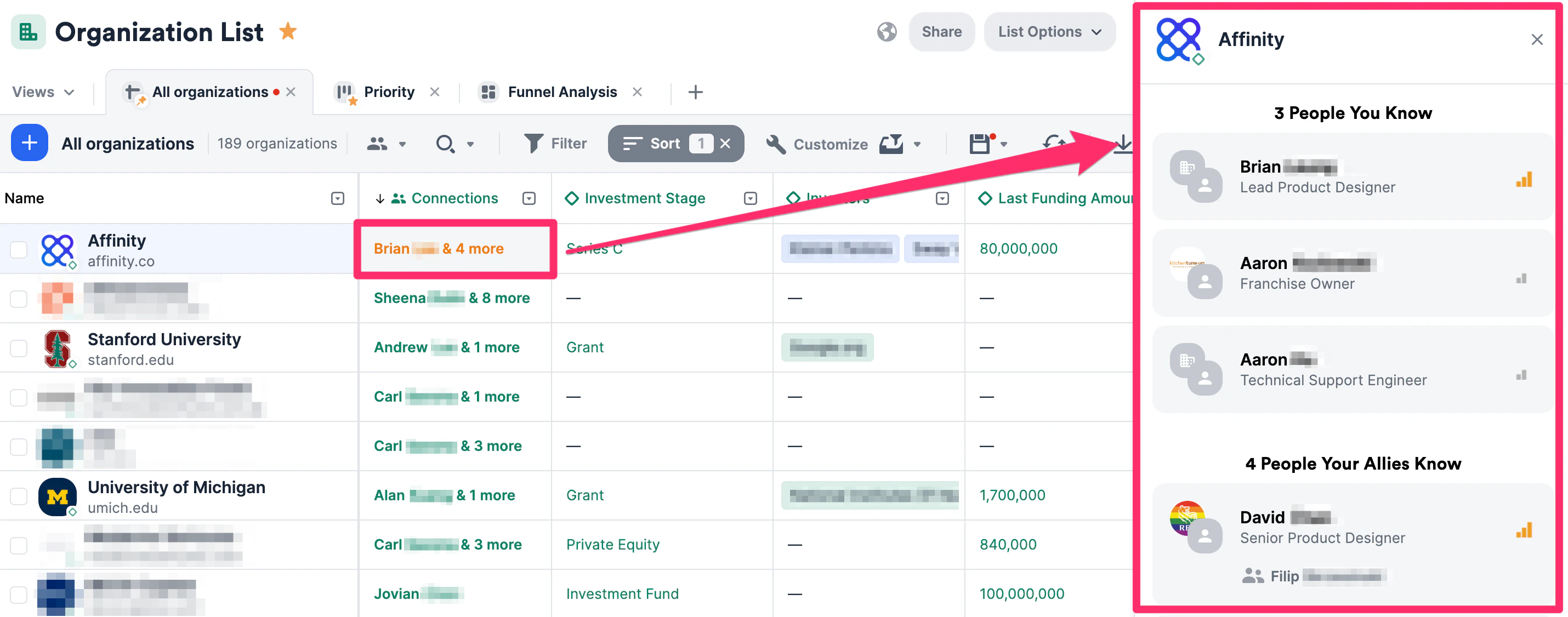
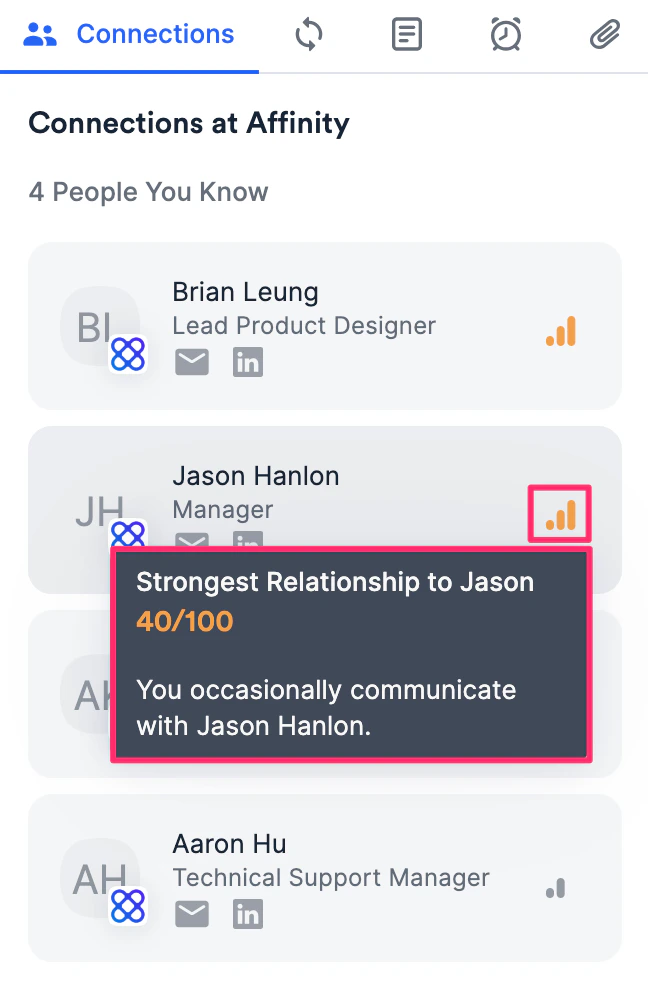 1. Green bars represent strong connections
2. Orange bars represent average connections
3. Gray bars represent weak connections
### Types of Connections in Affinity
1. **People You Know** - These are the people you have directly communicated with.
2. **People Your Allies Know** - These are the people that your allies have directly communicated with (see [Getting started with Affinity Alliances](/s/article/Getting-started-with-Affinity-Alliances)).
3. **People Added Manually** - These are the people that are manually associated within your Affinity instance.
4. **Inferred Connections** - These are the people that you/your team can potentially get introduced to based on previous shared work experience.
* Inferred Connections will only appear for organizations, **not** for people or opportunities.
* Inferred Connections will only be available for those on the **Scale**, **Advanced**, and **Enterprise** tiers. If you're interested in upgrading to one of these new tiers, please reach out to your Affinity point of contact or [support@affinity.co](mailto:support@affinity.co).
### Degrees of Connections in Affinity
Powered by Affinity's relationship intelligence, you will be able to quickly see your 1st and 2nd degree connections with a person or organization:
* **1st Degree** - Someone you directly know and have communicated with.
* **2nd Degree** - Someone who knows one of your 1st degree connections, but you don't directly know.
### Viewing Connections on a contact's profile page
1. Click the **Connections** tab to see your/your team members' connections with that contact.
1. Green bars represent strong connections
2. Orange bars represent average connections
3. Gray bars represent weak connections
### Types of Connections in Affinity
1. **People You Know** - These are the people you have directly communicated with.
2. **People Your Allies Know** - These are the people that your allies have directly communicated with (see [Getting started with Affinity Alliances](/s/article/Getting-started-with-Affinity-Alliances)).
3. **People Added Manually** - These are the people that are manually associated within your Affinity instance.
4. **Inferred Connections** - These are the people that you/your team can potentially get introduced to based on previous shared work experience.
* Inferred Connections will only appear for organizations, **not** for people or opportunities.
* Inferred Connections will only be available for those on the **Scale**, **Advanced**, and **Enterprise** tiers. If you're interested in upgrading to one of these new tiers, please reach out to your Affinity point of contact or [support@affinity.co](mailto:support@affinity.co).
### Degrees of Connections in Affinity
Powered by Affinity's relationship intelligence, you will be able to quickly see your 1st and 2nd degree connections with a person or organization:
* **1st Degree** - Someone you directly know and have communicated with.
* **2nd Degree** - Someone who knows one of your 1st degree connections, but you don't directly know.
### Viewing Connections on a contact's profile page
1. Click the **Connections** tab to see your/your team members' connections with that contact.
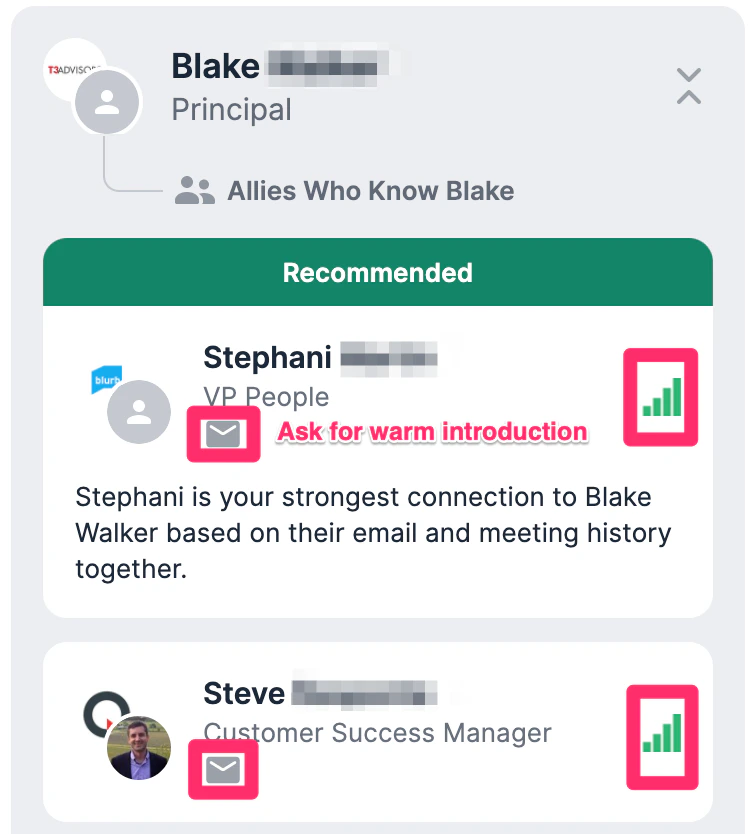
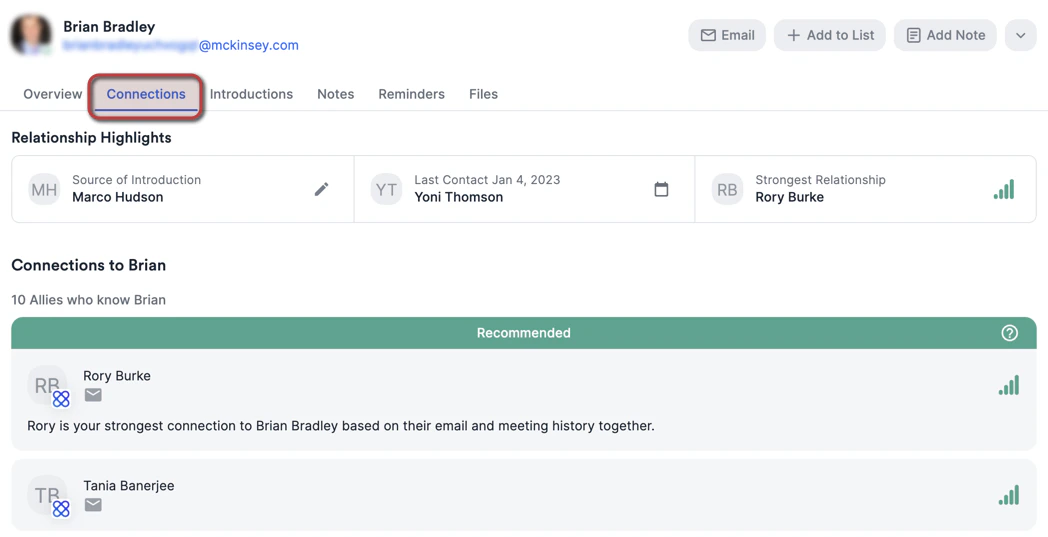 2. Click on each contact to see everyone that can provide you with a warm introduction to that contact.
 ### Viewing Connections within a list
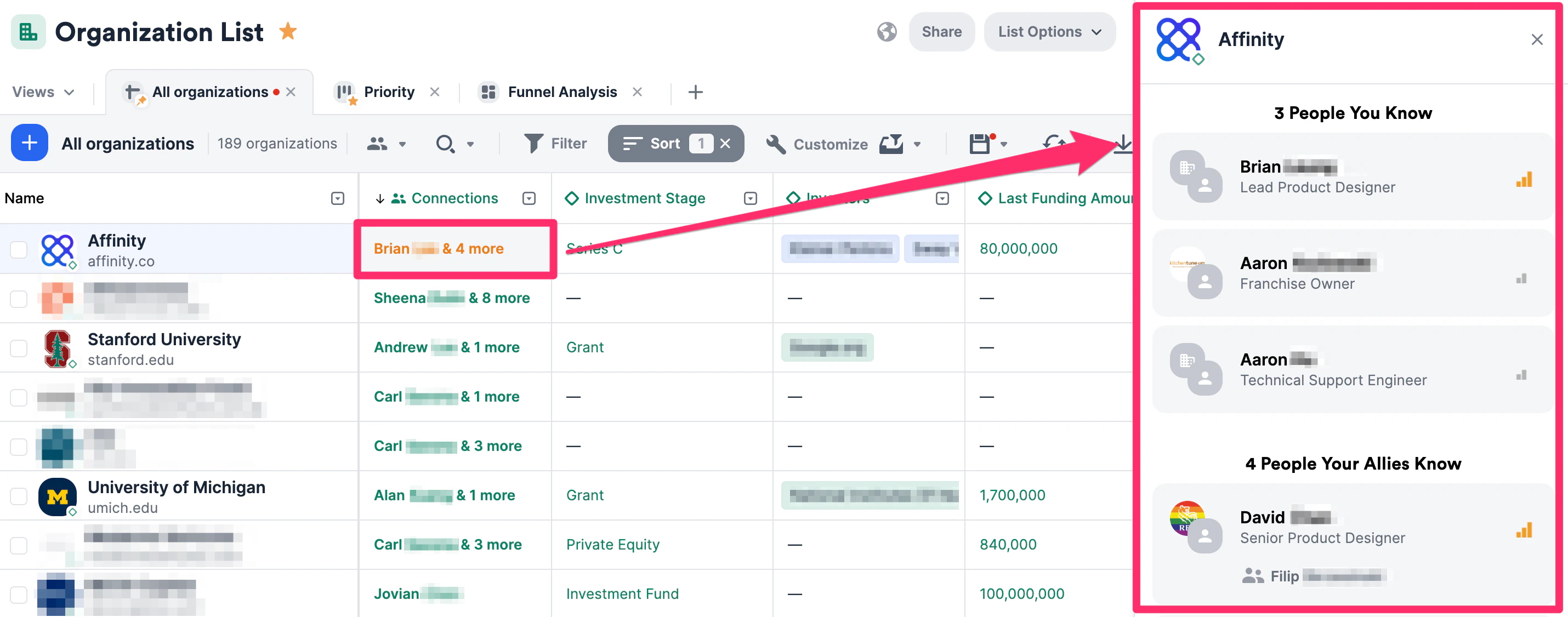
1. Click any cell within the **Connections** column to see your connections to that contact. The **Connections** sidebar will slide out from the right side of the screen.
### Viewing Connections within a list
1. Click any cell within the **Connections** column to see your connections to that contact. The **Connections** sidebar will slide out from the right side of the screen.
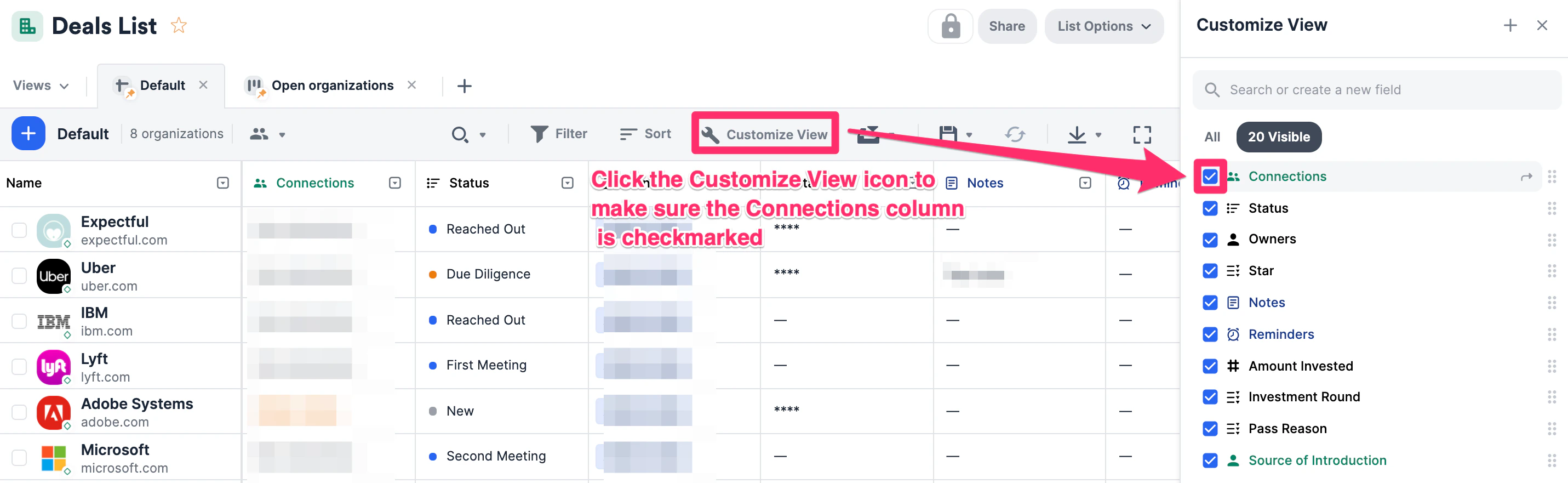
 2. If you cannot find the **Connections** column, click the **Customize View** icon to make sure it's checked and on display.
 ### Can you export Connections and Relationship Strengths from Affinity?
* Connections and Relationship Strengths can **not** be exported directly from the Affinity CRM.
* However, you can leverage the [Affinity API - Relationship Strengths](https://api-docs.affinity.co/#relationship-strengths) endpoint to access the data outside of the CRM.
* You can also leverage the Affinity API to get [the strongest relationship strength connection to an organization on a list](https://api-docs.affinity.co/#getting-the-strongest-relationship-strength-connection-to-an-organization-on-a-list).
{/* */}
{/* */}
{/* */}
### Can you export Connections and Relationship Strengths from Affinity?
* Connections and Relationship Strengths can **not** be exported directly from the Affinity CRM.
* However, you can leverage the [Affinity API - Relationship Strengths](https://api-docs.affinity.co/#relationship-strengths) endpoint to access the data outside of the CRM.
* You can also leverage the Affinity API to get [the strongest relationship strength connection to an organization on a list](https://api-docs.affinity.co/#getting-the-strongest-relationship-strength-connection-to-an-organization-on-a-list).
{/* */}
{/* */}
{/* */}