> ## Documentation Index
> Fetch the complete documentation index at: https://support.affinity.co/llms.txt
> Use this file to discover all available pages before exploring further.
# How To Import Notes Into Affinity
> Help center reference: How To Import Notes Into Affinity
**How-to** — task-oriented recipe.
Switching to Affinity from another platform and need to migrate over some notes? Importing these notes will have to be done **by Affinity Support** - using the [standard import process](/s/article/How-to-import-your-data-into-Affinity) will lead to errors given that your CSV file can contain multiple notes for the same contact (i.e. person, organization, or opportunity).
**Callout:** Note imports can only support one type of contact at a time (i.e. people, organizations, or opportunities), so make sure the CSV file contains only one type of contact for the **Tagged Entity** column (see Column C for example).
## Steps to import your notes into Affinity
1. Make sure these **4 columns** are present in your CSV file:
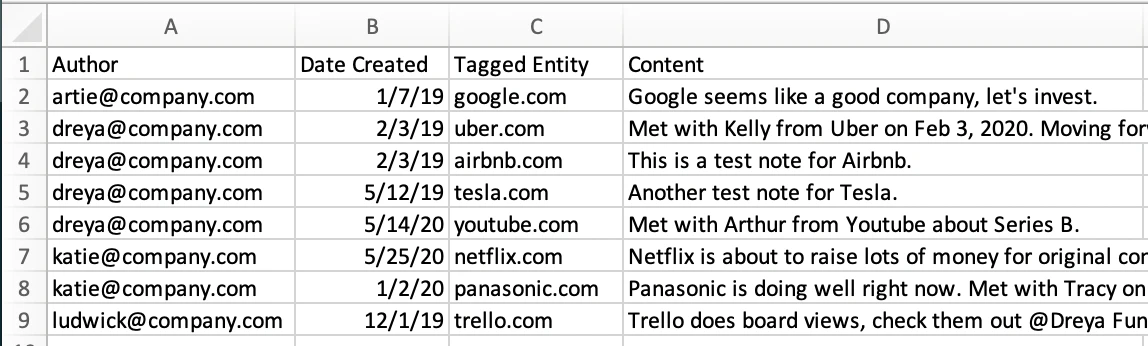 1. **Author (Column A):** Email address required since only your team members can be authors of notes.
2. **Date Created (Column B):** MM/DD/YYYY, DD/MM/YYYY, and YYYY/MM/DD formats supported.
1. Just make sure that all the cells are in the same format in your CSV file.
3. **Tagged Entity (Column C):** We can only import notes for one type of contact at a time: people-type, organization-type, or opportunity-type.
1. **Email address** if it is a people-type contact
2. **Organization Website** if it is an organization-type contact
3. **Opportunity name** if it is an opportunity-type contact
4. **Content (Column D):** The contents of the note itself.
5. Once you have these columns in the proper format, send over the CSV file to [support@affinity.co](mailto:support@affinity.co) and we will import your notes for you.
1. **Author (Column A):** Email address required since only your team members can be authors of notes.
2. **Date Created (Column B):** MM/DD/YYYY, DD/MM/YYYY, and YYYY/MM/DD formats supported.
1. Just make sure that all the cells are in the same format in your CSV file.
3. **Tagged Entity (Column C):** We can only import notes for one type of contact at a time: people-type, organization-type, or opportunity-type.
1. **Email address** if it is a people-type contact
2. **Organization Website** if it is an organization-type contact
3. **Opportunity name** if it is an opportunity-type contact
4. **Content (Column D):** The contents of the note itself.
5. Once you have these columns in the proper format, send over the CSV file to [support@affinity.co](mailto:support@affinity.co) and we will import your notes for you.