> ## Documentation Index
> Fetch the complete documentation index at: https://support.affinity.co/llms.txt
> Use this file to discover all available pages before exploring further.
# How to Find and Filter Notes in Notes Center
> How to Find and Filter Notes in Notes Center
**How-to** — task-oriented recipe.
## Overview
Find notes quickly using Notes Center's five filter types: Associated With (entities), Created Date (when), Created By (who), Capture Method (how), and Text Search (keywords). Combine filters to create precise queries across all your firm's notes.
## How to Access Notes Center
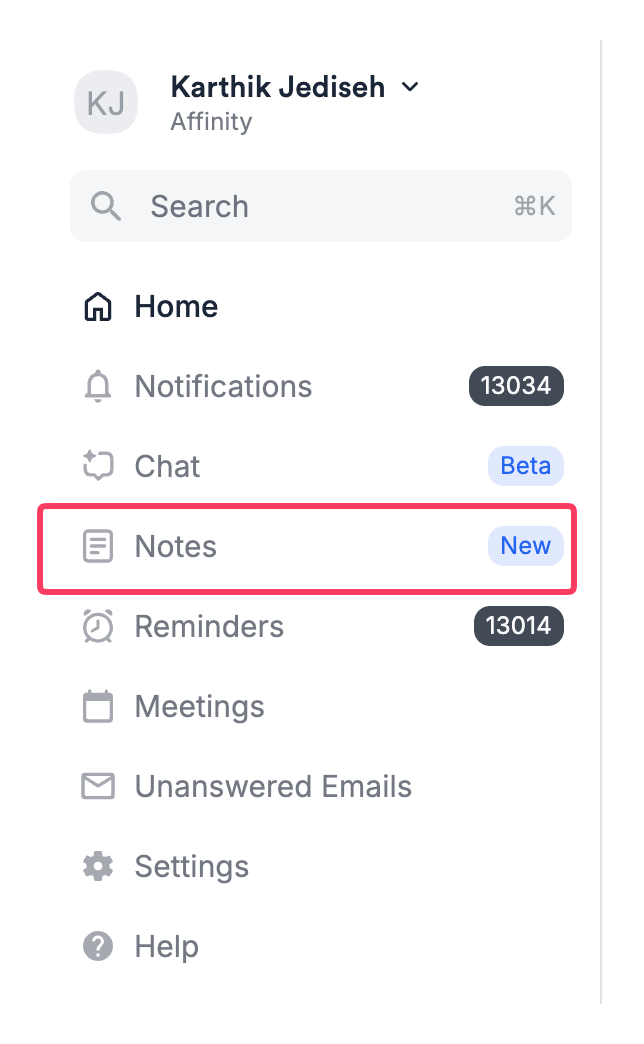 * Open Affinity web app
* Look for **Notes** in left sidebar navigation
* Click **Notes Center**
* Full notes feed appears in main view
**Default view shows:**
* All notes you have permission to view
* Sorted newest first (reverse chronological)
* No filters applied
## How to Browse Notes Chronologically
**Without applying any filters:**
1. Open Notes Center
2. Scroll down through the feed
3. Notes load automatically as you scroll
4. View notes in order of creation (newest to oldest)
**Use when:** Reviewing recent activity, catching up on team notes, scanning what's happened this week
## How to Filter by Associated Entity
**Find all notes linked to specific companies, people, or opportunities:**
1. Click **Associated With** filter button
2. Search bar appears
3. Type company, person, or opportunity name
4. Select from dropdown results
5. Repeat to add more entities
6. Notes linked to ANY selected entity appear
**Example:**
* Select "Acme Corp"
* Results: All notes associated with Acme Corp
* Add "Sarah Chen" (CEO of Acme)
* Results: Notes associated with Acme Corp OR Sarah Chen
**To remove an entity:**
* Click **X** next to entity name in filter
**Use when:**
* "Show me all notes about this target company"
* "Find notes related to these 5 deals"
* "Everything we know about this person"
## How to Filter by Author
**Find notes by who created them:**
### Finding Your Own Notes
1. Click **Created By** filter
2. “Me” will appear at the top of the Created by filter list
3. Select yourself from dropdown
4. Only your notes appear **Use when:** Reviewing your weekly activity, finding notes you took but can't remember where
### Finding Teammate Notes
1. Click **Created By** filter
2. Search for teammate's name
3. Select from dropdown
4. Only their notes appear
**Add multiple authors:**
* Select multiple teammates
* Notes from ANY selected author appear (OR logic)
**Example:**
* Select "Rachel" and "Alex"
* Results: Notes from Rachel OR Alex **Use when:** Catching up on teammate activity, coordinating on shared deals
## How to Filter by Date Range
**Find notes created during a specific time period:**
### Single Day
1. Click **Created Date** filter
2. Click calendar icon
3. Select one date
4. Notes from that day only
### Date Range
1. Click **Created Date** filter
2. Click calendar icon
3. Select start date
4. Select end date
5. Notes from that period appear
**Examples:**
* Start: March 1, End: March 31 → All notes from March
* Start: Jan 1, 2026, End: Mar 31, 2026 → All notes from Q1 2026
**Use when:**
* "What did we learn last week?"
* "All notes from Q4 2025"
* "Notes from the past month"
## How to Search by Keyword
**Find notes containing specific terms:**
1. Click in **Text Search** box (or type directly)
2. Enter search term or phrase
3. Press Enter or click search icon
4. Notes containing term anywhere in body appear
**Search behavior:**
**Single word:**
* Search: healthcare
* Finds: Notes with healthcare, Healthcare, HEALTHCARE
* Case-insensitive matching
**Phrase:**
* Search: "product-market fit"
* Finds: Exact phrase "product-market fit" in notes
**Multiple words:**
* Search: "Series B funding"
* Finds: Notes containing all three words (may not be consecutive)
**Partial matching:**
* Search: "health"
* Finds: "health", "healthcare", "healthy"
**Use when:**
* "Find every note mentioning 'due diligence'"
* "Notes discussing 'competitor analysis'"
* "References to 'San Francisco'"
## How to Combine Filters
**Create precise queries by combining multiple filters:**
### Example 1: Find Your Recent Notes About a Company
**Goal:** Your notes about Acme Corp from past month
1. Filter **Created By:** Select yourself
2. Filter **Associated With:** Select "Acme Corp"
3. Filter **Created Date:** Past 30 days
4. Result: YOUR notes about Acme Corp from the past month
### Example 2: Find All AI Notetaker Notes from This Week
**Goal:** All meeting summaries from this week
1. Filter **Capture Method:** AI Notetaker
2. Filter **Created Date:** Past 7 days
3. Result: All meeting summaries from this week
### Example 3: Find Specific Topic Notes by Your Team
**Goal:** Team notes mentioning competitive analysis from Q1
1. Filter **Created By:** Select multiple teammates
2. Search **Text:** "competitive analysis"
3. Filter **Created Date:** select the date range corresponding to this quarter
4. Result: Team notes mentioning competitive analysis from Q1
### Example 4: Comprehensive Deal Research
**Goal:** All notes about multiple companies mentioning pricing
1. Filter **Associated With:** "Loom" + "Figma" + "Notion"
2. Search **Text:** "pricing strategy"
3. Filter **Created Date:** Past 6 months
4. Result: All notes about these companies mentioning pricing from past half year **Understanding the logic:**
* Multiple entities = OR (notes linked to ANY entity)
* Multiple authors = OR (notes from ANY author)
* Multiple filter types = AND (notes matching ALL criteria)
## Tips & Best Practices
**Start broad, narrow progressively:**
1. Apply one filter first (e.g., date range)
2. Review results
3. Add second filter to narrow (e.g., entity)
4. Continue until you find what you need
**Save time with common queries:**
Memorable filter combinations you'll use repeatedly:
* Your past 7 days (weekly self-review)
* Team + this week (standup prep)
* Specific company + past quarter (deal prep)
* AI Notetaker + past month (meeting review)
**Use text search strategically:**
* Specific enough to filter noise
* Broad enough to catch variations
* Try different phrasings if first search fails
**Check filter combinations:**
* If too many results → Add more filters
* If too few results → Remove a filter or broaden date range
* If zero results → Check spelling, try different keywords
* Open Affinity web app
* Look for **Notes** in left sidebar navigation
* Click **Notes Center**
* Full notes feed appears in main view
**Default view shows:**
* All notes you have permission to view
* Sorted newest first (reverse chronological)
* No filters applied
## How to Browse Notes Chronologically
**Without applying any filters:**
1. Open Notes Center
2. Scroll down through the feed
3. Notes load automatically as you scroll
4. View notes in order of creation (newest to oldest)
**Use when:** Reviewing recent activity, catching up on team notes, scanning what's happened this week
## How to Filter by Associated Entity
**Find all notes linked to specific companies, people, or opportunities:**
1. Click **Associated With** filter button
2. Search bar appears
3. Type company, person, or opportunity name
4. Select from dropdown results
5. Repeat to add more entities
6. Notes linked to ANY selected entity appear
**Example:**
* Select "Acme Corp"
* Results: All notes associated with Acme Corp
* Add "Sarah Chen" (CEO of Acme)
* Results: Notes associated with Acme Corp OR Sarah Chen
**To remove an entity:**
* Click **X** next to entity name in filter
**Use when:**
* "Show me all notes about this target company"
* "Find notes related to these 5 deals"
* "Everything we know about this person"
## How to Filter by Author
**Find notes by who created them:**
### Finding Your Own Notes
1. Click **Created By** filter
2. “Me” will appear at the top of the Created by filter list
3. Select yourself from dropdown
4. Only your notes appear **Use when:** Reviewing your weekly activity, finding notes you took but can't remember where
### Finding Teammate Notes
1. Click **Created By** filter
2. Search for teammate's name
3. Select from dropdown
4. Only their notes appear
**Add multiple authors:**
* Select multiple teammates
* Notes from ANY selected author appear (OR logic)
**Example:**
* Select "Rachel" and "Alex"
* Results: Notes from Rachel OR Alex **Use when:** Catching up on teammate activity, coordinating on shared deals
## How to Filter by Date Range
**Find notes created during a specific time period:**
### Single Day
1. Click **Created Date** filter
2. Click calendar icon
3. Select one date
4. Notes from that day only
### Date Range
1. Click **Created Date** filter
2. Click calendar icon
3. Select start date
4. Select end date
5. Notes from that period appear
**Examples:**
* Start: March 1, End: March 31 → All notes from March
* Start: Jan 1, 2026, End: Mar 31, 2026 → All notes from Q1 2026
**Use when:**
* "What did we learn last week?"
* "All notes from Q4 2025"
* "Notes from the past month"
## How to Search by Keyword
**Find notes containing specific terms:**
1. Click in **Text Search** box (or type directly)
2. Enter search term or phrase
3. Press Enter or click search icon
4. Notes containing term anywhere in body appear
**Search behavior:**
**Single word:**
* Search: healthcare
* Finds: Notes with healthcare, Healthcare, HEALTHCARE
* Case-insensitive matching
**Phrase:**
* Search: "product-market fit"
* Finds: Exact phrase "product-market fit" in notes
**Multiple words:**
* Search: "Series B funding"
* Finds: Notes containing all three words (may not be consecutive)
**Partial matching:**
* Search: "health"
* Finds: "health", "healthcare", "healthy"
**Use when:**
* "Find every note mentioning 'due diligence'"
* "Notes discussing 'competitor analysis'"
* "References to 'San Francisco'"
## How to Combine Filters
**Create precise queries by combining multiple filters:**
### Example 1: Find Your Recent Notes About a Company
**Goal:** Your notes about Acme Corp from past month
1. Filter **Created By:** Select yourself
2. Filter **Associated With:** Select "Acme Corp"
3. Filter **Created Date:** Past 30 days
4. Result: YOUR notes about Acme Corp from the past month
### Example 2: Find All AI Notetaker Notes from This Week
**Goal:** All meeting summaries from this week
1. Filter **Capture Method:** AI Notetaker
2. Filter **Created Date:** Past 7 days
3. Result: All meeting summaries from this week
### Example 3: Find Specific Topic Notes by Your Team
**Goal:** Team notes mentioning competitive analysis from Q1
1. Filter **Created By:** Select multiple teammates
2. Search **Text:** "competitive analysis"
3. Filter **Created Date:** select the date range corresponding to this quarter
4. Result: Team notes mentioning competitive analysis from Q1
### Example 4: Comprehensive Deal Research
**Goal:** All notes about multiple companies mentioning pricing
1. Filter **Associated With:** "Loom" + "Figma" + "Notion"
2. Search **Text:** "pricing strategy"
3. Filter **Created Date:** Past 6 months
4. Result: All notes about these companies mentioning pricing from past half year **Understanding the logic:**
* Multiple entities = OR (notes linked to ANY entity)
* Multiple authors = OR (notes from ANY author)
* Multiple filter types = AND (notes matching ALL criteria)
## Tips & Best Practices
**Start broad, narrow progressively:**
1. Apply one filter first (e.g., date range)
2. Review results
3. Add second filter to narrow (e.g., entity)
4. Continue until you find what you need
**Save time with common queries:**
Memorable filter combinations you'll use repeatedly:
* Your past 7 days (weekly self-review)
* Team + this week (standup prep)
* Specific company + past quarter (deal prep)
* AI Notetaker + past month (meeting review)
**Use text search strategically:**
* Specific enough to filter noise
* Broad enough to catch variations
* Try different phrasings if first search fails
**Check filter combinations:**
* If too many results → Add more filters
* If too few results → Remove a filter or broaden date range
* If zero results → Check spelling, try different keywords