> ## Documentation Index
> Fetch the complete documentation index at: https://support.affinity.co/llms.txt
> Use this file to discover all available pages before exploring further.
# How To Create A Dashboard View
> Help center reference
**How-to** — task-oriented recipe.
Welcome to Affinity Analytics! We're excited to help you track your team's performance and activity. To begin, we'll start off with the **dashboard view**, the area where you'll be accessing Affinity Analytics. You can also follow step-by-step instructions below:
1. Click into the list that you'd like to create a dashboard view within.
2. Click the **+** icon to create a new **dashboard view**.
**Note**: If you don't see this option below, you have been assigned a **Viewer** role and not the **Creator** role (generally assigned to Admins only). You can ask an admin on your team to create the dashboard view for you or ask them to send an email to [support@affinity.co](mailto:support@affinity.co), requesting you to be given the **Creator** role as well.
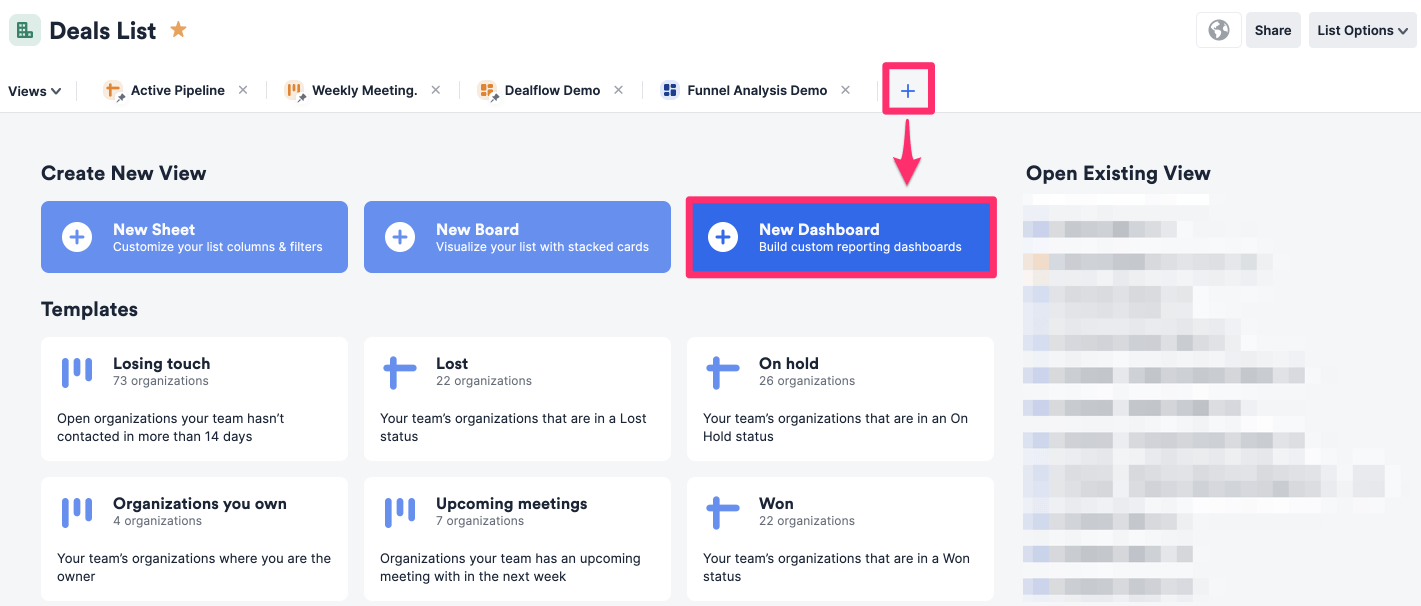 3. Once you're done, feel free to check out [how to create and edit tiles](/s/article/How-to-create-and-edit-tiles-in-dashboard-views) within your dashboard view.