> ## Documentation Index
> Fetch the complete documentation index at: https://support.affinity.co/llms.txt
> Use this file to discover all available pages before exploring further.
# How To Add Or Remove Your Synced Email Accounts From Affinity
> Help center reference
**How-to** — task-oriented recipe.
You can sync additional Gmail, Microsoft Office365, and Microsoft Exchange (On-Prem) email accounts in Affinity. Just make sure that they are your own email accounts and not someone else's, since it would interfere with your relationship strengths with your connections.
**Note**: Affinity does not support email accounts from Yahoo ([yahoo.com](http://yahoo.com/)), iCloud ([icloud.com](http://icloud.com/)), and other email clients that are not under Google or Microsoft.
### How to add additional email accounts to Affinity
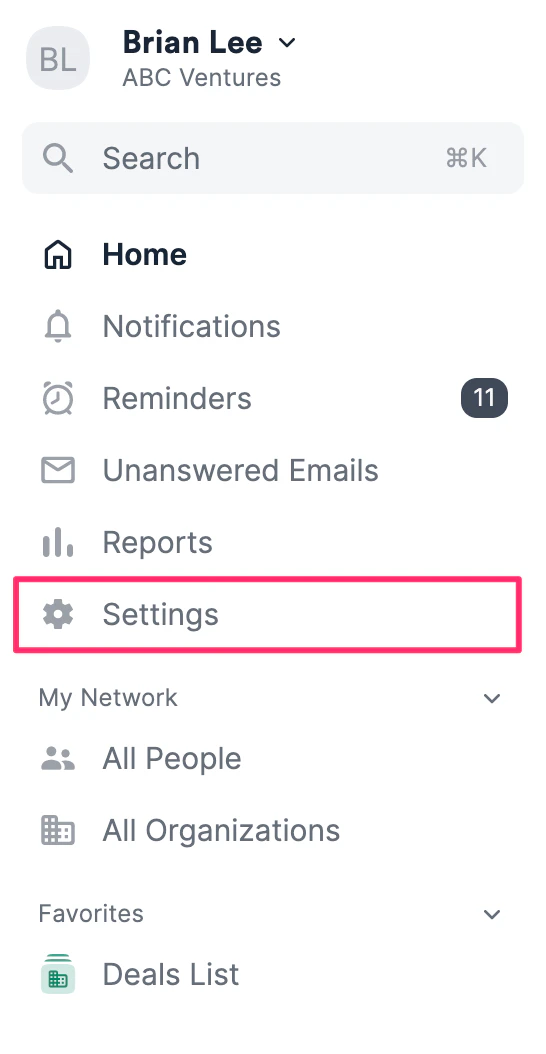
1. Click **Settings** on the left-side of your screen.
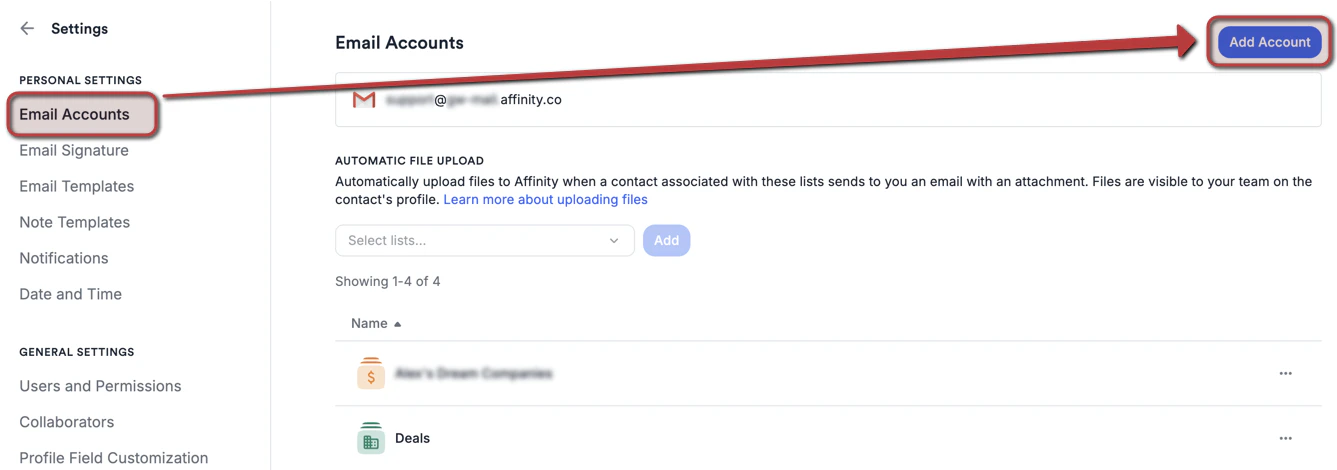
 2. Click the **Email Accounts** tab, then click **Add account**.
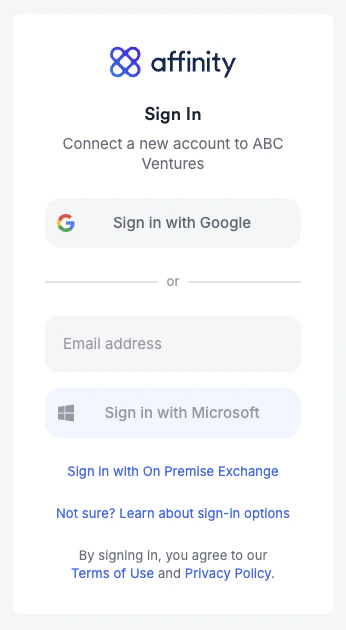
 3. Once you come across the sign in page, please sign in with either [Google](/s/article/How-to-sign-in-with-Google), [Microsoft Office 365](/s/article/How-to-sign-in-with-Microsoft-Office-365), or [Microsoft Exchange (On-Premise)](/s/article/How-to-sign-in-with-Microsoft-Exchange-On-Premise), depending on which email client your account is based on.
 ### How to remove your email accounts from Affinity
To remove your email accounts, simply email us at [support@affinity.co](mailto:support@affinity.co) with the email address(es) you'd like to have removed. Removing email accounts will do the following:
* Stop data syncing moving forward
* Delete the email/calendar data that have synced until now
* Revoke login access using the stated email address(es)
### Email account's syncing got disabled? How to reenable syncing
Are your recent email/calendar communications not surfacing as expected? See [How to reenable syncing into Affinity](/s/article/How-to-reenable-syncing-into-Affinity).
### How to remove your email accounts from Affinity
To remove your email accounts, simply email us at [support@affinity.co](mailto:support@affinity.co) with the email address(es) you'd like to have removed. Removing email accounts will do the following:
* Stop data syncing moving forward
* Delete the email/calendar data that have synced until now
* Revoke login access using the stated email address(es)
### Email account's syncing got disabled? How to reenable syncing
Are your recent email/calendar communications not surfacing as expected? See [How to reenable syncing into Affinity](/s/article/How-to-reenable-syncing-into-Affinity).