> ## Documentation Index
> Fetch the complete documentation index at: https://support.affinity.co/llms.txt
> Use this file to discover all available pages before exploring further.
# Enabling Affinity Ascend — An Admin's Guide
> What the agents do, why they're safe to enable, and how to turn them on or off.
**Affinity Ascend is off at launch (Jul 22) — and turns on by default on Aug 5.** As an admin, you decide: enable it now to start early, do nothing and it turns on automatically for your firm on **August 5**, or **opt out before Aug 5 to keep it off** (your preference is preserved). This guide covers what the agents do, why they're safe to enable, and how to turn them on or off.
## What Affinity Ascend is
Ascend is Affinity's AI layer — agents that do routine work in the background and surface suggestions for your team to **review and approve**. At launch:
* **Meeting Prep** — an automatic brief before each external meeting (relationship history, deal context, recent interactions, and news).
* **Data Update** — reads meeting notes and suggests the CRM field updates they imply, waiting for your approval.
* **Warm Intro** — on request in AI Chat, finds the best path to a target across your firm's network and drafts the ask.
The rule across all of them: **an agent suggests; your team decides.** Nothing is written to your CRM without a person approving it.
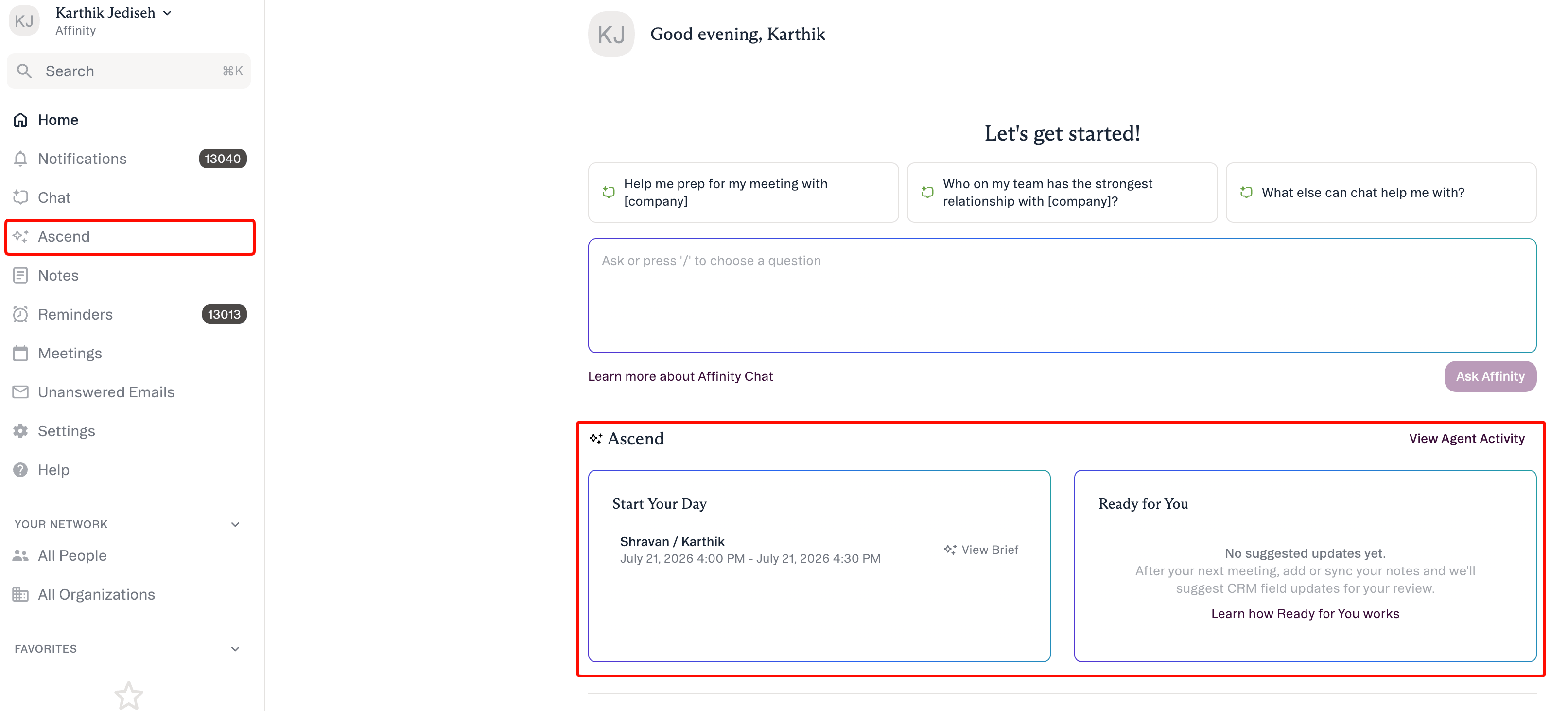 For detailed information on Ascend and what users experience like in the image above, visit the [Agents overview](/s/article/Affinity-Ascend-agents-overview) page.
## Why turn it on
* **Give your team time back.** Meeting Prep replaces manual pre-meeting research — every external meeting arrives pre-briefed each morning. (Investors commonly spend \~20 minutes preparing per meeting today.)
* **Keep your CRM current without manual entry.** Data Update turns what happened in a meeting into suggested field updates, so your pipeline reflects reality instead of going stale.
* **The value compounds.** Better data makes every list, dashboard, and AI surface more useful.
## Why it's safe to enable
* **Human-in-the-loop, always.** No agent writes to your CRM without explicit approval.
* **Scoped to each user's own access.** An agent only ever sees and changes the records and fields that user can already access.
* **You stay in control.** You turn Ascend on or off for the whole organization; individual users can turn each agent on or off for themselves.
* **Your data is not used to train AI models.** Affinity's contracts with its AI providers prohibit using your data to train their models.
* **Enterprise-grade data handling.** See the [Affinity Trust Center](https://trust.affinity.co/) and the [Affinity Subprocessors](/s/article/Affinity-Subprocessors) list. For a security, IT, or compliance review, your Affinity team can share the **Affinity Ascend — Security, Privacy & Trust** overview.
## How to turn it on
For detailed information on Ascend and what users experience like in the image above, visit the [Agents overview](/s/article/Affinity-Ascend-agents-overview) page.
## Why turn it on
* **Give your team time back.** Meeting Prep replaces manual pre-meeting research — every external meeting arrives pre-briefed each morning. (Investors commonly spend \~20 minutes preparing per meeting today.)
* **Keep your CRM current without manual entry.** Data Update turns what happened in a meeting into suggested field updates, so your pipeline reflects reality instead of going stale.
* **The value compounds.** Better data makes every list, dashboard, and AI surface more useful.
## Why it's safe to enable
* **Human-in-the-loop, always.** No agent writes to your CRM without explicit approval.
* **Scoped to each user's own access.** An agent only ever sees and changes the records and fields that user can already access.
* **You stay in control.** You turn Ascend on or off for the whole organization; individual users can turn each agent on or off for themselves.
* **Your data is not used to train AI models.** Affinity's contracts with its AI providers prohibit using your data to train their models.
* **Enterprise-grade data handling.** See the [Affinity Trust Center](https://trust.affinity.co/) and the [Affinity Subprocessors](/s/article/Affinity-Subprocessors) list. For a security, IT, or compliance review, your Affinity team can share the **Affinity Ascend — Security, Privacy & Trust** overview.
## How to turn it on
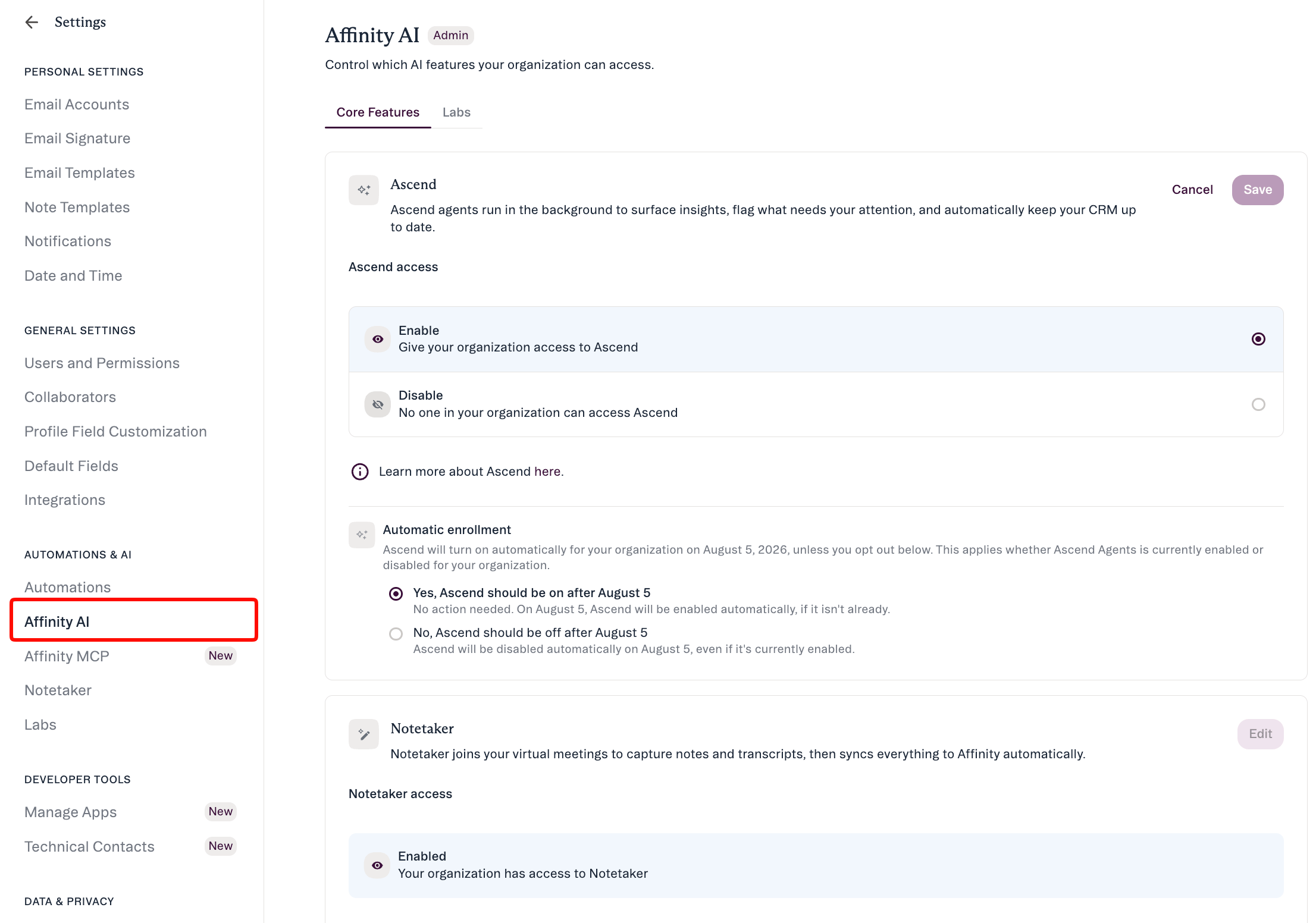 1. Go to **Settings → Automations & AI → Affinity AI**.
2. Find the **Ascend Agents** card.
3. Click Edit and Toggle **Enable** for your organization.
4. Don't forget to click **Save**.
That's it — your team will start seeing briefs and suggestions to review. You can turn it off the same way, anytime.
**On August 5, Ascend turns on by default** for all accounts that haven't opted out. To keep agents off, toggle **off** here before August 5 — your preference is preserved. Your CSM can also set this for you on request.
## What happens when you enable it
1. Go to **Settings → Automations & AI → Affinity AI**.
2. Find the **Ascend Agents** card.
3. Click Edit and Toggle **Enable** for your organization.
4. Don't forget to click **Save**.
That's it — your team will start seeing briefs and suggestions to review. You can turn it off the same way, anytime.
**On August 5, Ascend turns on by default** for all accounts that haven't opted out. To keep agents off, toggle **off** here before August 5 — your preference is preserved. Your CSM can also set this for you on request.
## What happens when you enable it
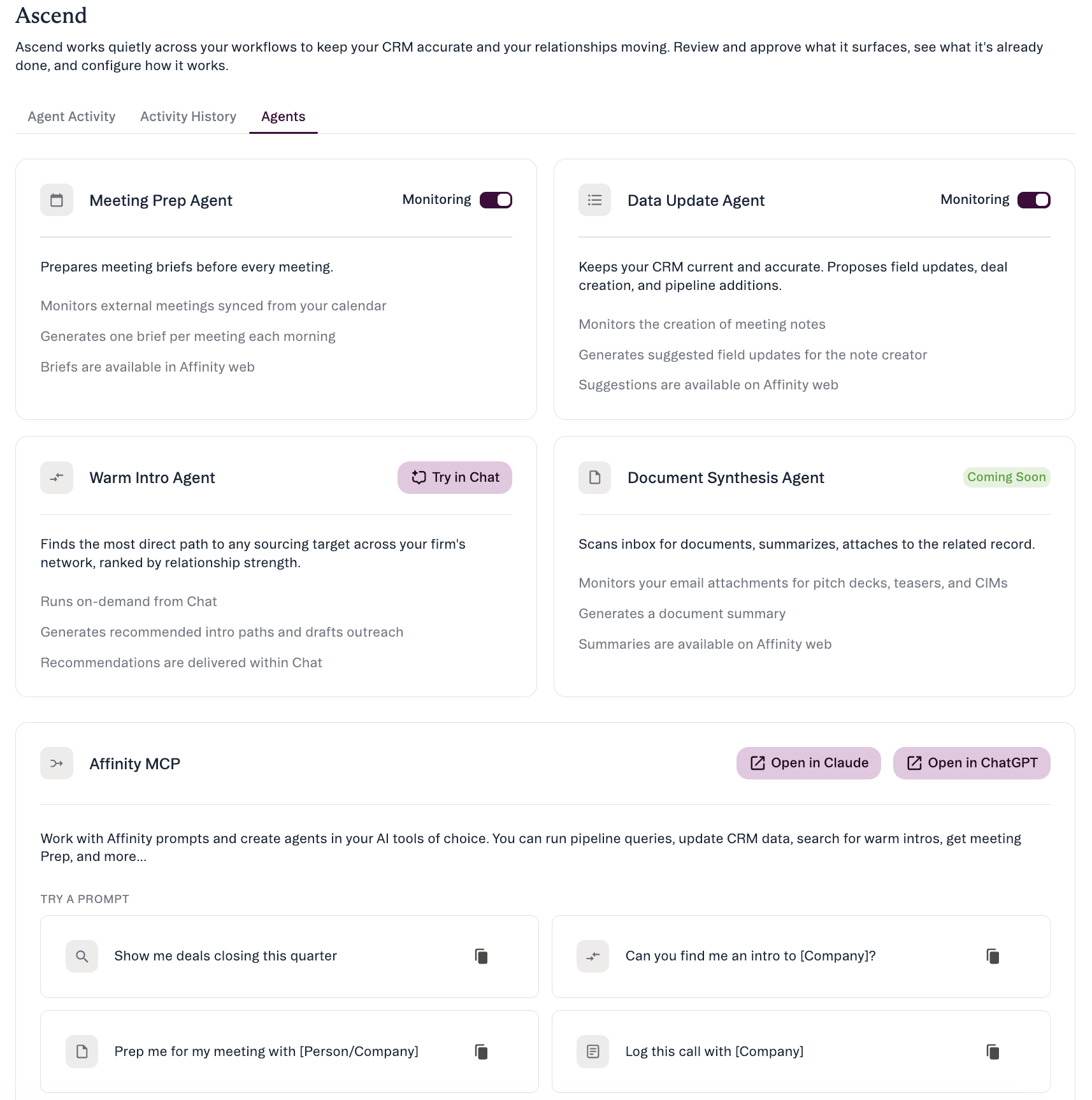 * Ascend turns on for your organization; **Meeting Prep and Data Update begin running automatically** for eligible users. Each user can turn an individual agent off for themselves.
* Agent output appears **in-app** — on the Affinity home page (**Start Your Day** / **Ready for You**) and in the **Ascend** area. Meeting briefs are ready each morning (around **7 AM local time**); there's no email or notification.
* Available on **Scale, Advanced, and Enterprise**. Free during launch; usage-based pricing later, with advance notice.
## Get your team up to speed
Once Ascend is on, point your team to: [Working with Affinity agents](/s/article/Working-with-Affinity-agents) · [Meeting Prep & Data Update](/s/article/Meeting-Prep-and-Data-Update) · [Review & approve an agent's suggestions](/s/article/Review-and-approve-agent-suggestions) · [Affinity AI Chat](/s/article/Affinity-AI-chat-overview).
## Common admin questions
* **Do I have to enable it?** No. If you do nothing, Ascend turns on by default on **August 5**. Enable early to start now, or opt out before Aug 5 to keep it off — your preference is preserved.
* **Can I turn it off later?** Yes — same **Ascend Agents** card, any time. Individual users can also turn off agents for themselves.
* **Who sees the suggestions?** They go to the relevant user (for Data Update, the person who created the meeting note) to review. Once applied, a change appears on the record like any other edit.
* **Does our data leave Affinity or get used for AI training?** Your data is **not** used to train AI models. Processing follows Affinity's standard security and data-handling practices — see the [Trust Center](https://trust.affinity.co/).
* **Not used to train AI models.** Affinity's contracts with its AI providers prohibit using your data to train their models.
* **Processed by Affinity's contracted AI providers.** The AI subprocessors behind these features are listed on the [Affinity Subprocessors](https://support.affinity.co/s/article/Affinity-Subprocessors) page. Data is sent to generate the brief or suggestion and returned into Affinity for your review.
* **Same practices as the rest of Affinity.** AI features follow Affinity's standard data-security, retention, and compliance practices; certifications and policy documentation live in the [Affinity Trust Center](https://trust.affinity.co/).
* **What does it cost?** Free during launch; usage-based pricing later, with notice.
* **What if someone on my team doesn't want it?** Each user can turn any agent off for themselves in **Ascend → Agents**.
* **Can the agents act without us knowing?** No. You control enablement at the org level (see above), and every write is user-approved and recorded — nothing is written to your CRM without a person approving it.
* **Can we restrict who uses it?** Yes — org-level enablement plus per-user toggles, and agents respect each user's existing permissions.
* **Where is our data processed and stored? Is EU residency available?** Regional and residency specifics vary; contact your account team for the current details and supporting documentation.
* **We have recording / consent concerns (e.g. SEC, two-party consent).** Data Update works from your own meeting notes; your account team and the Trust Center can provide the material to support your compliance review.
***
*Affinity AI can make mistakes. Your team reviews every suggestion before it's applied.*
## Related topics
- [Affinity Ascend agents — Overview](/s/article/Affinity-Ascend-agents-overview.md)
- [Manage AI Settings (Admin Guide)](/s/article/Manage-AI-Settings.md)
- [How to use File Analyzer for iOS](/s/article/how-to-use-file-analyzer-for-ios.md)
- [Troubleshooting Affinity Ascend agents](/s/article/Troubleshooting-Affinity-Ascend-agents.md)
- [Meeting Prep & Data Update with Ascend](/s/article/Meeting-Prep-and-Data-Update-tutorial.md)
- [How To Set Up Your Integration User](/s/article/How-to-set-up-your-Integration-User.md)
- [Lists in Affinity — Open Beta Guide](/s/article/Lists-in-Affinity.md)
- [Set up & configure your agents](/s/article/Set-up-and-configure-your-agents.md)
- [Meeting Prep & Data Update](/s/article/Meeting-Prep-and-Data-Update.md)
* Ascend turns on for your organization; **Meeting Prep and Data Update begin running automatically** for eligible users. Each user can turn an individual agent off for themselves.
* Agent output appears **in-app** — on the Affinity home page (**Start Your Day** / **Ready for You**) and in the **Ascend** area. Meeting briefs are ready each morning (around **7 AM local time**); there's no email or notification.
* Available on **Scale, Advanced, and Enterprise**. Free during launch; usage-based pricing later, with advance notice.
## Get your team up to speed
Once Ascend is on, point your team to: [Working with Affinity agents](/s/article/Working-with-Affinity-agents) · [Meeting Prep & Data Update](/s/article/Meeting-Prep-and-Data-Update) · [Review & approve an agent's suggestions](/s/article/Review-and-approve-agent-suggestions) · [Affinity AI Chat](/s/article/Affinity-AI-chat-overview).
## Common admin questions
* **Do I have to enable it?** No. If you do nothing, Ascend turns on by default on **August 5**. Enable early to start now, or opt out before Aug 5 to keep it off — your preference is preserved.
* **Can I turn it off later?** Yes — same **Ascend Agents** card, any time. Individual users can also turn off agents for themselves.
* **Who sees the suggestions?** They go to the relevant user (for Data Update, the person who created the meeting note) to review. Once applied, a change appears on the record like any other edit.
* **Does our data leave Affinity or get used for AI training?** Your data is **not** used to train AI models. Processing follows Affinity's standard security and data-handling practices — see the [Trust Center](https://trust.affinity.co/).
* **Not used to train AI models.** Affinity's contracts with its AI providers prohibit using your data to train their models.
* **Processed by Affinity's contracted AI providers.** The AI subprocessors behind these features are listed on the [Affinity Subprocessors](https://support.affinity.co/s/article/Affinity-Subprocessors) page. Data is sent to generate the brief or suggestion and returned into Affinity for your review.
* **Same practices as the rest of Affinity.** AI features follow Affinity's standard data-security, retention, and compliance practices; certifications and policy documentation live in the [Affinity Trust Center](https://trust.affinity.co/).
* **What does it cost?** Free during launch; usage-based pricing later, with notice.
* **What if someone on my team doesn't want it?** Each user can turn any agent off for themselves in **Ascend → Agents**.
* **Can the agents act without us knowing?** No. You control enablement at the org level (see above), and every write is user-approved and recorded — nothing is written to your CRM without a person approving it.
* **Can we restrict who uses it?** Yes — org-level enablement plus per-user toggles, and agents respect each user's existing permissions.
* **Where is our data processed and stored? Is EU residency available?** Regional and residency specifics vary; contact your account team for the current details and supporting documentation.
* **We have recording / consent concerns (e.g. SEC, two-party consent).** Data Update works from your own meeting notes; your account team and the Trust Center can provide the material to support your compliance review.
***
*Affinity AI can make mistakes. Your team reviews every suggestion before it's applied.*
## Related topics
- [Affinity Ascend agents — Overview](/s/article/Affinity-Ascend-agents-overview.md)
- [Manage AI Settings (Admin Guide)](/s/article/Manage-AI-Settings.md)
- [How to use File Analyzer for iOS](/s/article/how-to-use-file-analyzer-for-ios.md)
- [Troubleshooting Affinity Ascend agents](/s/article/Troubleshooting-Affinity-Ascend-agents.md)
- [Meeting Prep & Data Update with Ascend](/s/article/Meeting-Prep-and-Data-Update-tutorial.md)
- [How To Set Up Your Integration User](/s/article/How-to-set-up-your-Integration-User.md)
- [Lists in Affinity — Open Beta Guide](/s/article/Lists-in-Affinity.md)
- [Set up & configure your agents](/s/article/Set-up-and-configure-your-agents.md)
- [Meeting Prep & Data Update](/s/article/Meeting-Prep-and-Data-Update.md)