> ## Documentation Index
> Fetch the complete documentation index at: https://support.affinity.co/llms.txt
> Use this file to discover all available pages before exploring further.
# Best Practices Affinity For Venture Capital
> Help center reference
Create, manage, and close deals faster and more easily with Affinity's dedicated relationship intelligence platform. In this article, we'll go over best practices and features you can leverage to get you/your team up and running in no time.
## Getting started with lists
Upon sign in, you'll notice that Affinity has provided you with a **Deals** list to begin with. Follow the suggestions below to create more lists from list templates and learn how these lists work best together to optimize your workflow.
 If you click on **+ New List**, you'll see other list templates readily available for use.
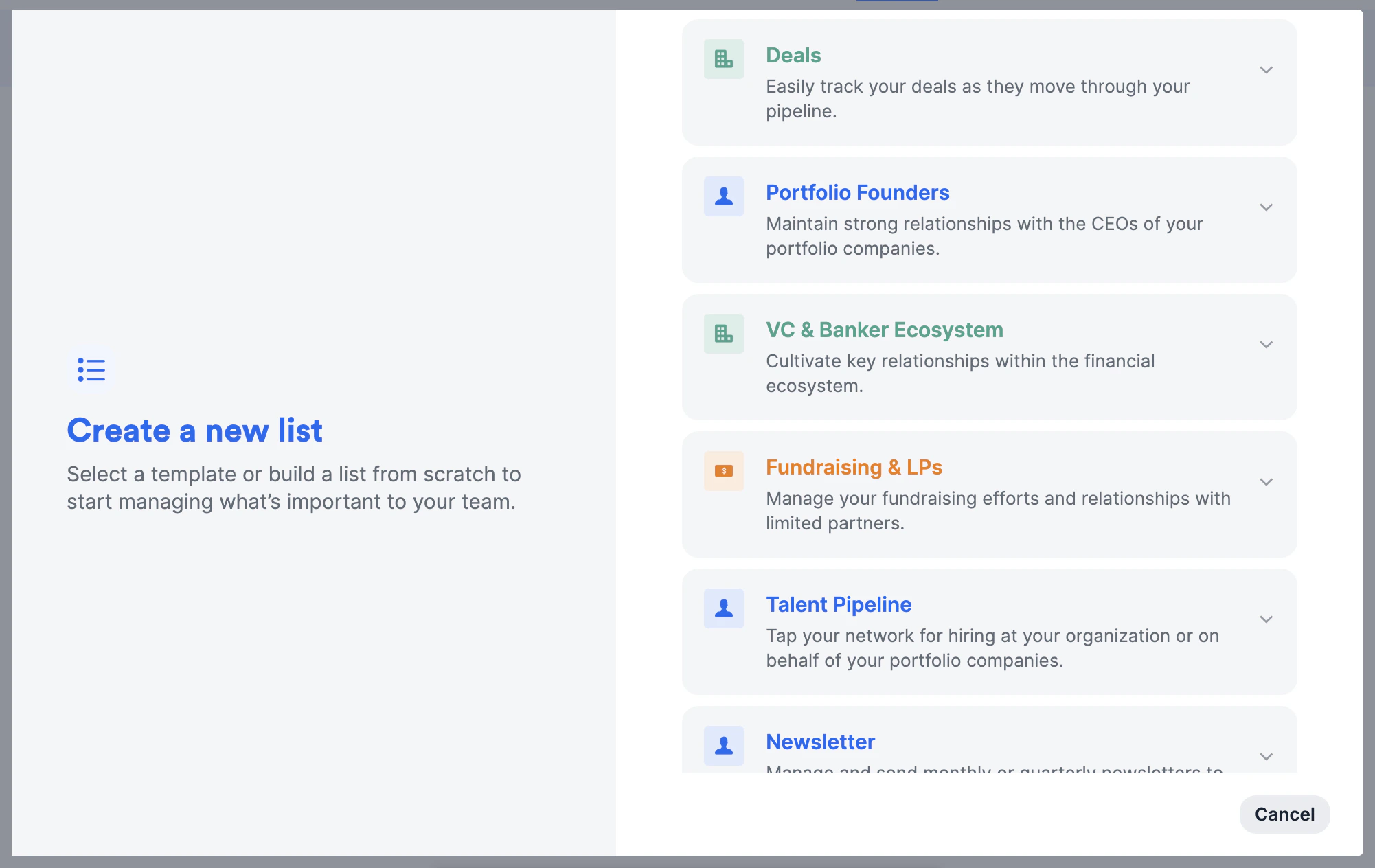 1. **Deals** is an organization list that will help you/your team track all deals in one place (skip to 1:25 in the video for a demo).
* You can simply filter by all the won deals in the **Status** column, then create a new saved view by choosing **Duplicate this view** and labeling it "Portfolio Companies" (see [How to create and use saved views within a list](/s/article/How-to-create-and-use-saved-views-within-a-list)). Otherwise, you can create a new organization list titled "Portfolio Companies" and track them separately.
* You can also create [board views](/s/article/How-to-use-board-views-in-Affinity) to visualize your deals by different stages of the pipeline, often used for weekly team meetings across many VC firms.
* Keep these relationships warm by setting up [reminder triggers](/s/article/How-to-set-up-Reminder-Triggers) to stay in touch if a certain amount of time passes since your last interaction.
2. **Portfolio Founders/CEOs** is a people list that will help you/your team track all the founders of your portfolio companies in one place.
1. **Deals** is an organization list that will help you/your team track all deals in one place (skip to 1:25 in the video for a demo).
* You can simply filter by all the won deals in the **Status** column, then create a new saved view by choosing **Duplicate this view** and labeling it "Portfolio Companies" (see [How to create and use saved views within a list](/s/article/How-to-create-and-use-saved-views-within-a-list)). Otherwise, you can create a new organization list titled "Portfolio Companies" and track them separately.
* You can also create [board views](/s/article/How-to-use-board-views-in-Affinity) to visualize your deals by different stages of the pipeline, often used for weekly team meetings across many VC firms.
* Keep these relationships warm by setting up [reminder triggers](/s/article/How-to-set-up-Reminder-Triggers) to stay in touch if a certain amount of time passes since your last interaction.
2. **Portfolio Founders/CEOs** is a people list that will help you/your team track all the founders of your portfolio companies in one place.
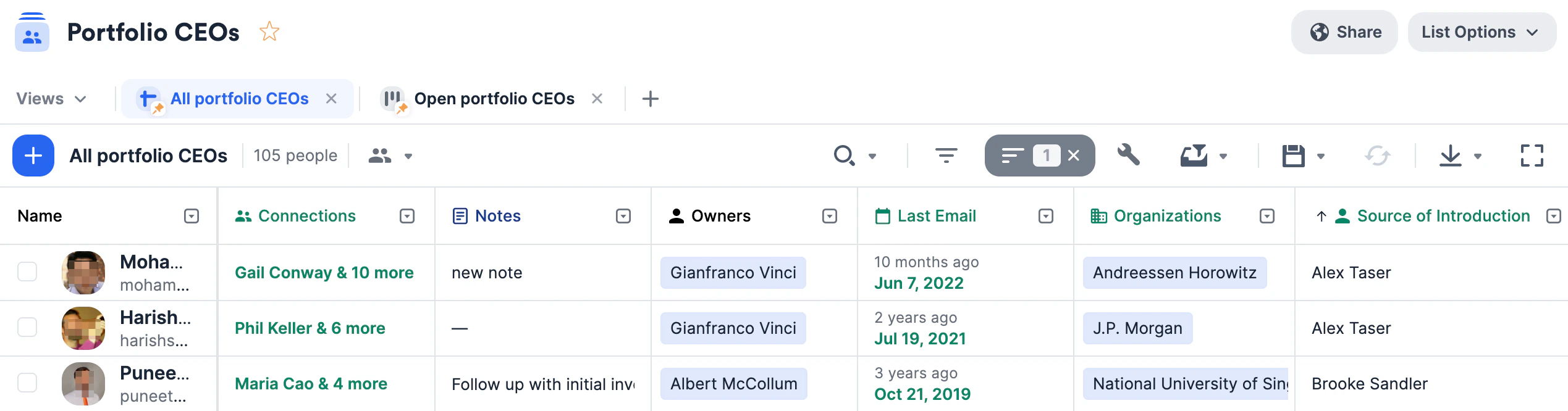 * Once a deal is won in the **Deals** list, go to this list and add the respective founders/CEOs.
* Keep these relationships warm by setting up [reminder triggers](/s/article/How-to-set-up-Reminder-Triggers).
3. **VC & Banker Ecosystem** is an organization list that will help you/your team track key relationships with other Venture Capital, Private Equity, and Investment Banking firms.
* Once a deal is won in the **Deals** list, go to this list and add the respective founders/CEOs.
* Keep these relationships warm by setting up [reminder triggers](/s/article/How-to-set-up-Reminder-Triggers).
3. **VC & Banker Ecosystem** is an organization list that will help you/your team track key relationships with other Venture Capital, Private Equity, and Investment Banking firms.
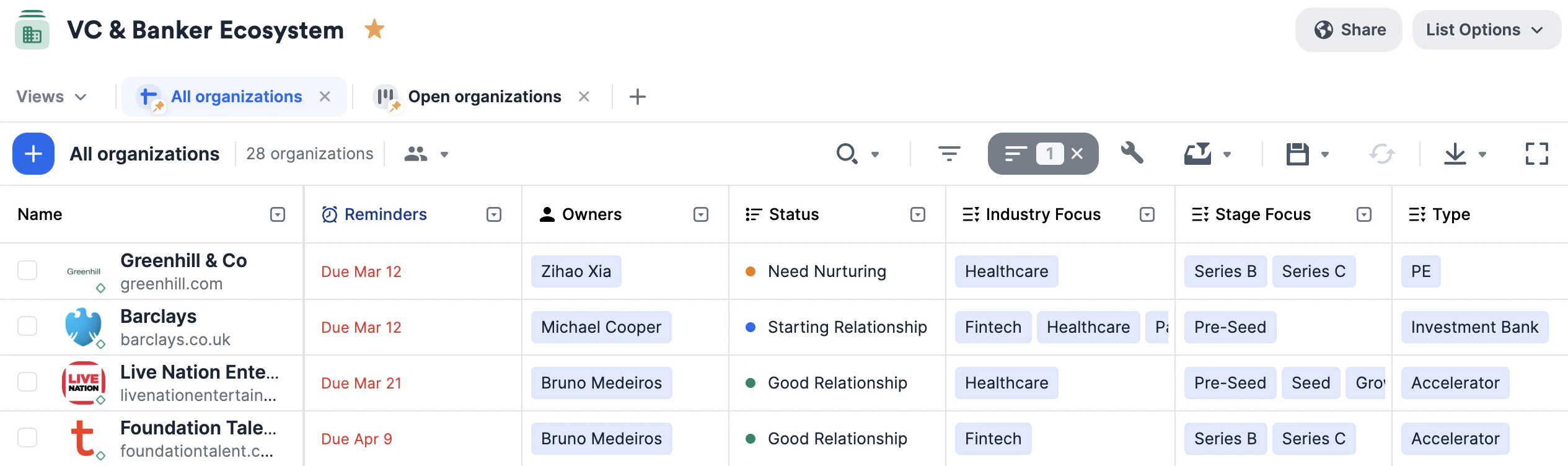 * Use the columns provided (i.e. **Firm Type**, **Sector Focus**, **Preferred Deal Stage**, etc.) to easily filter and narrow down your list based on different interests and attributes.
4. **Fundraising & LPs** is an opportunity list that will help you/your team track all your LPs and their respective statuses when it comes to raising capital for different funds over time.
* Make sure to fill out the default **Organizations** and **People** fields for each opportunity - these fields will determine how the other [enriched fields](/s/article/Enriched-Global-and-List-specific-Fields) get auto-populated with data.
* Use the columns provided (i.e. **Previous Funds Invested**, **Prospective Funds**, etc.) to keep track of all the different funds each LP has invested in or is interested in.
5. **Talent Pipeline** is a people list that consists of all the individuals in your network open to new opportunities in your portfolio companies.
* Use the columns provided (i.e. **Firm Type**, **Sector Focus**, **Preferred Deal Stage**, etc.) to easily filter and narrow down your list based on different interests and attributes.
4. **Fundraising & LPs** is an opportunity list that will help you/your team track all your LPs and their respective statuses when it comes to raising capital for different funds over time.
* Make sure to fill out the default **Organizations** and **People** fields for each opportunity - these fields will determine how the other [enriched fields](/s/article/Enriched-Global-and-List-specific-Fields) get auto-populated with data.
* Use the columns provided (i.e. **Previous Funds Invested**, **Prospective Funds**, etc.) to keep track of all the different funds each LP has invested in or is interested in.
5. **Talent Pipeline** is a people list that consists of all the individuals in your network open to new opportunities in your portfolio companies.
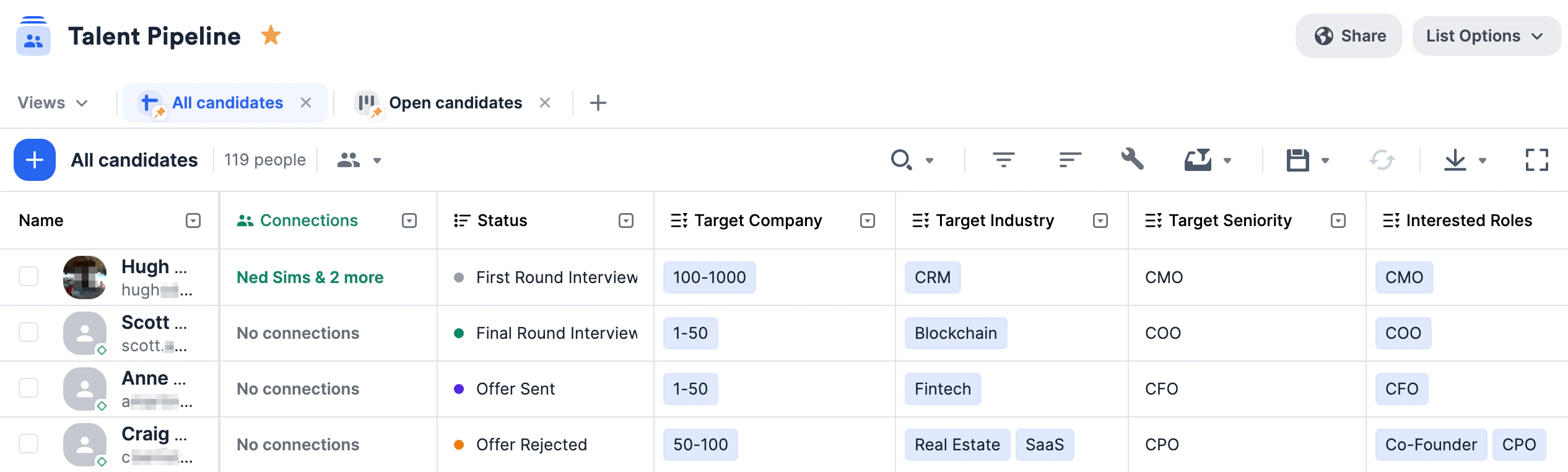 * Keep these relationships warm by setting up [reminder triggers](/s/article/How-to-set-up-Reminder-Triggers) to stay in touch if a certain amount of time passes since your last interaction.
* Create [custom columns](/s/article/How-to-create-a-new-column-field-in-a-list) like **Target Company Size, Target Industry, Interested Roles,** and more to apply quick filters or add unique data points moving forward.
6. **Newsletter Mailing List** is a people list that consists of individuals that have opted in to receive monthly/quarterly newsletters.
* Keep these relationships warm by setting up [reminder triggers](/s/article/How-to-set-up-Reminder-Triggers) to stay in touch if a certain amount of time passes since your last interaction.
* Create [custom columns](/s/article/How-to-create-a-new-column-field-in-a-list) like **Target Company Size, Target Industry, Interested Roles,** and more to apply quick filters or add unique data points moving forward.
6. **Newsletter Mailing List** is a people list that consists of individuals that have opted in to receive monthly/quarterly newsletters.
 * You can leverage Affinity's [bulk email feature](/s/article/How-to-send-personalized-bulk-emails-within-Affinity) and [email templates feature](/s/article/How-to-create-use-Email-Templates-within-Affinity).
* If you're on the **Advanced** or **Enterprise** tiers and also use Mailchimp for your newsletters, you can also leverage Affinity's [native integration with Mailchimp](/s/article/How-to-integrate-Affinity-with-Mailchimp).
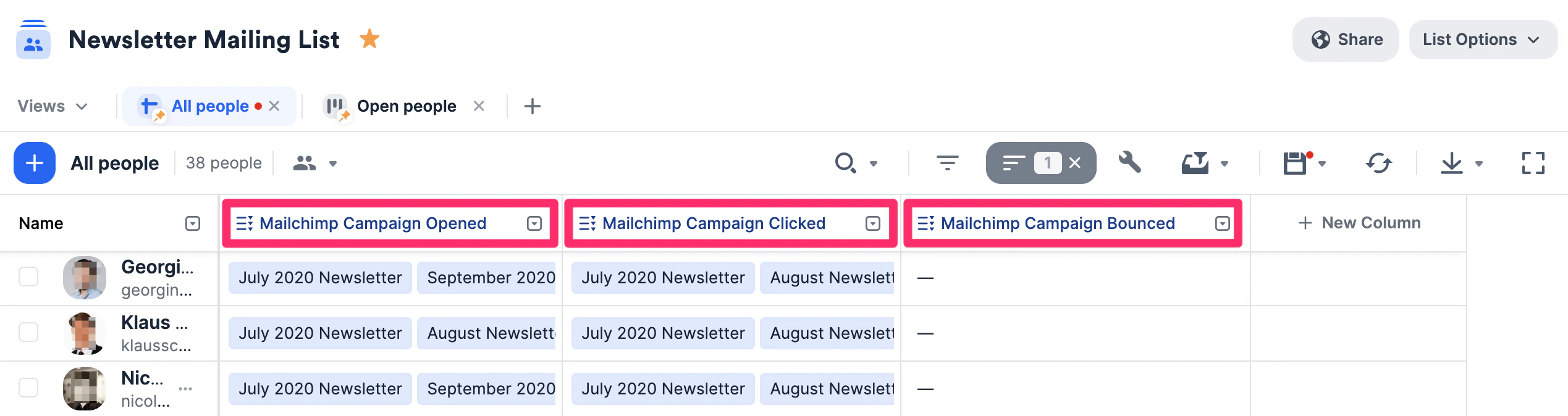
* If you integrate with Mailchimp, use the columns provided (e.g. **Mailchimp Campaign Opened**, **Mailchimp Campaign Clicked**, and **Mailchimp Campaign Bounced**) to identify recipients who are either interested in or not receiving the newsletter.
## Importing data into these lists
Now that you have these lists set up, quickly migrate data from other CRMs into Affinity using our data importer.
## Getting started with reporting/analytics
Once your lists are filled with relevant data, you can leverage [Affinity Analytics](/s/article/Getting-started-with-Affinity-Analytics) if you're on the **Scale**, **Advanced**, or **Enterprise** tiers.
1. [Getting started with Affinity Analytics](/s/article/Getting-started-with-Affinity-Analytics)
2. [Affinity Analytics - List Summary Reports](/s/article/Affinity-Analytics-List-Summary-Reports)
3. [Affinity Analytics - Status Reports for Investment Banking](/s/article/Analytics-dashboards)
4. [Affinity Analytics - Introductions Summary Reports](/s/article/Affinity-Analytics-Introductions-Summary-Reports)
5. [Affinity Analytics - Team Activity Reports](/s/article/Affinity-Analytics-Team-Activity-Reports)
6. [Affinity Analytics - Funnel Analysis Reports](/s/article/Affinity-Analytics-Funnel-Analysis-Reports)
7. Get notified when certain metrics/thresholds are met using [Affinity Analytics alerts](/s/article/How-to-set-up-automated-alerts-for-Affinity-Analytics).
##
* You can leverage Affinity's [bulk email feature](/s/article/How-to-send-personalized-bulk-emails-within-Affinity) and [email templates feature](/s/article/How-to-create-use-Email-Templates-within-Affinity).
* If you're on the **Advanced** or **Enterprise** tiers and also use Mailchimp for your newsletters, you can also leverage Affinity's [native integration with Mailchimp](/s/article/How-to-integrate-Affinity-with-Mailchimp).
* If you integrate with Mailchimp, use the columns provided (e.g. **Mailchimp Campaign Opened**, **Mailchimp Campaign Clicked**, and **Mailchimp Campaign Bounced**) to identify recipients who are either interested in or not receiving the newsletter.
## Importing data into these lists
Now that you have these lists set up, quickly migrate data from other CRMs into Affinity using our data importer.
## Getting started with reporting/analytics
Once your lists are filled with relevant data, you can leverage [Affinity Analytics](/s/article/Getting-started-with-Affinity-Analytics) if you're on the **Scale**, **Advanced**, or **Enterprise** tiers.
1. [Getting started with Affinity Analytics](/s/article/Getting-started-with-Affinity-Analytics)
2. [Affinity Analytics - List Summary Reports](/s/article/Affinity-Analytics-List-Summary-Reports)
3. [Affinity Analytics - Status Reports for Investment Banking](/s/article/Analytics-dashboards)
4. [Affinity Analytics - Introductions Summary Reports](/s/article/Affinity-Analytics-Introductions-Summary-Reports)
5. [Affinity Analytics - Team Activity Reports](/s/article/Affinity-Analytics-Team-Activity-Reports)
6. [Affinity Analytics - Funnel Analysis Reports](/s/article/Affinity-Analytics-Funnel-Analysis-Reports)
7. Get notified when certain metrics/thresholds are met using [Affinity Analytics alerts](/s/article/How-to-set-up-automated-alerts-for-Affinity-Analytics).
##