> ## Documentation Index
> Fetch the complete documentation index at: https://support.affinity.co/llms.txt
> Use this file to discover all available pages before exploring further.
# Best Practices Affinity For Investment Banking
> Help center reference
Create, manage, and close deals faster and more easily with Affinity's dedicated relationship intelligence platform. In this article, we'll go over best practices and features you can leverage to get you/your team up and running in no time.
## Getting started with lists
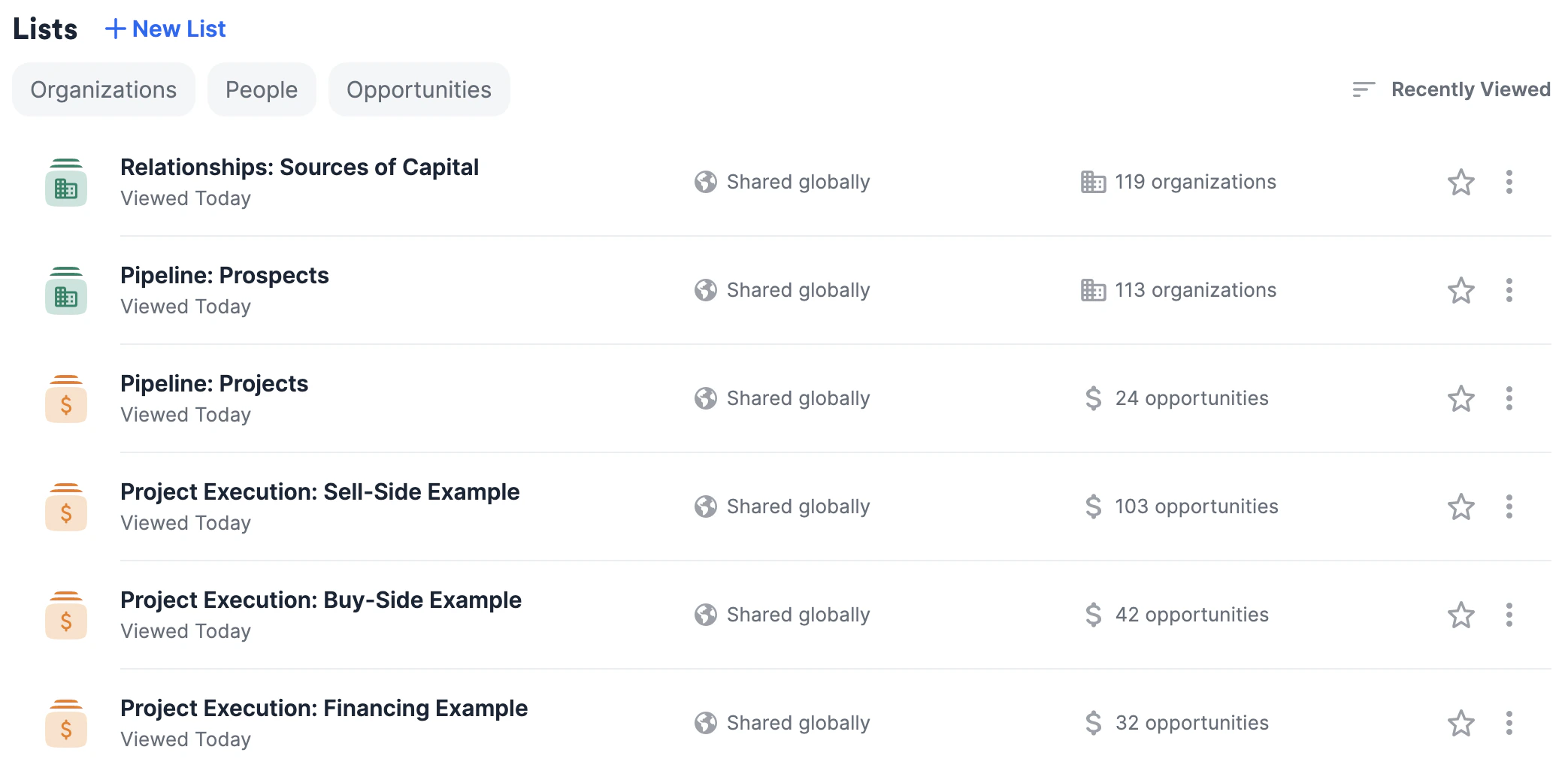
Upon sign in, you'll notice that Affinity has provided you with a few lists to begin with. Follow the suggestions below to understand how these lists work together to optimize your workflow.
 ### The first three lists: Tracking all prospects, clients (projects), and buyers
These first three lists are meant to be centralized sources of truth for you and your team members:
1. **Relationships: Sources of Capital** is an organization list that will help you/your team track key relationships with buyers and capital providers in one place.
### The first three lists: Tracking all prospects, clients (projects), and buyers
These first three lists are meant to be centralized sources of truth for you and your team members:
1. **Relationships: Sources of Capital** is an organization list that will help you/your team track key relationships with buyers and capital providers in one place.
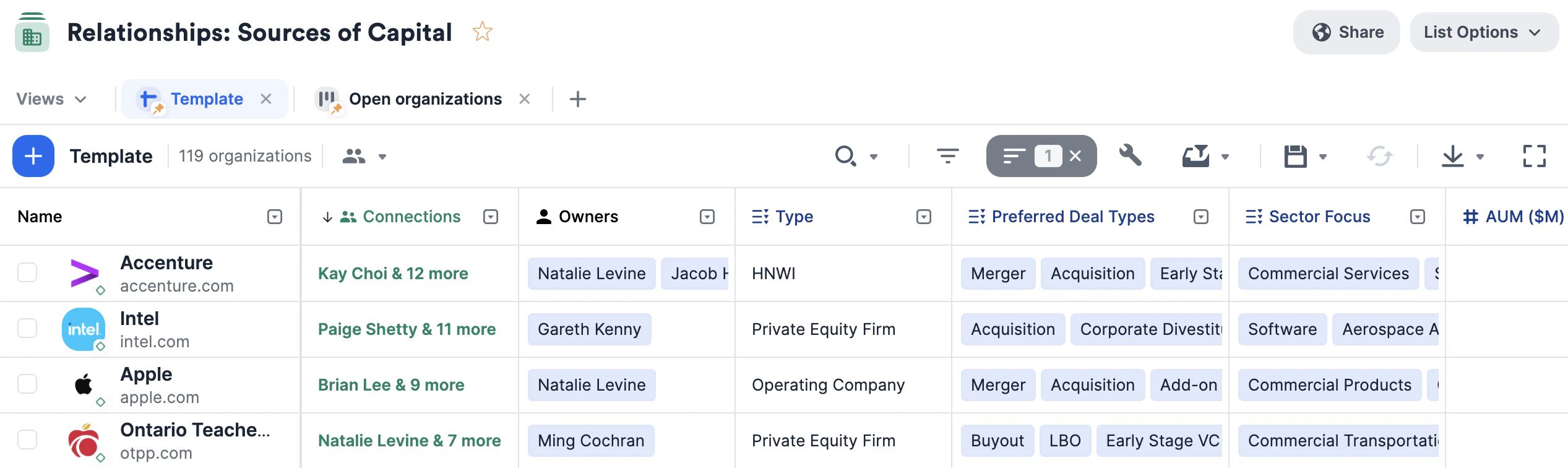 * Keep these relationships warm by setting up [reminder triggers](https://affinity2ndorg.lightning.force.com/articles/Knowledge/How-to-set-up-Reminder-Triggers) to stay in touch if a certain amount of time passes since your last interaction.
* Make sure to fill out this list first so that whenever you create a new opportunity list for a new project (see **Project Execution** list templates below), you can easily [bulk-create opportunities](https://affinity2ndorg.lightning.force.com/articles/Knowledge/How-to-bulk-convert-organizations-into-opportunities) from the organizations in this list that fit the criteria for the new project.
* Example: If your client **Company ABC** is looking to be acquired, then you can create a new opportunity list using the list template **Project Execution: Sell-Side Example**, name the list to something like **Company ABC Sells**, then go back to the **Relationships: Sources of Capital** list and bulk-create opportunities from there in order to populate the **Company ABC Sells** list with relevant buyers for **Company ABC**.
2. **Pipeline: Prospects** is a separate organization list that will help you/your team track the progress of your prospects through the pipeline.
* Keep these relationships warm by setting up [reminder triggers](https://affinity2ndorg.lightning.force.com/articles/Knowledge/How-to-set-up-Reminder-Triggers) to stay in touch if a certain amount of time passes since your last interaction.
* Make sure to fill out this list first so that whenever you create a new opportunity list for a new project (see **Project Execution** list templates below), you can easily [bulk-create opportunities](https://affinity2ndorg.lightning.force.com/articles/Knowledge/How-to-bulk-convert-organizations-into-opportunities) from the organizations in this list that fit the criteria for the new project.
* Example: If your client **Company ABC** is looking to be acquired, then you can create a new opportunity list using the list template **Project Execution: Sell-Side Example**, name the list to something like **Company ABC Sells**, then go back to the **Relationships: Sources of Capital** list and bulk-create opportunities from there in order to populate the **Company ABC Sells** list with relevant buyers for **Company ABC**.
2. **Pipeline: Prospects** is a separate organization list that will help you/your team track the progress of your prospects through the pipeline.
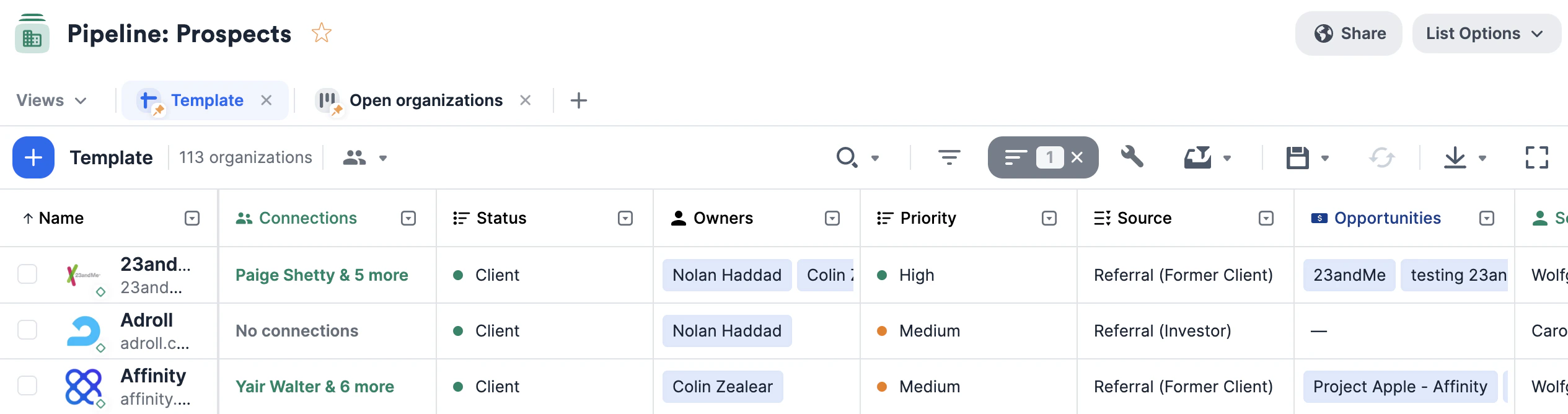 * Keep these relationships warm by setting up [reminder triggers](https://affinity2ndorg.lightning.force.com/articles/Knowledge/How-to-set-up-Reminder-Triggers) to stay in touch if a certain amount of time passes since your last interaction.
* Send out [personalized bulk emails](https://affinity2ndorg.lightning.force.com/articles/Knowledge/How-to-send-personalized-bulk-emails-within-Affinity) to your prospects with the ability to attach files and hyperlinks as needed.
* Make sure to also turn on [email tracking](https://affinity2ndorg.lightning.force.com/articles/Knowledge/How-to-track-emails-sent-through-Affinity) to gauge the effectiveness of your emails.
* Set up an [opportunity trigger](https://affinity2ndorg.lightning.force.com/articles/Knowledge/How-to-set-up-Opportunity-Triggers) so that once a prospect becomes a client, you make sure to track this client as an opportunity within the **Pipeline: Projects** list (see below).
* **Example**: You can set "Client" as the status option in the **Won** category, so that once a prospect becomes a client, the opportunity trigger will ask for you to add that client to the **Pipeline: Projects** list just below.
3. **Pipeline: Projects** is an opportunity list that will help you track the overall progression of all client projects in one place.
* Keep these relationships warm by setting up [reminder triggers](https://affinity2ndorg.lightning.force.com/articles/Knowledge/How-to-set-up-Reminder-Triggers) to stay in touch if a certain amount of time passes since your last interaction.
* Send out [personalized bulk emails](https://affinity2ndorg.lightning.force.com/articles/Knowledge/How-to-send-personalized-bulk-emails-within-Affinity) to your prospects with the ability to attach files and hyperlinks as needed.
* Make sure to also turn on [email tracking](https://affinity2ndorg.lightning.force.com/articles/Knowledge/How-to-track-emails-sent-through-Affinity) to gauge the effectiveness of your emails.
* Set up an [opportunity trigger](https://affinity2ndorg.lightning.force.com/articles/Knowledge/How-to-set-up-Opportunity-Triggers) so that once a prospect becomes a client, you make sure to track this client as an opportunity within the **Pipeline: Projects** list (see below).
* **Example**: You can set "Client" as the status option in the **Won** category, so that once a prospect becomes a client, the opportunity trigger will ask for you to add that client to the **Pipeline: Projects** list just below.
3. **Pipeline: Projects** is an opportunity list that will help you track the overall progression of all client projects in one place.
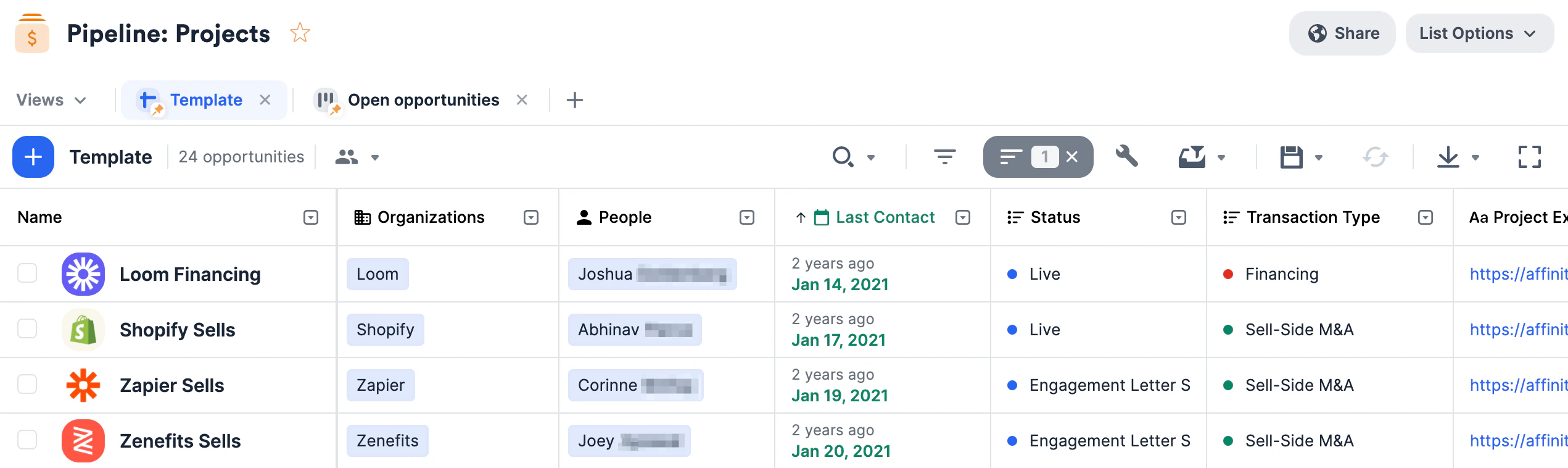 * This opportunity list should contain high-level information about each project, including the team working on the project and expected fees.
* **Note**: Once you create an opportunity here for a specific project, make sure to create a separate opportunity list for that project (choose one of the **Project Execution** list templates in the next paragraph below). Since executing a project involves reaching out to many companies on behalf of a client, this separate opportunity list will help you track all the different parties interested in this particular project.
### The next three lists: Tracking opportunities for each client/project
Unlike the three lists above, these next three should be viewed more as list templates to create duplicates from. Therefore, it would be expected for you/your team to have **many project execution** lists - one list for each client/project in the **Pipeline: Projects** list.
Whenever you start a new project, choose one of the three **Project Execution** list templates below based on the nature of the project:
1. **Project Execution: Buy-Side Example** - This opportunity list will help you track interest and coordinate **buy-side** outreach efforts for your client project. Each row (opportunity) in this list would represent a potential seller looking to get acquired by your client.
* This opportunity list should contain high-level information about each project, including the team working on the project and expected fees.
* **Note**: Once you create an opportunity here for a specific project, make sure to create a separate opportunity list for that project (choose one of the **Project Execution** list templates in the next paragraph below). Since executing a project involves reaching out to many companies on behalf of a client, this separate opportunity list will help you track all the different parties interested in this particular project.
### The next three lists: Tracking opportunities for each client/project
Unlike the three lists above, these next three should be viewed more as list templates to create duplicates from. Therefore, it would be expected for you/your team to have **many project execution** lists - one list for each client/project in the **Pipeline: Projects** list.
Whenever you start a new project, choose one of the three **Project Execution** list templates below based on the nature of the project:
1. **Project Execution: Buy-Side Example** - This opportunity list will help you track interest and coordinate **buy-side** outreach efforts for your client project. Each row (opportunity) in this list would represent a potential seller looking to get acquired by your client.
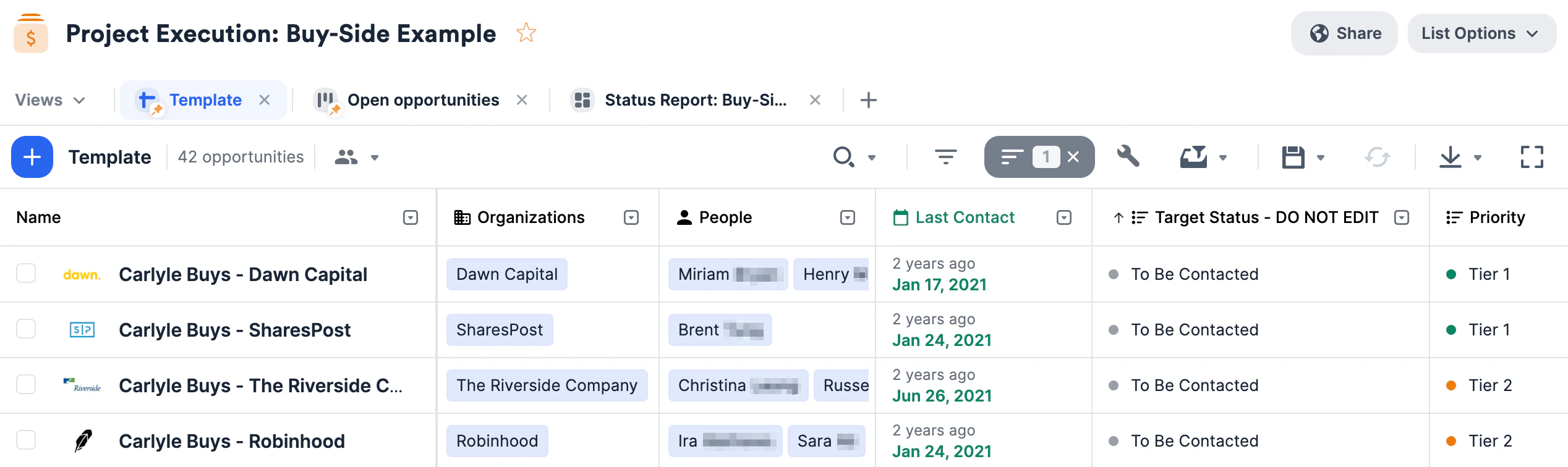 * **List Naming Tip**: If *Company ABC* approaches your team looking to acquire a company, then you can name the list whatever *Project Name* has been assigned or by `something` more general, like *Company ABC Buys*.
* **Opportunity Naming Tip**: Each row in this list represents a unique, potential opportunity to partner your client with a particular seller. Therefore, we recommend naming the opportunities in the following format: **\[Project Name] - \[Seller Name]**.
2. **Project Execution: Sell-Side Example** - This opportunity list will help you track interest and coordinate **sell-side** outreach efforts for your client project. Each row (opportunity) in this list would represent a potential buyer looking to acquire your client.
* **List Naming Tip**: If *Company ABC* approaches your team looking to acquire a company, then you can name the list whatever *Project Name* has been assigned or by `something` more general, like *Company ABC Buys*.
* **Opportunity Naming Tip**: Each row in this list represents a unique, potential opportunity to partner your client with a particular seller. Therefore, we recommend naming the opportunities in the following format: **\[Project Name] - \[Seller Name]**.
2. **Project Execution: Sell-Side Example** - This opportunity list will help you track interest and coordinate **sell-side** outreach efforts for your client project. Each row (opportunity) in this list would represent a potential buyer looking to acquire your client.
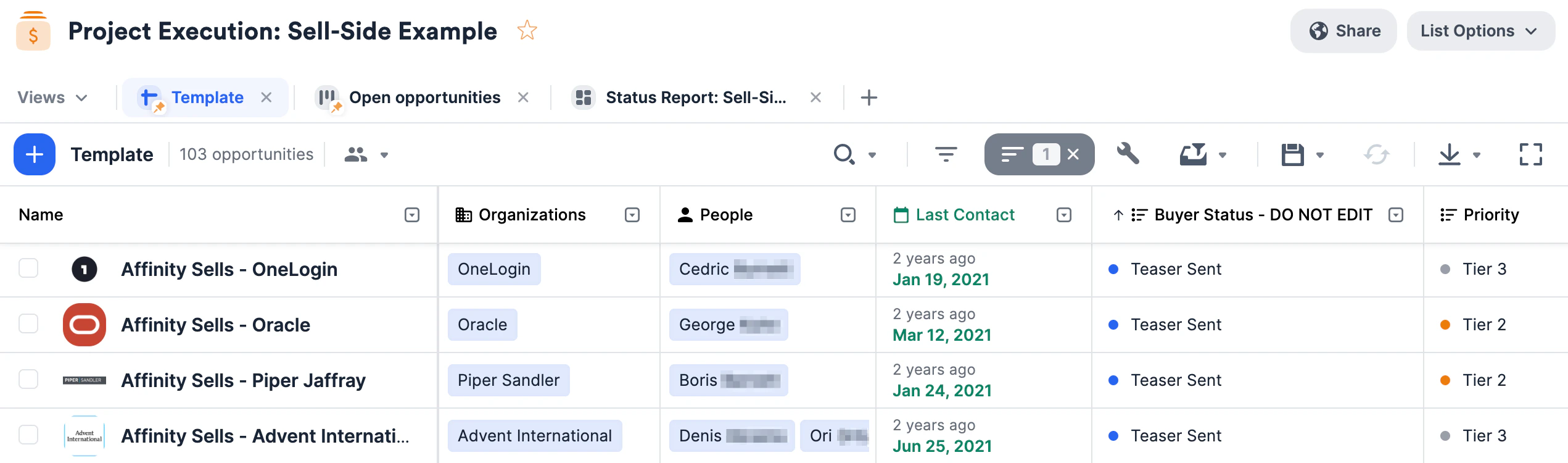 * **List Naming Tip**: If *Company XYZ* approaches your team looking to get acquired, then you can name the list whatever *Project Name* has been assigned or by something more general, like *Company XYZ Sells*.
* **Opportunity Naming Tip**: Each row in this list represents a unique, potential opportunity to partner your client with a particular buyer. Therefore, we recommend naming the opportunities in the following format: **\[Project Name] - \[Buyer Name]**.
3. **Project Execution: Financing Example** - This opportunity list will help you track interest and coordinate **financing** outreach efforts for your client project. Each row (opportunity) in this list would represent a potential investor for your client.
* **List Naming Tip**: If *Company XYZ* approaches your team looking to get acquired, then you can name the list whatever *Project Name* has been assigned or by something more general, like *Company XYZ Sells*.
* **Opportunity Naming Tip**: Each row in this list represents a unique, potential opportunity to partner your client with a particular buyer. Therefore, we recommend naming the opportunities in the following format: **\[Project Name] - \[Buyer Name]**.
3. **Project Execution: Financing Example** - This opportunity list will help you track interest and coordinate **financing** outreach efforts for your client project. Each row (opportunity) in this list would represent a potential investor for your client.
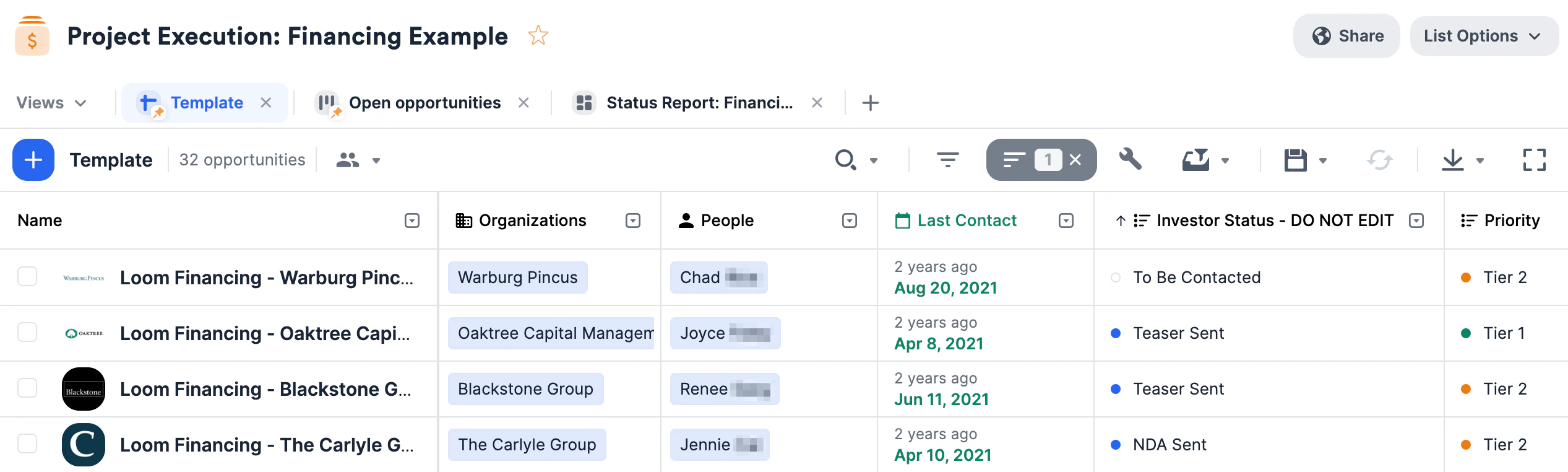 * **List Naming Tip**: If *Company 123* approaches your team looking to raise funds, then you can name the list whatever *Project Name* has been assigned or by something more general, like *Company 123 Financing*.
* **Opportunity Naming Tip**: Each row in this list represents a unique, potential opportunity to partner your client with a particular investor. Therefore, we recommend naming the opportunities in the following format: **\[Project Name] - \[Investor Name]**.
## Importing data into these lists
Now that you have these lists set up, quickly migrate data from other CRMs into Affinity using our data importer.
## Getting started with reporting/analytics
Once your lists are filled with relevant data, you can leverage [Affinity Analytics](/s/article/Getting-started-with-Affinity-Analytics) if you're on the **Scale**, **Advanced**, or **Enterprise** tiers.
1. [Getting started with Affinity Analytics](/s/article/Getting-started-with-Affinity-Analytics)
2. [Affinity Analytics - List Summary Reports](/s/article/Affinity-Analytics-List-Summary-Reports)
3. [Affinity Analytics - Status Reports for Investment Banking](/s/article/Analytics-dashboards)
4. [Affinity Analytics - Introductions Summary Reports](/s/article/Affinity-Analytics-Introductions-Summary-Reports)
5. [Affinity Analytics - Team Activity Reports](/s/article/Affinity-Analytics-Team-Activity-Reports)
6. [Affinity Analytics - Funnel Analysis Reports](/s/article/Affinity-Analytics-Funnel-Analysis-Reports)
7. Get notified when certain metrics/thresholds are met using [Affinity Analytics alerts](/s/article/How-to-set-up-automated-alerts-for-Affinity-Analytics).
{/* */}
* **List Naming Tip**: If *Company 123* approaches your team looking to raise funds, then you can name the list whatever *Project Name* has been assigned or by something more general, like *Company 123 Financing*.
* **Opportunity Naming Tip**: Each row in this list represents a unique, potential opportunity to partner your client with a particular investor. Therefore, we recommend naming the opportunities in the following format: **\[Project Name] - \[Investor Name]**.
## Importing data into these lists
Now that you have these lists set up, quickly migrate data from other CRMs into Affinity using our data importer.
## Getting started with reporting/analytics
Once your lists are filled with relevant data, you can leverage [Affinity Analytics](/s/article/Getting-started-with-Affinity-Analytics) if you're on the **Scale**, **Advanced**, or **Enterprise** tiers.
1. [Getting started with Affinity Analytics](/s/article/Getting-started-with-Affinity-Analytics)
2. [Affinity Analytics - List Summary Reports](/s/article/Affinity-Analytics-List-Summary-Reports)
3. [Affinity Analytics - Status Reports for Investment Banking](/s/article/Analytics-dashboards)
4. [Affinity Analytics - Introductions Summary Reports](/s/article/Affinity-Analytics-Introductions-Summary-Reports)
5. [Affinity Analytics - Team Activity Reports](/s/article/Affinity-Analytics-Team-Activity-Reports)
6. [Affinity Analytics - Funnel Analysis Reports](/s/article/Affinity-Analytics-Funnel-Analysis-Reports)
7. Get notified when certain metrics/thresholds are met using [Affinity Analytics alerts](/s/article/How-to-set-up-automated-alerts-for-Affinity-Analytics).
{/* */}