> ## Documentation Index
> Fetch the complete documentation index at: https://support.affinity.co/llms.txt
> Use this file to discover all available pages before exploring further.
# Affinity Ascend agents — Overview
> What Affinity's agents are, how they keep you in control, which agents are available, and where to go next.
Affinity **agents** are part of **Affinity Ascend** — you'll find them under **Ascend** in the left navigation (a separate top-level item from Chat). This page is your starting point: what agents are, how they keep you in control, which agents are available, and where to go next.
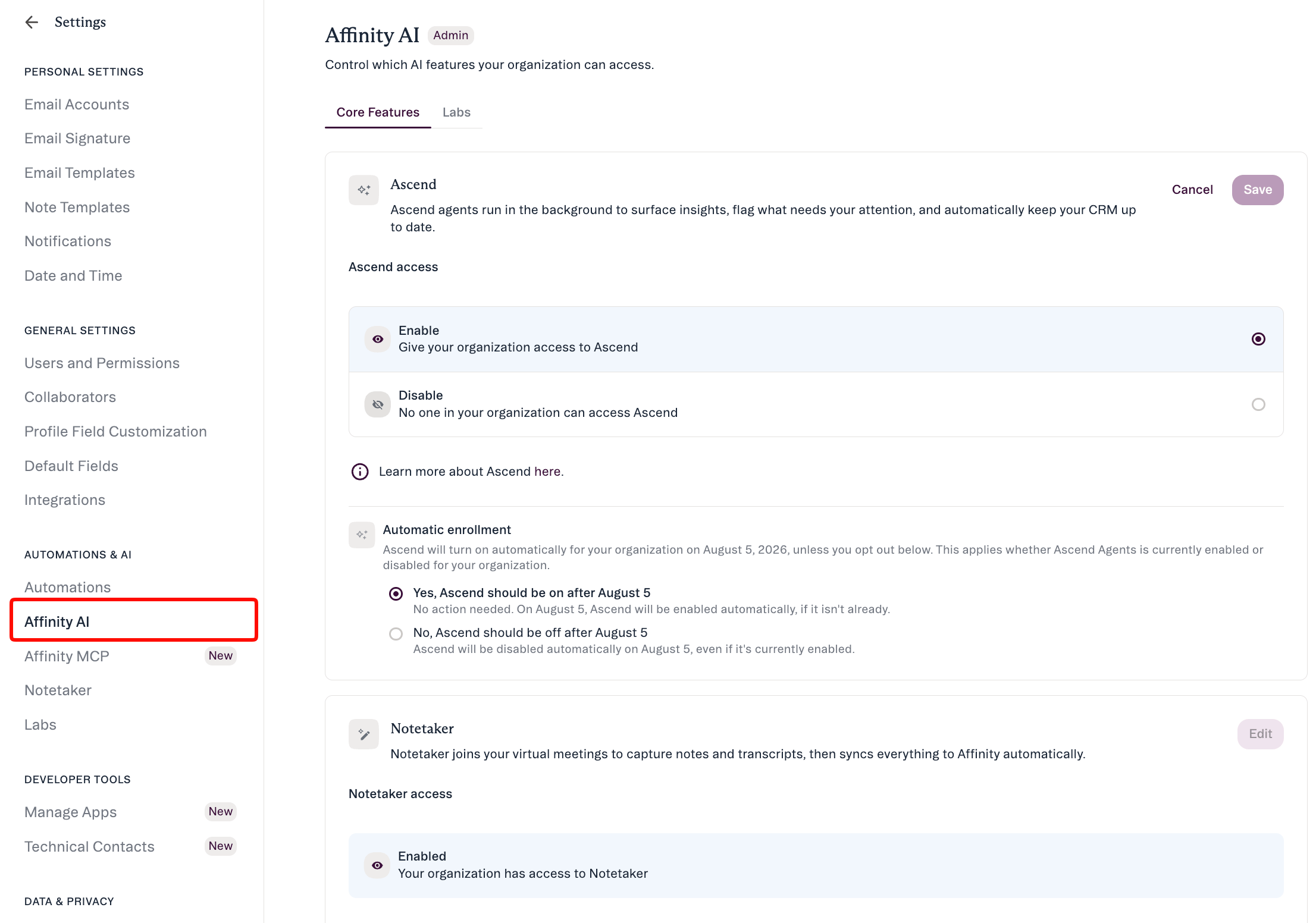
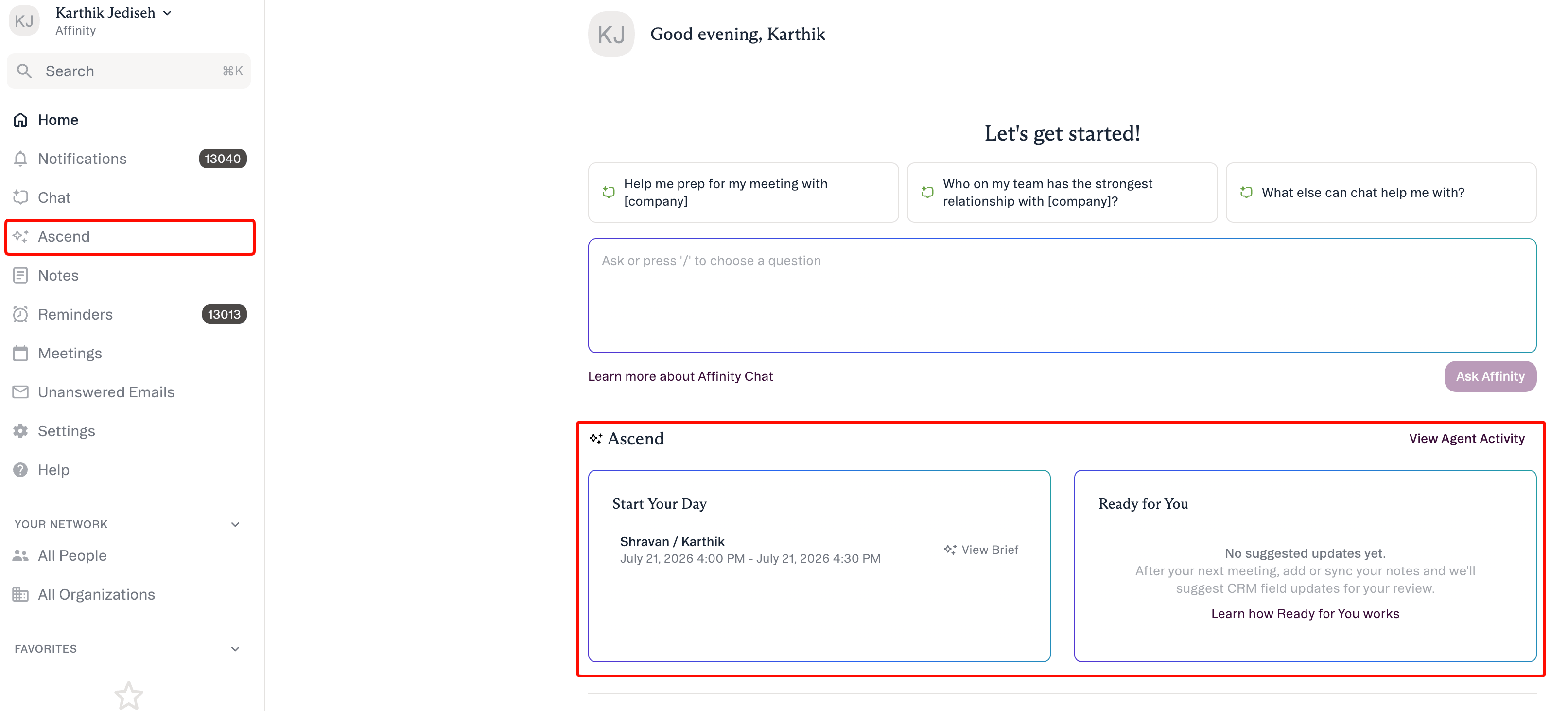 **Getting access:** Ascend is off until an admin turns it on. **Admins** — enable it at **Settings → Automations & AI → Affinity AI**; see [Enabling Affinity Ascend — An Admin's Guide](/s/article/Enabling-Affinity-Ascend). **Everyone else** — ask your admin to turn on Ascend.
## What are Affinity agents
An Affinity agent does a specific job — preparing you for meetings, keeping your CRM current, or finding a warm path into a company — and **suggests** what to do next. Most agents run in the **background**; one (Warm Intro) runs **on demand** when you ask in Chat. An agent never changes your CRM on its own.
Every agent follows the same trust model:
> **The agent suggests → you review → you approve.**
* **Human-in-the-loop.** Suggestions wait in a review queue until you act.
* **Scoped to your access.** An agent only sees and changes what your own account already can.
* **No silent outreach.** Agents never send email or other outreach without your approval.
## The agents
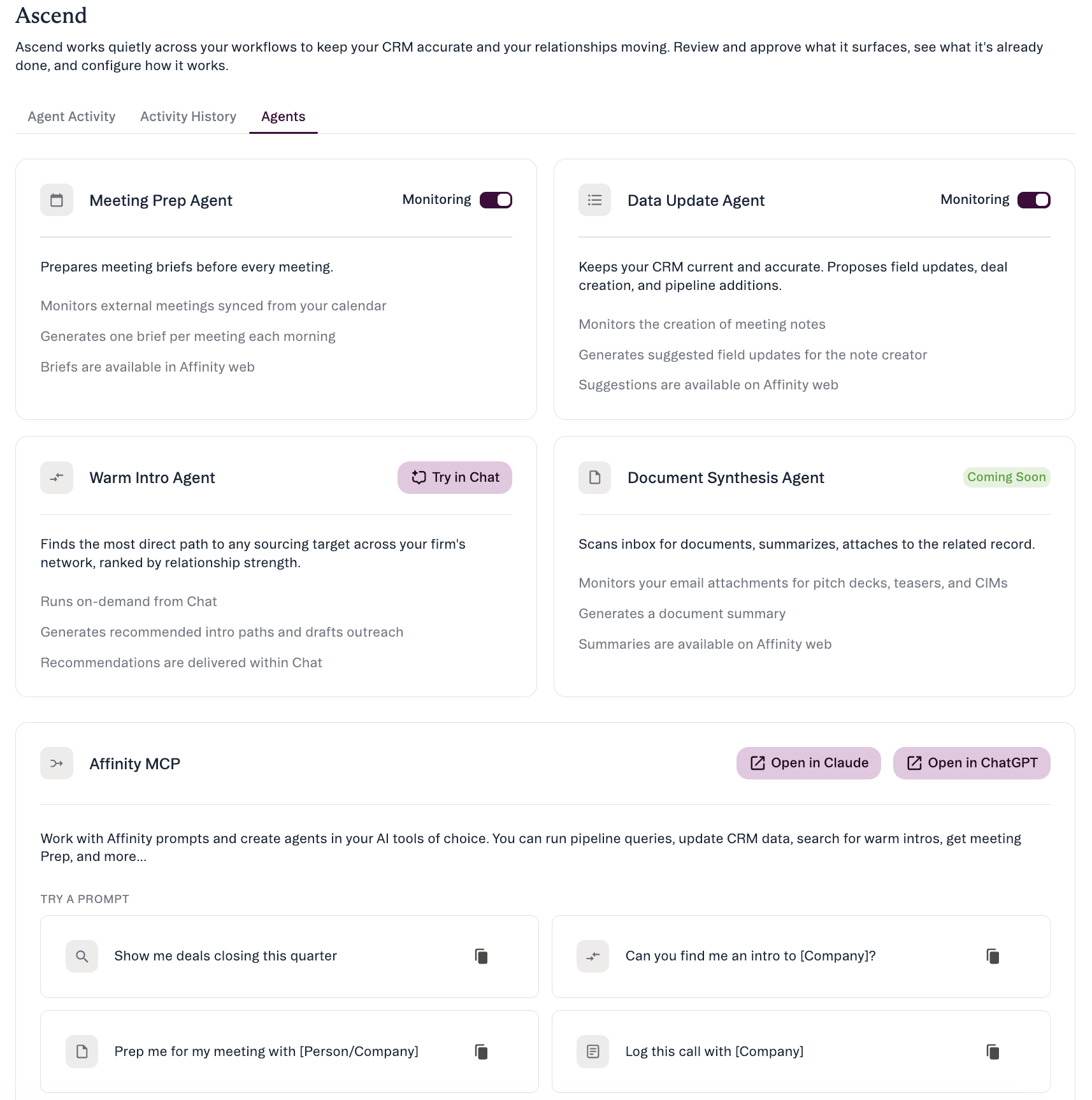
Four agents, all on **Scale, Advanced, and Enterprise**. Only **Meeting Prep** and **Data Update** are background agents you toggle (via **Monitoring** in **Ascend → Agents**); **Warm Intro** runs on demand from Chat; **Document Synthesis** is coming soon.
**Getting access:** Ascend is off until an admin turns it on. **Admins** — enable it at **Settings → Automations & AI → Affinity AI**; see [Enabling Affinity Ascend — An Admin's Guide](/s/article/Enabling-Affinity-Ascend). **Everyone else** — ask your admin to turn on Ascend.
## What are Affinity agents
An Affinity agent does a specific job — preparing you for meetings, keeping your CRM current, or finding a warm path into a company — and **suggests** what to do next. Most agents run in the **background**; one (Warm Intro) runs **on demand** when you ask in Chat. An agent never changes your CRM on its own.
Every agent follows the same trust model:
> **The agent suggests → you review → you approve.**
* **Human-in-the-loop.** Suggestions wait in a review queue until you act.
* **Scoped to your access.** An agent only sees and changes what your own account already can.
* **No silent outreach.** Agents never send email or other outreach without your approval.
## The agents
Four agents, all on **Scale, Advanced, and Enterprise**. Only **Meeting Prep** and **Data Update** are background agents you toggle (via **Monitoring** in **Ascend → Agents**); **Warm Intro** runs on demand from Chat; **Document Synthesis** is coming soon.
 ### Meeting Prep — *Background agent*
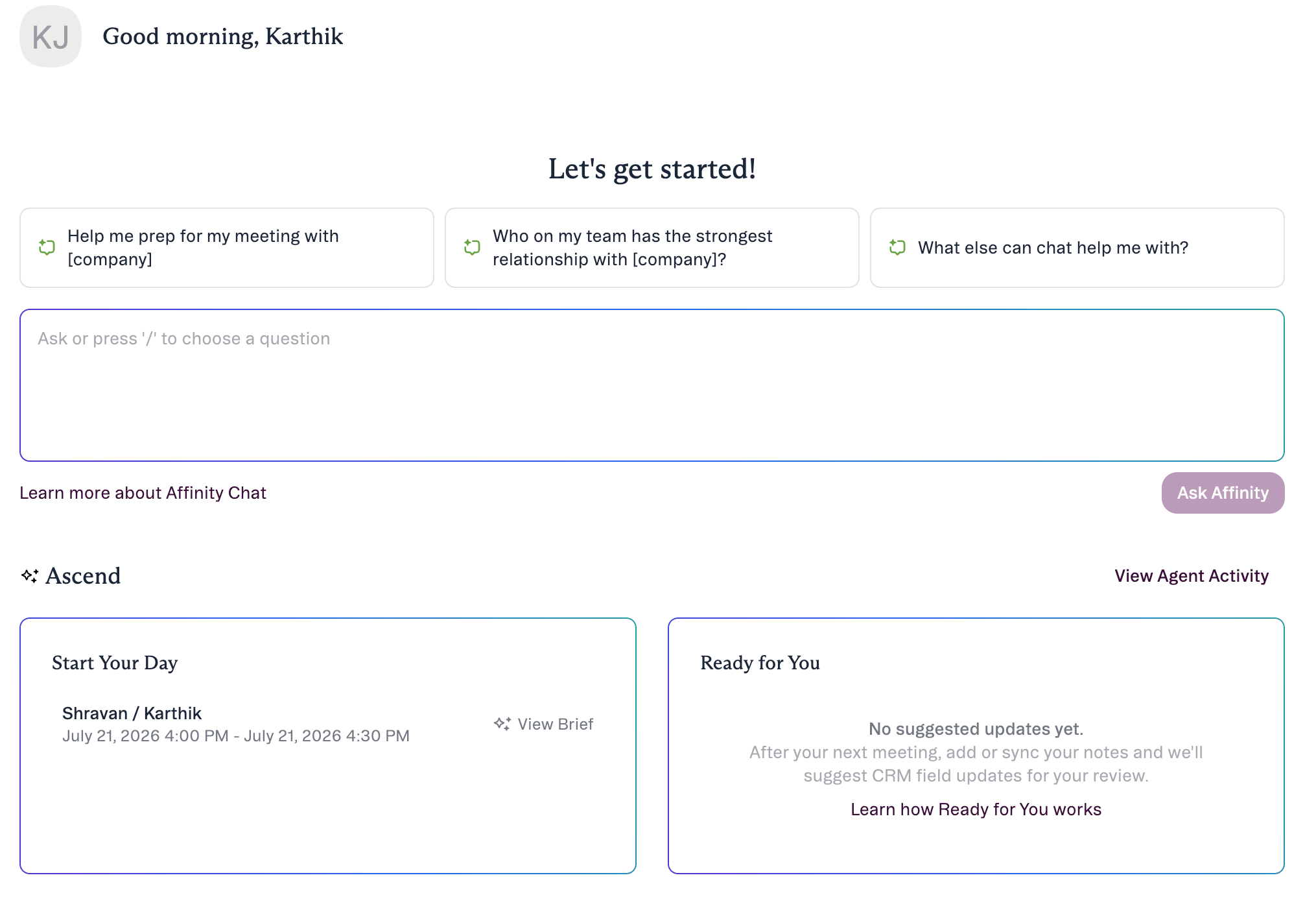 Prepares a **pre-meeting brief** for each of the day's external meetings — on your **“Start your day” / “Ready for you”** homepage modules and in the **Ascend Agent Activity** feed. Nothing to apply — a brief you read. Open it with **View Brief**.
 → [Meeting Prep & Data Update](/s/article/Meeting-Prep-and-Data-Update)
### Data Update — *Background agent*
Reads a meeting note and proposes **Suggested Field Updates** you review and approve on the **Agent Activity** tab. It matches what was said against the **fields you can already edit** and waits for your approval.
→ [Meeting Prep & Data Update](/s/article/Meeting-Prep-and-Data-Update)
### Data Update — *Background agent*
Reads a meeting note and proposes **Suggested Field Updates** you review and approve on the **Agent Activity** tab. It matches what was said against the **fields you can already edit** and waits for your approval.
 → [Meeting Prep & Data Update](/s/article/Meeting-Prep-and-Data-Update) · [Review & approve an agent's suggestions](/s/article/Review-and-approve-agent-suggestions)
### Warm Intro — *On demand from Chat*
→ [Meeting Prep & Data Update](/s/article/Meeting-Prep-and-Data-Update) · [Review & approve an agent's suggestions](/s/article/Review-and-approve-agent-suggestions)
### Warm Intro — *On demand from Chat*
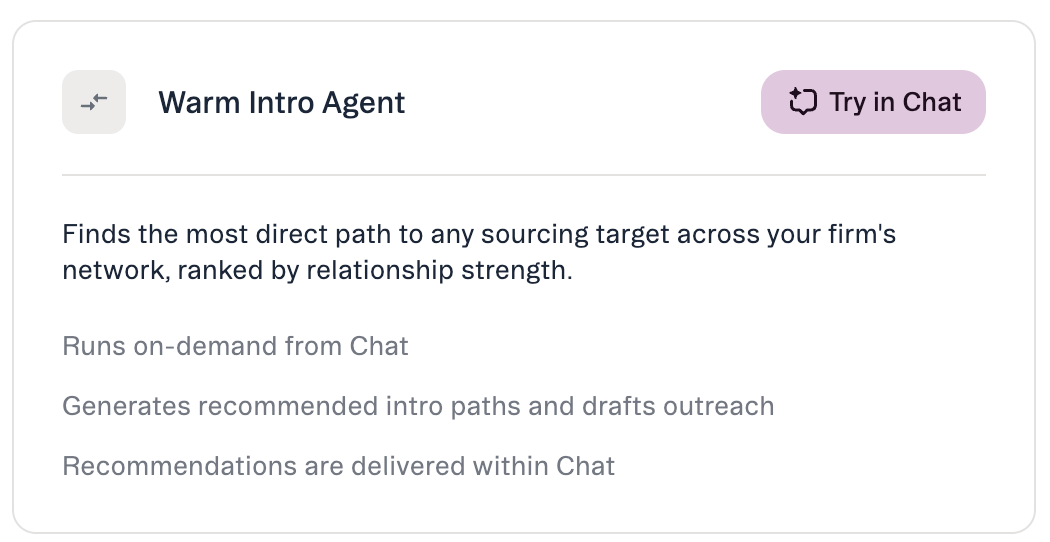 Ask in **AI Chat** — e.g. *“Who can introduce me to someone at \[Company]?”* — and Affinity AI returns **ranked intro paths** and can **draft outreach for you to send yourself (it never sends)**. Also available as the `affinity-warm-intro` MCP skill.
→ [Warm Intros in AI Chat and MCP](/s/article/Warm-Intros-in-AI-Chat-and-MCP)
### Document Synthesis — *Coming soon*
Will watch for inbound **PDF** pitch decks, teasers, and CIMs, read them, and post a **summary** to Agent Activity. Coming soon — the card is visible but not functional at launch.
→ [Document Synthesis](/s/article/Document-Synthesis)
## How every agent keeps you in control
The Ascend area has three places to work:
* **Agent Activity** — the queue of suggestions that need your review.
* **Activity History** — a read-only log of what the agent has already done.
* **Agents** — agent details and status.
When you review a suggestion, expand **Review** to see the **Current Value**, the **Suggested Value**, and a link to the **source** (**View Meeting Note**). Agents never apply changes without your approval: check the fields you want (or **Select all**) and click **Apply Updates** — anything left unchecked is skipped.
## How AI Chat fits alongside agents
**AI Chat** is a **separate item in the left navigation** from Ascend (a docked side panel), not an agent. Ask questions about your CRM in plain language and get answers grounded in your data with cited sources. Beyond answering, Chat can take **four confirm-before-execute actions** — **Update Field**, **Add to List**, **Create Note**, and **Create Reminder**. Applying **Suggested Field Updates** is not a Chat action; that's the **Data Update** agent.
## Where to manage agents
Ask in **AI Chat** — e.g. *“Who can introduce me to someone at \[Company]?”* — and Affinity AI returns **ranked intro paths** and can **draft outreach for you to send yourself (it never sends)**. Also available as the `affinity-warm-intro` MCP skill.
→ [Warm Intros in AI Chat and MCP](/s/article/Warm-Intros-in-AI-Chat-and-MCP)
### Document Synthesis — *Coming soon*
Will watch for inbound **PDF** pitch decks, teasers, and CIMs, read them, and post a **summary** to Agent Activity. Coming soon — the card is visible but not functional at launch.
→ [Document Synthesis](/s/article/Document-Synthesis)
## How every agent keeps you in control
The Ascend area has three places to work:
* **Agent Activity** — the queue of suggestions that need your review.
* **Activity History** — a read-only log of what the agent has already done.
* **Agents** — agent details and status.
When you review a suggestion, expand **Review** to see the **Current Value**, the **Suggested Value**, and a link to the **source** (**View Meeting Note**). Agents never apply changes without your approval: check the fields you want (or **Select all**) and click **Apply Updates** — anything left unchecked is skipped.
## How AI Chat fits alongside agents
**AI Chat** is a **separate item in the left navigation** from Ascend (a docked side panel), not an agent. Ask questions about your CRM in plain language and get answers grounded in your data with cited sources. Beyond answering, Chat can take **four confirm-before-execute actions** — **Update Field**, **Add to List**, **Create Note**, and **Create Reminder**. Applying **Suggested Field Updates** is not a Chat action; that's the **Data Update** agent.
## Where to manage agents
 * **Ascend** in the left nav — all your agents, their status, and anything pending your review. Agent names appear on the **Agents** tab.
* **Settings → Automations & AI → Affinity AI** — where **admins enable or disable the Ascend Agents card** for the org.
* **Ascend → Agents** — where **each member turns Monitoring on or off** for each background agent (Meeting Prep, Data Update).
## Common questions
**Will an agent change my CRM on its own?** No. Every agent only **suggests**. Nothing is written until you review and approve it.
**How do I get access to each agent?** After an admin enables **Ascend Agents** at **Settings → Automations & AI → Affinity AI**, turn on the background agents (**Meeting Prep**, **Data Update**) with the **Monitoring** toggle in **Ascend → Agents**. **Warm Intro** runs on demand from Chat. **Document Synthesis** is coming soon. All require **Scale, Advanced, or Enterprise**.
**What if a suggestion is wrong?** Leave it unchecked so it's skipped — nothing is applied for that field. You review each suggestion with its source before applying.
***
*Affinity AI can make mistakes. Review each suggestion before approving it.*
## Related topics
- [Troubleshooting Affinity Ascend agents](/s/article/Troubleshooting-Affinity-Ascend-agents.md)
- [Warm Intro Agent — overview](/s/article/Warm-Intro-Agent.md)
- [Document Synthesis — overview](/s/article/Document-Synthesis.md)
- [Enabling Affinity Ascend — An Admin's Guide](/s/article/Enabling-Affinity-Ascend.md)
- [Affinity AI Chat Overview](/s/article/Affinity-AI-chat-overview.md)
- [Warm Intros in AI Chat and MCP](/s/article/Warm-Intros-in-AI-Chat-and-MCP.md)
- [Working with Affinity agents](/s/article/Working-with-Affinity-agents.md)
- [AI & MCP](/s/article/AI-and-MCP.md)
- [Review & approve an agent's suggestions](/s/article/Review-and-approve-agent-suggestions.md)
* **Ascend** in the left nav — all your agents, their status, and anything pending your review. Agent names appear on the **Agents** tab.
* **Settings → Automations & AI → Affinity AI** — where **admins enable or disable the Ascend Agents card** for the org.
* **Ascend → Agents** — where **each member turns Monitoring on or off** for each background agent (Meeting Prep, Data Update).
## Common questions
**Will an agent change my CRM on its own?** No. Every agent only **suggests**. Nothing is written until you review and approve it.
**How do I get access to each agent?** After an admin enables **Ascend Agents** at **Settings → Automations & AI → Affinity AI**, turn on the background agents (**Meeting Prep**, **Data Update**) with the **Monitoring** toggle in **Ascend → Agents**. **Warm Intro** runs on demand from Chat. **Document Synthesis** is coming soon. All require **Scale, Advanced, or Enterprise**.
**What if a suggestion is wrong?** Leave it unchecked so it's skipped — nothing is applied for that field. You review each suggestion with its source before applying.
***
*Affinity AI can make mistakes. Review each suggestion before approving it.*
## Related topics
- [Troubleshooting Affinity Ascend agents](/s/article/Troubleshooting-Affinity-Ascend-agents.md)
- [Warm Intro Agent — overview](/s/article/Warm-Intro-Agent.md)
- [Document Synthesis — overview](/s/article/Document-Synthesis.md)
- [Enabling Affinity Ascend — An Admin's Guide](/s/article/Enabling-Affinity-Ascend.md)
- [Affinity AI Chat Overview](/s/article/Affinity-AI-chat-overview.md)
- [Warm Intros in AI Chat and MCP](/s/article/Warm-Intros-in-AI-Chat-and-MCP.md)
- [Working with Affinity agents](/s/article/Working-with-Affinity-agents.md)
- [AI & MCP](/s/article/AI-and-MCP.md)
- [Review & approve an agent's suggestions](/s/article/Review-and-approve-agent-suggestions.md)